12.1 Fire Controls
Updated: v2026.02.15

[Screenshot Pending — #1081] Fire Control Configuration Window (CRITICAL for combat mechanics)
Fire controls are the targeting systems that direct weapons to their targets. In Aurora C#, no weapon can fire without an assigned fire control, making them as essential as the weapons themselves. There are two distinct types: beam fire controls (BFCs) for directing energy weapons and point defense, and missile fire controls (MFCs) for guiding missile attacks. Each type has different design parameters and tactical considerations.
Contents
Updated: v2026.02.15
12.1.1 Beam Fire Controls
Updated: v2026.02.15
Beam Fire Controls (BFCs) direct lasers, railguns, plasma carronades, mesons, microwaves, and gauss cannons to their targets. Their two key parameters are tracking speed and maximum range.
Design Parameters
When designing a BFC in the Component Design window (see Section 8.5 Weapons for weapon component design), you set:
- Range: The maximum distance at which the fire control can engage targets. Determined by the Beam Fire Control Range technology. Ranges start at 20,000 km and increase with research.\hyperlink{ref-12.1-1}{[1]}
- Tracking Speed: The maximum speed of target the fire control can accurately track, expressed in km/s. Determined by the Fire Control Speed Rating technology.\hyperlink{ref-12.1-2}{[2]}
- Size: The base BFC size is 1 HS, with components scalable up to size 4 for increased range.\hyperlink{ref-12.1-7}{[7]} Single-weapon (SW) variants provide 30-50% reduced size and cost for fighter and FAC applications, with exact values varying based on range and tracking speed selections.\hyperlink{ref-12.1-8}{[8]}
Range Technology
The Fire Control Range technology determines maximum engagement distance:\hyperlink{ref-12.1-1}{[1]}
| Tech Level | Max Range | Research Cost |
|---|---|---|
| Fire Control Range 20,000 km | 20,000 km | 1,000 RP |
| Fire Control Range 32,000 km | 32,000 km | 2,000 RP |
| Fire Control Range 48,000 km | 48,000 km | 4,000 RP |
| Fire Control Range 64,000 km | 64,000 km | 8,000 RP |
| Fire Control Range 80,000 km | 80,000 km | 16,000 RP |
| Fire Control Range 96,000 km | 96,000 km | 30,000 RP |
| Fire Control Range 120,000 km | 120,000 km | 60,000 RP |
| Fire Control Range 150,000 km | 150,000 km | 125,000 RP |
| Fire Control Range 200,000 km | 200,000 km | 250,000 RP |
| Fire Control Range 250,000 km | 250,000 km | 500,000 RP |
| Fire Control Range 300,000 km | 300,000 km | 1,000,000 RP |
| Fire Control Range 350,000 km | 350,000 km | 2,000,000 RP |
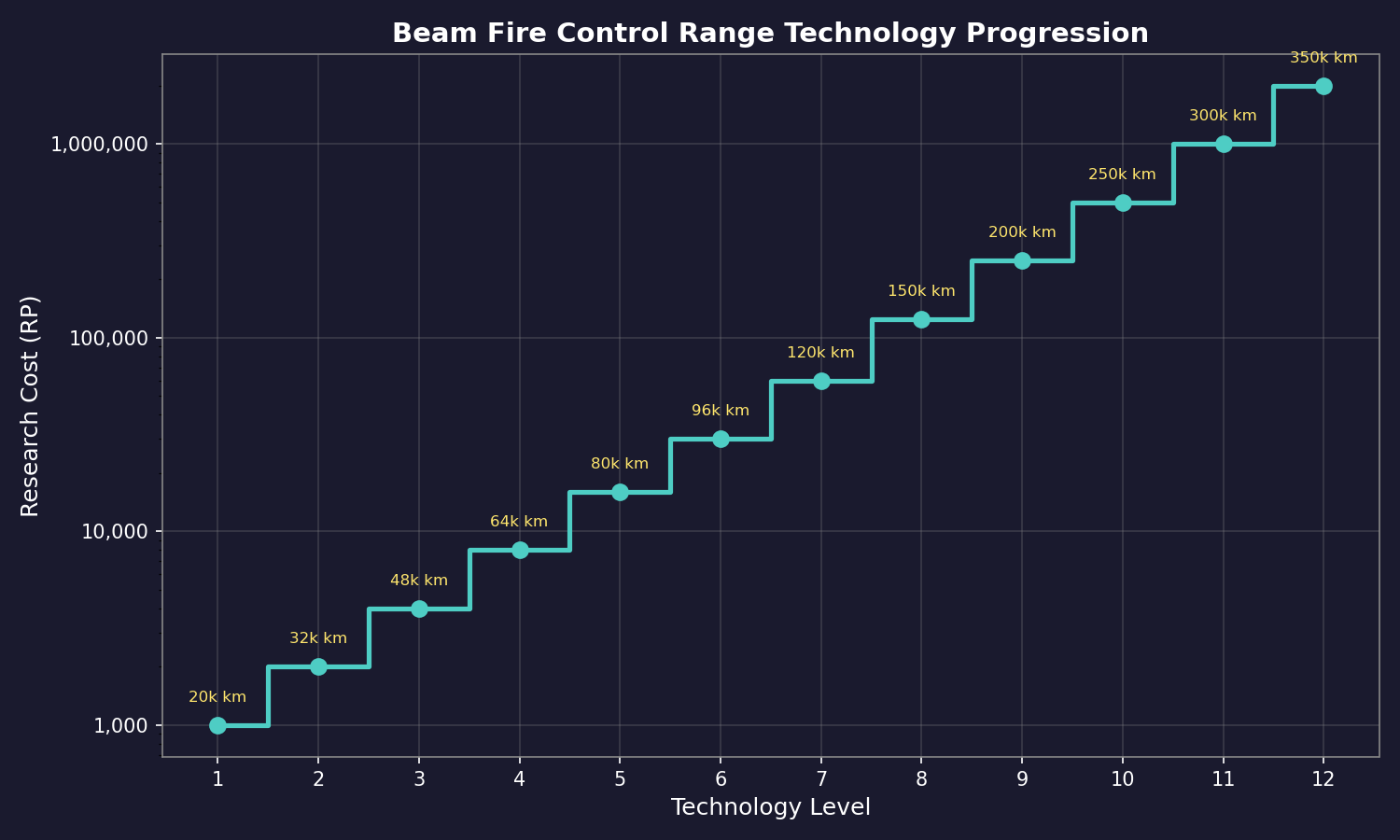
The fire control range should match or exceed the range of the beam weapons assigned to it. A fire control with 80,000 km range paired with a laser that reaches 160,000 km wastes half the weapon’s potential. Conversely, fire control range exceeding weapon range provides no benefit.
Tracking Speed and Hit Probability
Tracking speed is critical for determining hit probability. The tracking component of the hit chance formula is:\hyperlink{ref-12.1-3}{[3]}
Tracking_Mod = min(1.0, Fire Control Tracking Speed / Target Speed)
This value is capped at 1.0 (100%). If the target is moving faster than your fire control can track, accuracy degrades linearly. The tracking modifier is one component of the full hit probability formula, which also includes range, crew training, commander bonus, and ECM/ECCM effects. See Section 12.2.3 Tracking Speed for the complete formula. As of v1.10.0, hit chance calculations use two decimal places instead of integers, improving accuracy resolution for low-probability hits where the difference between 1% and 1.5% can be tactically significant. (unverified — #837 – requires live testing to confirm v1.10.0 precision change)
Examples:
- FC tracking 10,000 km/s vs. target at 5,000 km/s = 100% base accuracy
- FC tracking 10,000 km/s vs. target at 20,000 km/s = 50% base accuracy
- FC tracking 5,000 km/s vs. target at 25,000 km/s = 20% base accuracy
Additional modifiers apply to this base chance (see Section 12.2.3 Tracking Speed for full hit probability calculation).
Minimum Tracking Speed (Racial Tracking Speed)
For hull-mounted (non-turreted) weapons, the effective tracking speed is the higher of: \hyperlink{ref-12.1-12}{[12]}
- The ship’s maximum speed, OR
- The race’s researched Fire Control Speed Rating (“racial tracking speed”)
This minimum floor means stationary installations like PDCs can track targets at the base fire control speed even though the installation itself has 0 km/s speed. A race with Fire Control Speed Rating 10,000 km/s researched will have all hull-mounted weapons track at minimum 10,000 km/s regardless of platform speed.
Implication: Reduced Tracking Speed fire control variants (0.5x, 0.75x size/tracking multipliers) provide no practical benefit for hull-mounted weapons, since the racial tracking speed minimum always applies. Only turreted weapons can benefit from tracking speeds exceeding the racial baseline, making turrets essential for engaging fast targets like missiles and fighters.
Single Weapon Fire Controls (v1.13+):
A specialized fire control variant designed for dedicated weapon systems. Only a single beam weapon can be assigned to a fire control designed for single weapon use. The size, cost, and crew requirements of single weapon fire controls are significantly reduced compared to multi-weapon fire controls (typically 50-70% reduction depending on range and tracking speed settings).\hyperlink{ref-12.1-8}{[8]} (unverified — #837 – requires live testing to confirm v1.13+ availability)
Players can designate fire control type through the Create Project Window using an additional dropdown menu that allows selection between multi-weapon or single-weapon configurations.
This feature aligns ship-based weapon systems with ground-based STO weapons, which already use single weapon fire controls.
Weapon Assignment
Each standard BFC can have multiple beam weapons assigned to it, but they all fire at the same target. When the fire control fires, all assigned weapons fire simultaneously. Considerations:
- Assigning more weapons to fewer fire controls means less target flexibility
- One weapon per fire control maximizes target options but uses more hull space
- A common compromise: group weapons by type on shared fire controls
- Single weapon fire controls provide significant cost/size savings (30-50%) when only one weapon per FC is needed
Assign # Weapons (Batch Assignment):
The “Assign # Weapons” feature allows efficient assignment of multiple similar weapons to fire controls simultaneously. To use it:
- Check the “Assign #” checkbox in the Ship Combat tab of the Naval Organization window (as of v1.12.0, fire controls on this tab are sorted by range for easier management) (unverified — #837 – version-specific UI change; requires live testing)
- Enter a number in the text field (the number of additional weapons to assign)
- Ensure “Assign All” is unchecked
- Drag a weapon to assign it – additional weapons transfer sequentially by ascending weapon number
All weapons have a number suffix (e.g., “10cm Railgun #1”, “10cm Railgun #2”). When you drag weapon #5 with “Assign # 4”, weapons #6, #7, and #8 also transfer. If higher-numbered weapons are already assigned elsewhere, the system skips them and takes the next available. Lower-numbered weapons never transfer; only ascending sequences from the selected weapon move. (unverified — #837 – UI mechanic; requires live testing)
This feature works for assigning unassigned weapons to fire controls, reassigning weapons between fire controls, and assigning missiles to weapons. It is particularly useful for ships with many similar weapons such as multiple box launchers.
Copy Assignments Excludes Damaged Components (v2.5.0):
When using the copy assignment feature to duplicate weapon-to-fire-control configurations between ships, the system automatically excludes damaged components from the operation. Specifically:
- Damaged fire controls are excluded from the copy operation
- Damaged weapons are excluded from assignment
- This prevents players from accidentally assigning weapons to non-functional fire controls
This quality-of-life improvement ensures that copied configurations only apply to operational equipment, avoiding tactical errors during combat when ships may have sustained damage to their fire control or weapon systems.
ECCM Integration (C# Aurora):\hyperlink{ref-12.1-4}{[4]}
ECCM is no longer a standalone component – it is designed directly into fire controls:
- Beam Fire Controls: ECCM costs 10% of the total fire control cost (without ECCM) per level of ECCM
- CIWS: ECCM costs 5% of the CIWS fire control component per level, with no size penalty
- STO Weapons: ECCM costs 10% of the fire control component per level
This integration eliminates the need for separate ECCM, Compact ECCM, and Small Craft ECCM components.
ECM Effects on Fire Controls:\hyperlink{ref-12.1-5}{[5]}
ECM (Electronic Counter Measures) affects beam fire controls and missile fire controls differently:
- Against Beam Fire Controls: ECM reduces the fire control’s effective tracking speed, making it harder to hit fast-moving targets. This is a hit chance reduction – the target appears to move faster than it actually does, degrading accuracy.
- Against Missile Fire Controls: ECM reduces the MFC’s maximum lock-on range by 10% per ECM level. This is a flat percentage range reduction, not a hit chance reduction. A target with ECM-3 reduces your MFC’s effective range against it by 30%. If your MFC has a 100M km lock-on range, ECM-3 reduces it to 70M km against that target.
- ECCM offset: ECCM on the fire control offsets ECM at 10% per ECCM level. An MFC with ECCM-2 facing a target with ECM-3 suffers only a net 10% range reduction (3 - 2 = 1 effective ECM level).
This distinction is important: against beam weapons, ECM degrades accuracy directly. Against missiles, ECM shortens the range at which the fire control can maintain lock, potentially causing missiles to go ballistic before reaching the target if launched from maximum range. Missiles already in flight that lose fire control lock will fly to the target’s last known position rather than tracking actively.
Fire Control Modes
BFCs can be set to different operating modes:
- Open Fire: Fires at any valid target within range. Beam weapons will not fire if they have zero chance to hit, preventing wasted fire. As of v1.12.0, the auto-fire system checks the actual weapon range rather than the fire control range when determining engagement eligibility, preventing weapons from being assigned targets beyond their effective reach. (unverified — #837 – version-specific change; requires live testing)
- Point Blank Defensive Fire: Engages hostile missiles within 10,000 km during movement phase; always calculates hit chance at 10,000 km range baseline (unverified — #837 – requires live testing)
- Point Blank Defensive Fire (Self Only): Same as above but only engages missiles targeting this ship
- Ranged Defensive Fire: Engages hostile missiles at full weapon range during movement phase; uses actual distance for hit calculation beyond 10,000 km (default mode for automated assignment)
- Area Defence: Engages the closest hostile missile within weapon range during the naval combat phase
- Hold Fire: Assigned but not firing
Time Increment Warning
Warning: A known issue can prevent incoming missiles from being detected by automated defenses if you use a long time increment during combat. Always reduce the time increment to 30 seconds or less when combat is possible. Longer increments may cause missile salvos to pass through defensive fire envelopes without triggering PD engagement checks, resulting in uncontested hits on your ships.
Fire Delay (C# Aurora):
Fire delay occurs when inexperienced ships open fire or change targets. The formula is: (unverified — #837 – forum-sourced formula; requires live testing)
Fire Delay = Round((1 - (Fleet Training Points / 500)) * (1 - Reaction Bonus) * Random(10) * Random(10) * 0.5)
Key mechanics:
- Ships with 100% Fleet Training (500 points) experience zero fire delay\hyperlink{ref-12.1-9}{[9]}
- The delay is approximately half that of VB6 and follows a bell curve distribution, making maximum delays far less probable (unverified — #837 – requires live testing to confirm distribution)
- Fire delays are applied in three situations: jump point transit, opening fire, and changing target (unverified — #837 – requires live testing to confirm)
- The second and third situations (opening fire and changing target) only apply to inexperienced crews
Example: A vessel with 20% training (100 points) and 10% reaction bonus calculates: 0.8 x 0.9 x Random(10) x Random(10) x 0.5, producing delays ranging from zero to roughly 36 seconds, with typical outcomes between 15-20 seconds.
Fire Delay and Point Defence (v1.13+):
Fire delay will only apply to point defence fire if it is caused by jump point transit. This prevents a single offensive fire control changing targets from imposing delays across all ship fire controls, including those dedicated to point defence. (unverified — #837 – version-specific change; requires live testing)
Because fire delay operates at the ship level, all fire controls are normally affected equally. This created a problem where larger ships with multiple fire controls would experience reduced point defence effectiveness when offensive systems changed targets. The v1.13.0 change allows automated point defence to function consistently without being compromised by offensive targeting changes.
Interrupts for Active Weapons (C# Aurora):
In VB6, the game would interrupt gameplay when weapons were set to fire but lacked valid targets, or when recharging completed regardless of target availability. C# Aurora evaluates each fire control individually:
- If a fire control has no valid target in range, there is no interrupt
- Instead, a single event message per ship is generated stating the ship is trying to fire on a target that is out of range or does not exist
- The increment otherwise processes normally
- You can assign targets to weapons while still out of range without triggering interrupts
- Once weapons enter firing range, recharge cycle interrupts activate normally
- Example: if weapons have a 40-second cycle time, pressing 2 minutes advances time 40 seconds to the first firing opportunity
Point Defence Priority and Fire Concentration:
Fire controls can be configured with two parameters for point defense:
- Point Defence Priority: Determines the order in which weapons assign to missile targets
- Fire Concentration: Controls the number of shots allocated to individual missiles
High-cost, single-shot weapons should receive low priority and minimal concentration to preserve maintenance supplies against weapon failure chances.
Automatic PD Classification:
Any beam fire control with a tracking speed at least 2x the racial base speed is automatically classified as a point defence fire control by the game’s weapon assignment system. For a conventional start with 1,250 km/s base tracking speed, this threshold would be 2,500 km/s.\hyperlink{ref-12.1-10}{[10]} (unverified — #837 – requires live testing to confirm 2x classification threshold)
12.1.2 Missile Fire Controls
Updated: v2026.02.15
Missile Fire Controls (MFCs) are active sensors assigned to guide missiles to their targets. Unlike beam fire controls which are fixed-size dedicated components, missile fire controls are designed as active sensors with specific resolution and range characteristics.
Design as Active Sensors
MFCs are designed in the Component Design window under Active Sensors. Any active sensor can serve as a missile fire control – you assign it that role in the tactical window. The sensor’s properties directly determine the fire control’s capabilities:
- Resolution: Determines the size of target the fire control can effectively engage
- Range: The maximum distance at which the fire control maintains lock on a target
- Size: Larger sensors provide longer range but cost more hull space and generate more EM
See Section 11.3 Active Sensors for detailed mechanics of active sensors as fire controls.
MFC Range vs. Missile Range
MFC range is calculated using the same active sensor range formula (see Section 11.3.1 Active Sensor Range Formula):
Range (km) = SQRT((Active_Strength x HS x EM_Sensitivity x Resolution^(2/3)) / PI) x 1,000,000
(Note: Earlier versions of this manual contained an incorrect linear formula. The SQRT formula above has been verified against the game database.)
Note: MFC range depends on the target’s size relative to the sensor’s resolution. The range is maximum against targets matching or exceeding the resolution value, and reduces proportionally for smaller targets.
The fire control must maintain a sensor lock on the target for the entire duration of missile flight (unless the missiles have onboard active sensors). This creates a fundamental design constraint:
Effective Missile Range = min(MFC Range vs. Target, Missile Kinetic Range)
If your MFC cannot detect the target at the range where your missiles would reach it, the missiles cannot receive guidance updates and will go ballistic (flying to the last known position).
Resolution Matching
The MFC’s resolution must match the intended targets:
- Anti-ship MFC (resolution 50-500): Long range against warships, standard for fleet engagements
- Anti-FAC MFC (resolution 5-20): Medium range against small craft
- Anti-missile MFC (resolution 1): Short range, used for guiding anti-missile missiles (AMMs)
Resolution Scaling Formula: \hyperlink{ref-12.1-11}{[11]}
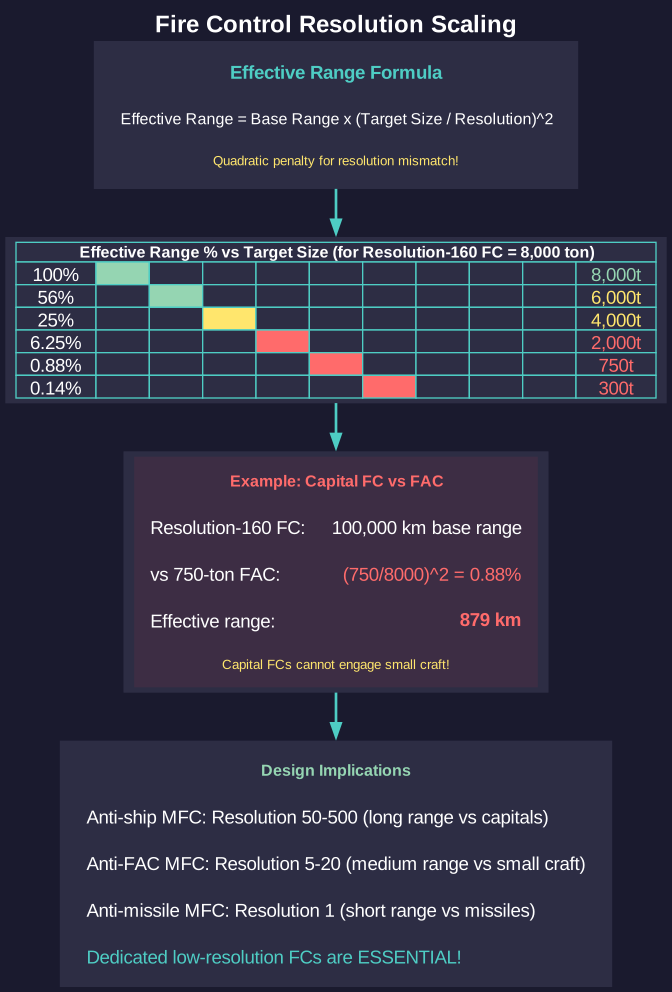
When a fire control’s resolution exceeds the target’s size, effective range is reduced. Because the MFC range formula contains Resolution^(2/3) inside a square root (see Section A.3.5), the effective range scales as the cube root of the size ratio:
Effective Range = Base Range x (Target Size / Resolution Size)^(1/3)
(Note: An earlier version of this section incorrectly stated the scaling was quadratic, citing a forum post attributed to the developer. The cube-root formula above is verified against the game database — substituting target size for resolution in the active sensor range formula produces ranges matching DB values within rounding error across all tested components.) \hyperlink{ref-12.1-13}{[13]}
This cube-root relationship means resolution mismatches are significant but not as extreme as a quadratic model would suggest:
| Fire Control Resolution | Target Size | Effective Range |
|---|---|---|
| 160 (8,000 tons) | 8,000 tons | 100% of base range |
| 160 (8,000 tons) | 4,000 tons | ~79.4% of base range |
| 160 (8,000 tons) | 2,000 tons | ~63.0% of base range |
| 160 (8,000 tons) | 750 tons | ~45.4% of base range |
Example: A Resolution-160 fire control with 100,000 km base range against a 750-ton FAC:
- Effective Range = 100,000 x (15/160)^(1/3) = 100,000 x 0.454 = 45,428 km
- Range is reduced to under half, but the fire control retains meaningful engagement distance
While the penalty is less extreme than a quadratic model, dedicated low-resolution fire controls still provide substantially better range against small targets. A Resolution-20 fire control would detect the same 750-ton FAC at (15/20)^(1/3) = 90.9% of base range, compared to 45.4% for the Resolution-160 unit.
Multiple MFCs and Target Allocation
Each MFC can engage one target at a time. Standard fleet doctrine includes:
- 1 MFC per intended simultaneous target
- Missile launchers are assigned to specific MFCs
- When an MFC’s target is destroyed, it can be reassigned to a new target
- Multiple MFCs can engage the same target (useful for concentrating fire)
Minimum AMM Range (C# Aurora):
Missile fire controls can be assigned a minimum engagement range for automated AMM launches. The fire control will not launch AMMs against hostile salvos within this range. Configuration:
- Select the fire control
- Click the “Min AMM Range” button
- Enter the desired range in kilometres
The minimum range setting displays as part of the descriptive text for the point defence option assigned to the fire control. This feature applies only to missile fire controls and cannot be assigned to beam fire controls.
Tactical applications:
- Layered Defense: Allow AMMs to engage distant threats while reserving energy weapons and CIWS for closer threats
- Multi-Range Engagement: Deploy different AMM types at varying ranges for comprehensive coverage
- Ammunition Conservation: Prevent AMMs from launching at targets already within beam PD range
Practical Tips
- Design MFCs with range matching your longest-range missiles
- Include at least one resolution-1 MFC on any ship that carries AMMs
- Remember that MFCs generate EM signature – turning them on announces your offensive intent
- Test your MFC detection range against expected target sizes before committing to a design
- For mixed fleets, centralize MFCs on dedicated missile platforms rather than distributing them
- Use minimum AMM range to create distinct engagement zones in layered defense
12.1.3 Point Defense Mode
Updated: v2026.01.30
Point defense (PD) mode converts beam weapons from offensive tools into defensive systems that automatically engage incoming missiles and fighters. This is configured through fire control settings and is one of the most important defensive mechanisms in Aurora.
Setting Up Point Defense
To configure point defense:
- Assign beam weapons to a Beam Fire Control
- Set the fire control to one of the four PD modes (see below)
- Configure Point Defence Priority and Fire Concentration settings
- The weapons will then automatically fire at incoming missiles each combat tick
Four Point Defence Modes (v2.2.0):
| Mode | Engagement Window | Range | Hit Calculation | Target Scope |
|---|---|---|---|---|
| Point Blank Defensive Fire | Movement phase | 10,000 km max | Always uses 10,000 km baseline | Any hostile missile nearby |
| Point Blank Defensive Fire (Self Only) | Movement phase | 10,000 km max | Always uses 10,000 km baseline | Only missiles targeting this ship |
| Ranged Defensive Fire | Movement phase | Full weapon range | Actual distance beyond 10,000 km | Any missile within weapon envelope |
| Area Defence | Naval combat phase | Full weapon range | Actual range beyond 10,000 km | Closest hostile missile in range |
Point Blank Defensive Fire is appropriate for:
- Gauss cannons (short range, high rate of fire)
- Ships with limited PD weapons that need maximum kill probability per shot
- Last-ditch defense against leaked missiles
- The “Self Only” variant for ships that should only protect themselves
Ranged Defensive Fire is appropriate for:
- Lasers and other long-range beam weapons
- Ships that want to thin out missile salvos at distance
- Covering other ships in the task group
- This is the default mode for automated fire control assignment
Area Defence is appropriate for:
- Broad defensive umbrella engagement during the naval combat phase
- Ships dedicated to fleet-wide missile defense
- Long-range beam weapons with excellent tracking speed
Defensive Fire Priority and Engagement Sequence
The engagement hierarchy for incoming missiles follows this sequence:
- Ship CIWS engages first (as of v1.12.0, CIWS always targets the closest incoming missile regardless of salvo ordering, improving point-blank defense effectiveness) (unverified — #837 – version-specific change; requires live testing)
- Point Blank Defensive Fire controls on the target ship engage next
- Allied ships within point defence range are checked by distance (closest first)
- Planetary defenses use assigned ground units, then follow the same ship prioritization
Missiles are moved in descending order of speed, then by descending order of salvo size. This means the largest salvos of the fastest missiles are engaged first by defensive fire.
Final Defensive Fire – Multiple Target Capability (C# Aurora):
A fire control in defensive fire mode will continue to fire on incoming salvos as long as it has unfired weapons remaining. Each individual weapon or turret can only engage a single salvo per increment. This is a significant change from VB6, where fire controls could only engage one target per increment.
This means point defence ships no longer need a large number of fire control systems, although there is still a design choice regarding redundancy.
Fleet Point Defense
Ships set to Ranged Defensive Fire or Area Defence can protect other ships in their task group, not just themselves. This enables dedicated PD escorts that shield high-value ships. A common fleet composition includes:
- Capital ships with offensive weapons
- PD escorts with gauss cannons and/or point defense lasers
- The PD escorts engage incoming missiles before they reach the capital ships
Fire Control Tracking Speed for PD
Point defense effectiveness against missiles depends heavily on tracking speed. Missiles in Aurora can be extremely fast (10,000+ km/s at higher tech levels). Your PD fire control tracking speed must match or exceed missile speeds for reliable intercepts:
PD Hit Chance = min(1.0, FC Tracking Speed / Missile Speed) * other modifiers
Design PD fire controls with the highest available tracking speed technology, even if this limits range (PD engages at close range anyway).
Simultaneous Engagement Resolution (v2.2.0):
All PD weapon-to-target assignments occur before combat resolution at the individual shot level (not salvos or weapons). All fire controls assign shots simultaneously within each increment, with results resolving before subsequent assignments. CIWS operates as a separate phase. This creates realistic scenarios where some missiles receive overkill while others penetrate.
Weapon Failure in PD:
Each time any weapon fires (including PD weapons), there is a 2% chance of weapon failure (see Section 12.2.4 Power Allocation and Recharge).\hyperlink{ref-12.1-6}{[6]}
Dual-Purpose Fire Controls
A single fire control can be switched between offensive and PD modes during combat. This allows:
- Using beam weapons offensively when no missiles threaten
- Switching to PD mode when incoming missiles are detected
- Requires manual intervention (or conditional orders) to switch modes
Practical Tips
- Every warship should have at least some PD capability – a single missile salvo can destroy an undefended ship
- Gauss cannons are the premier PD weapon: cheap, fast-firing, and effective at point-blank range
- Tracking speed is more important than range for PD fire controls
- Use Point Defence Priority settings to ensure expensive weapons fire last
- Set Fire Concentration low for expensive weapons, high for cheap rapid-fire weapons
- Mix point-blank and ranged-defense ships for layered protection
- Remember that PD weapons firing at missiles are not available for offensive fire and vice versa
- A single fire control can now engage multiple salvos per increment, reducing the need for many FCs
12.1.4 Pre-Battle Setup Checklist
Updated: v2026.01.30
Before entering combat, ensure the following steps are complete for each ship or task group:
-
Assign beam weapons to beam fire controls – Every beam weapon must be linked to a BFC or it cannot fire. Verify in the Ship Combat tab of the Naval Organization window.
-
Assign missile launchers to missile fire controls – Each launcher must be linked to an MFC for missile guidance. Unassigned launchers will not fire.
-
Assign missile types to launchers – Each launcher must have a specific missile type loaded. Verify ordnance assignment in the Missile/Ordnance tab.
-
Set fire control modes (Open Fire, Return Fire, PD modes) – Configure each fire control’s engagement mode. Offensive FCs should be set to Open Fire or Hold Fire. Defensive FCs should be set to the appropriate PD mode (Point Blank, Ranged Defensive, or Area Defence).
-
Assign targets or enable Auto Fire – Offensive fire controls need explicit target assignments, or enable Auto Fire to allow the ship to select targets autonomously.
-
Verify active sensors are ON – Missile fire controls require active sensors to maintain lock. Beam weapons require sensor data for targeting. Ensure sensors are active before engagement (note: this broadcasts your EM signature).
-
Reduce time increment to 30 seconds or less – Long time increments can cause missiles to bypass defensive fire checks entirely (see Time Increment Warning above). Always use short increments when combat is possible or imminent.
Skipping any of these steps is a common cause of ships failing to fire or defend themselves in combat. The checklist applies to both offensive and defensive operations.
12.1.5 Combat Reports
Updated: v2026.02.15
C# Aurora uses a condensed summary format for combat reports rather than showing individual weapon firing events. This simplifies understanding combat compared to VB6’s more detailed approach.
Report Format:
Rather than displaying each individual weapon firing event, C# Aurora consolidates weapon fire and resulting damage into summary reports per 5-second combat increment. Multiple damage reports appear across successive increments tracking accumulating damage until a target’s destruction. (unverified — #837 – gameplay observation; requires live testing)
Information Exchange:
- From the firing ship’s perspective: The report displays the target vessel with its classification as determined by the attacker’s intelligence (e.g., “Martian Patrol Ship”)
- From the defending ship’s perspective: The defending vessel receives information about the attacking ship, including the alien ship name if available in the intelligence database
Example: A destroyer attacking with 10cm railguns while 15cm weapons recharge generates one summary per 5-second increment, with subsequent reports tracking accumulating damage.
Combat Comparison (v2.2.0):
A Combat Comparison tab in the Naval Organization window displays a comprehensive list of all ships with combat history. Features include: (unverified — #837 – version-specific feature; requires live testing)
- Default sort by military tons destroyed
- Multiple viewing perspectives and sort options
- Strikegroup filtering: include or exclude combat results based on each ship’s assigned strikegroup
- Allows tracking and comparing individual ship combat effectiveness for data-driven decisions about ship design, deployment, and tactical assignments
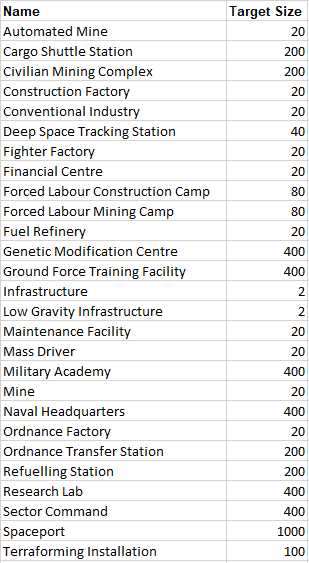
UI References and Screenshots
Updated: v2026.02.15
- Ship Design Window Layout — fire control component selection
- Forum screenshots:

References
\hypertarget{ref-12.1-1}{[1]}. Aurora C# game database (AuroraDB.db v2.7.1) – FCT_TechSystem (TechTypeID=4): Fire Control Range technology, 12 levels from 20,000 km (1,000 RP) to 350,000 km (2,000,000 RP). All range values and research costs verified.
\hypertarget{ref-12.1-2}{[2]}. Aurora C# game database (AuroraDB.db v2.7.1) – FCT_TechSystem (TechTypeID=5): Fire Control Speed Rating technology, 12 levels from 1,250 km/s (1,000 RP) to 25,000 km/s (2,000,000 RP).
\hypertarget{ref-12.1-3}{[3]}. Aurora Wiki (C-Ship-Combat) and Naval Gazing Aurora tutorials – Base Hit Chance = FC Tracking Speed / Target Speed, capped at 1.0.
\hypertarget{ref-12.1-4}{[4]}. Aurora Wiki (ECM, ECCM articles) and official forum sources – ECCM integration costs: 10% for BFC/MFC, 5% for CIWS (no size penalty), 10% for STO. Shield technology: FCT_TechSystem TechTypeID=16 (Shield Type), 12 levels from Alpha (1.0/HS, 1,000 RP) through Omega (15.0/HS, 2,000,000 RP). TechTypeID=14 (Shield Regeneration Rate), 12 levels from 1.0 (1,000 RP) through 15.0 (2,000,000 RP).
\hypertarget{ref-12.1-5}{[5]}. Aurora Wiki (ECM, ECCM articles) – ECM reduces MFC lock-on range by 10% per net ECM level (Sensor Jammer advantage). Against beam FCs, Fire Control Jammers reduce hit probability by 10% per net advantage level. At 10+ net advantage, complete denial (zero range or zero hit chance).
\hypertarget{ref-12.1-6}{[6]}. Aurora Wiki (C-Ship-Combat) – Weapon failure rate of 2% per firing event, verified via Aurora Wiki and official forum sources.
\hypertarget{ref-12.1-7}{[7]}. Aurora C# game database (AuroraDB.db v2.7.1) – FCT_TechSystem (TechTypeID=4) TechDescription: “Maximum beam fire control range for a size 1 beam fire control ship component. Components may be built up to size 4 with a corresponding linear increase in range.”
\hypertarget{ref-12.1-8}{[8]}. Aurora C# game database (AuroraDB.db v2.7.1) – FCT_ShipDesignComponents (ComponentTypeID=19): Single-weapon (SW) fire controls show 30-50% reduction in size, cost, and crew vs. comparable multi-weapon FCs. Example: R60-TS16000 (SW) = 0.6 HS, 28.8 BP, 2 crew vs. R64-TS16000 = 2.0 HS, 61.44 BP, 8 crew.
\hypertarget{ref-12.1-9}{[9]}. Aurora C# game database (AuroraDB.db v2.7.1) – FCT_Ship: MAX(TFPoints) = 500 (100% fleet training). Ships with TFPoints=500 have FireDelay=0, confirming zero fire delay at maximum training.
\hypertarget{ref-12.1-10}{[10]}. Aurora C# game database (AuroraDB.db v2.7.1) – FCT_TechSystem (TechSystemID=3653): “Fire Control Speed Rating 1250 km/s” is the ConventionalSystem=1 and StartingSystem=1 tracking speed technology, establishing 1,250 km/s as the racial base for conventional starts.
\hypertarget{ref-12.1-11}{[11]}. Aurora Forums – Steve Walmsley response in “Struggling with targeting and launching missiles” (https://aurora2.pentarch.org/index.php?topic=13714.0). Originally cited as confirming a quadratic scaling formula; however, database verification (see [13]) demonstrates cube-root scaling. The forum post may have been misinterpreted or the formula may have changed in a subsequent version.
\hypertarget{ref-12.1-12}{[12]}. AuroraWiki – Combat Overview (https://aurorawiki2.pentarch.org/index.php?title=Combat_Overview). “Hull mounted weapons have a tracking speed of either the ship’s max speed or the current base beam fire control tech, whichever is greater.”
\hypertarget{ref-12.1-13}{[13]}. Aurora C# game database (AuroraDB.db v2.7.1) – Resolution scaling verified as cube-root: Effective Range = Base Range x (Target/Resolution)^(1/3). Derived from the active sensor range formula containing Resolution^(2/3) under SQRT. Tested against FCT_ShipDesignComponents for 6-HS active sensors (SDComponentIDs 153671, 153674, 153675): R-102 range 73,053,084 km -> R-20 predicted 42,440,631 km (actual 42,440,631 km); R-102 -> R-5 predicted 26,735,922 km (actual 26,735,922 km). Zero error across all test cases.
Related Sections
- Section 8.5 Weapons – Weapon component design and specifications
- Section 11.3 Active Sensors – Active sensors as missile fire controls
- Section 12.2 Beam Weapons – Beam weapon types and mechanics
- Section 12.3 Missiles – Missile guidance and fire control integration
- Section 12.4 Point Defense – Point defense configuration details
- Section 16.2 Skills and Bonuses – Crew training effects on fire delay
- Worked Example: Fleet Engagement – Combat setup and fire control configuration walkthrough