6.1 Minerals
Updated: v2026.02.15

[Screenshot Pending — #1068] Mineral Survey Window showing deposit details
[Screenshot Pending — #846] Economics window Minerals tab showing stockpile amounts, annual production, and consumption rates.
Minerals are the fundamental resources of Aurora’s economy. Every ship, installation, missile, and piece of infrastructure requires specific combinations of trans-newtonian (TN) minerals to produce. Understanding mineral availability, accessibility, and depletion is essential for long-term strategic planning. Mineral deposits are discovered through geological surveys (see Section 17.1 Geological Survey).
Contents
Updated: v2026.02.15
6.1.1 Mineral Types
Updated: v2026.02.15
Aurora C# features eleven trans-newtonian minerals \hyperlink{ref-6.1-10}{[10]}, each serving distinct roles in your empire’s industry and military:
Duranium - The backbone structural material of your empire. Used in virtually every construction project including ship hulls, armour, ground installations, and infrastructure. Also consumed in the production of maintenance supplies. (unverified — #1259) Duranium demand is constant and enormous; shortages here cripple your entire economy.
Neutronium - A dense, ultra-hard material used in railguns and shipyard construction. \hyperlink{ref-6.1-1}{[1]} Also appears in some ground force equipment. Despite its name suggesting defensive applications, Neutronium is primarily an offensive and industrial mineral.
Corbomite - Used in advanced armour types, shields, and some defensive technologies. Also required for sensors, fire control systems, cloaking devices, and missile decoys. \hyperlink{ref-6.1-2}{[2]} Additionally required for converting Conventional Industry to Financial Centres (20 Corbomite per conversion). \hyperlink{ref-6.1-12}{[12]} Demand grows as you research improved defensive systems.
Tritanium - The primary material for missile systems. Missile launchers, magazines, and ordnance factories all consume Tritanium. \hyperlink{ref-6.1-3}{[3]} Military build-ups focused on missile doctrines require substantial stockpiles.
Boronide - Used in power generation components, reactors, and power plants. Also required for fuel refinery construction (fuel refineries consume Boronide \hyperlink{ref-6.1-11}{[11]}) and energy weapon components. \hyperlink{ref-6.1-4}{[4]} (v2.7.1) Every ship with an engine needs reactor power, making Boronide essential for fleet expansion.
Mercassium - Used in planetary installations including Research Facilities and infrastructure. \hyperlink{ref-6.1-5}{[5]} Despite common misconception, Mercassium is NOT the primary sensor mineral for ships – that role belongs to Uridium and Corbomite.
Vendarite - The primary ground force mineral. All ground unit construction consumes Vendarite. Also used in point defense systems including CIWS (Close-In Weapon System) and Gauss Cannons. \hyperlink{ref-6.1-6}{[6]} Critical for empires maintaining large ground forces or extensive point defense networks.
Sorium - The fuel mineral. Sorium is refined into fuel (Sorium harvested from gas giants is processed into fuel directly). Essential for all ship movement. Also heavily used in Jump Drive construction. \hyperlink{ref-6.1-7}{[7]} Sorium deposits on terrestrial bodies are mined like other minerals; gas giant harvesting is a separate process.
Uridium - The primary sensor mineral for ships. All active and passive sensor components, fire control systems, and electronic warfare equipment require Uridium. \hyperlink{ref-6.1-8}{[8]} Also used in research installations. Demand increases as your technology base grows and you build more sophisticated sensor systems.
Corundium - The principal mineral for building mines and the PRIMARY mineral for energy weapons. Lasers, particle beams, meson cannons, plasma carronades, and HPM weapons all consume Corundium. \hyperlink{ref-6.1-9}{[9]} Without Corundium, no new mines can be constructed, halting your ability to expand mineral extraction. Also used in buoy production. Corundium shortages are strategically crippling because they prevent both mining expansion and energy weapon construction.
Gallicite - The engine mineral. All ship engines (see Section 8.3 Engines) require Gallicite, making it one of the most strategically important minerals. Also consumed in the production of maintenance supplies. (unverified — #1259) Engine technology improvements often increase Gallicite demand per engine. Chronic Gallicite shortages are among the most common economic crises in Aurora.
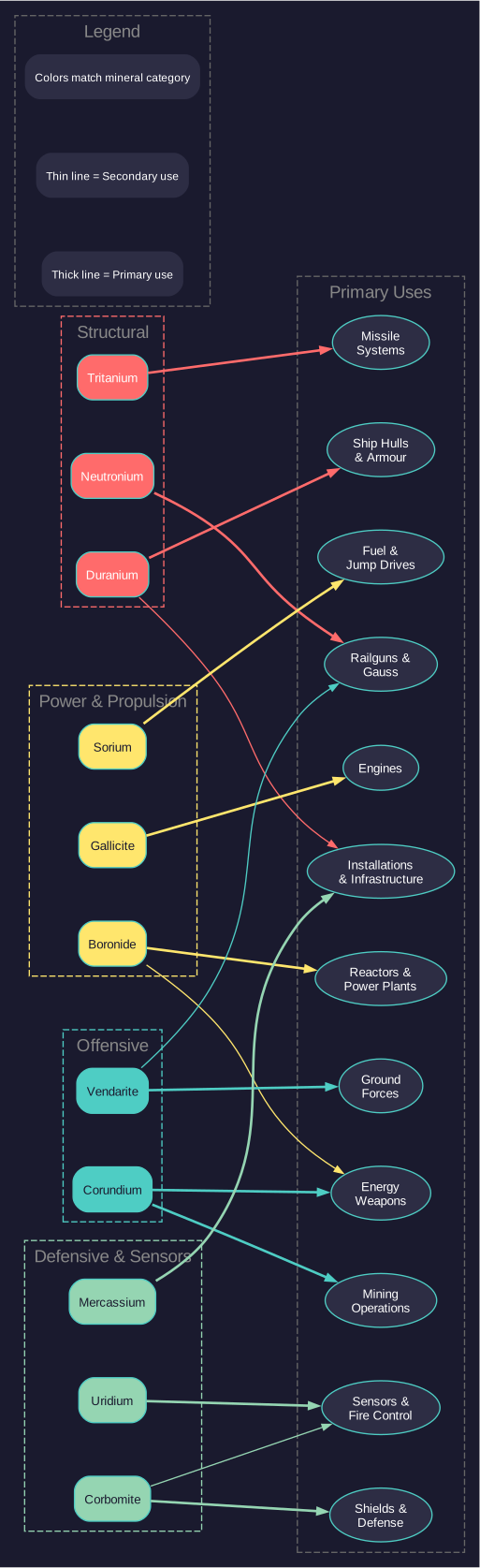
6.1.1.1 Mineral Usage Summary
| Mineral | Primary Uses |
|---|---|
| Duranium | Hulls, armour, installations, infrastructure, maintenance supplies |
| Neutronium | Railguns, shipyards, ground forces |
| Corbomite | Shields, advanced armour, sensors, fire control, cloaking, decoys |
| Tritanium | Missile launchers, magazines, ordnance factories |
| Boronide | Reactors, power plants, fuel refineries, energy weapons |
| Mercassium | Research facilities, infrastructure, planetary installations |
| Vendarite | Ground forces, CIWS, Gauss cannons, point defense |
| Sorium | Fuel (refined), fuel harvesting, jump drives |
| Uridium | Ship sensors, fire control, ECM, research installations |
| Corundium | Mines, energy weapons (lasers, particle beams, meson, plasma, HPM), buoys |
| Gallicite | Engines, maintenance supplies |
Tip: In the early game, Duranium and Gallicite shortages are the most common bottlenecks. Prioritize geological surveys of nearby bodies and consider which mineral deposits to exploit first based on your strategic needs.
6.1.2 Accessibility
Updated: v2026.01.30
Every mineral deposit on a planetary body has two key values: the total quantity available (in tons) and its accessibility rating (a value from 0.1 to 1.0, displayed as a decimal) \hyperlink{ref-6.1-14}{[14]}.
How Accessibility Works:
The accessibility value acts as a direct multiplier on mining output. A deposit with accessibility 1.0 yields full output from each mine working it, while a deposit with accessibility 0.1 yields only 10% of normal output. This represents how close to the surface the deposit is and how easily it can be extracted.
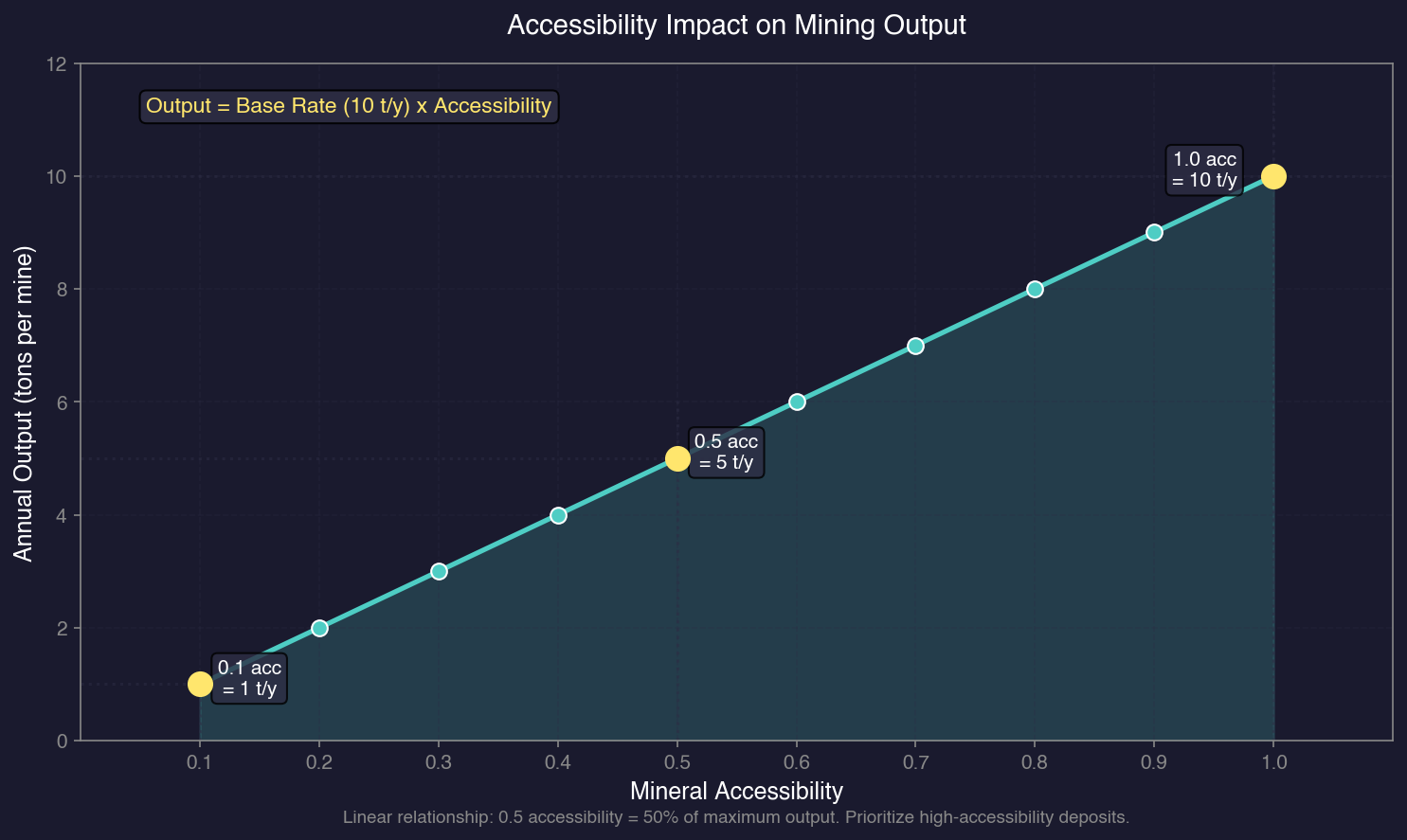
At the base tech level, a conventional mine produces 10 tons per year. \hyperlink{ref-6.1-13}{[13]} With accessibility:
- Accessibility 1.0: produces 10 tons/year
- Accessibility 0.5: produces 5 tons/year
- Accessibility 0.1: produces 1 ton/year
Initial Accessibility Is Fixed: The surveyed accessibility value represents the initial (maximum) accessibility for that deposit. You cannot improve this value through technology or infrastructure. However, accessibility may decline during depletion – see Section 6.1.3 for details on the 50% depletion threshold.
Strategic Implications:
- A small deposit with high accessibility (e.g., 5,000 tons at 1.0) may be more immediately useful than a massive deposit with low accessibility (e.g., 500,000 tons at 0.1).
- Low-accessibility deposits require many more mines to achieve useful output rates, tying up industrial capacity.
- When choosing mining sites, consider both total quantity and accessibility together. The “effective yield” of a deposit equals quantity multiplied by accessibility for comparison purposes.
Tip: The Economics window shows mineral deposits sorted by quantity. Pay close attention to the accessibility column – a planet with large but low-accessibility deposits may not be worth colonizing early when higher-accessibility deposits exist elsewhere in your system.
6.1.3 Depletion
Updated: v2026.01.30
Mineral deposits are finite. Every ton extracted reduces the remaining quantity of the deposit. When a deposit reaches zero, it is exhausted and no more of that mineral can be mined from that body (unless another deposit is somehow created through game events).
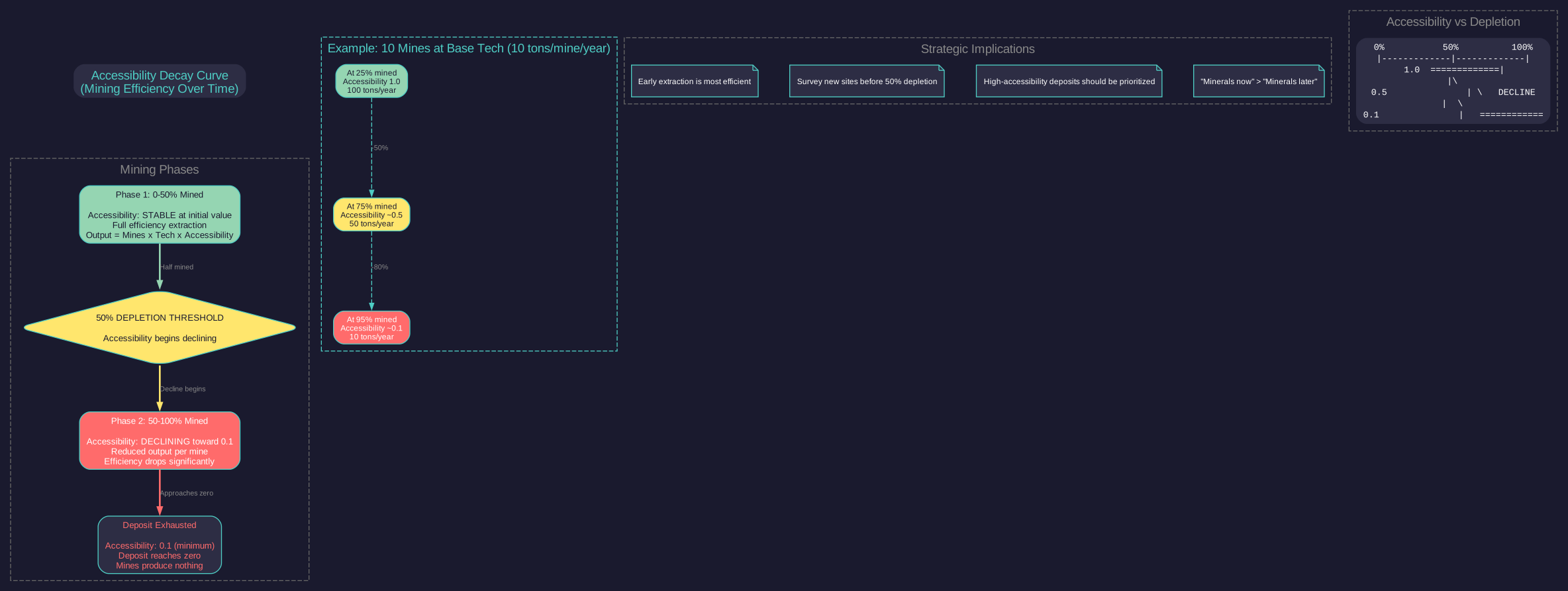
Depletion Mechanics:
- Mining output is subtracted directly from the deposit quantity each production cycle (every 5-day increment the game processes). \hyperlink{ref-6.1-15}{[15]}
- Accessibility declines during depletion: For planets and moons, once half of a deposit has been mined (50% depletion), the accessibility begins to decline, eventually reaching a minimum of 0.1 shortly before the deposit is exhausted. \hyperlink{ref-6.1-16}{[16]} This means early extraction is significantly more efficient than late-stage mining from the same deposit. See Section 6.2.1 Conventional Mines for details on how this affects mining output.
- When a deposit is exhausted, mining of that mineral on that body stops immediately. Mines remain in place but produce nothing for that mineral.
Monitoring Depletion:
The Economics window and the Mining tab show current deposit sizes. It is wise to periodically check your main mining colonies to ensure critical minerals are not about to run out unexpectedly.
Depletion Timeline Estimation:
You can estimate how long a deposit will last by dividing the remaining quantity by your annual extraction rate:
Years remaining = Deposit quantity / (Number of mines x per-mine output x accessibility)
Strategic Responses to Depletion:
- Begin surveying new systems (see Section 17.1 Geological Survey) well before deposits run out on your homeworld.
- Develop asteroid mining or remote colony mining infrastructure as backup sources.
- Consider stockpiling critical minerals if production exceeds current demand.
- Civilian mining colonies (see Section 6.5 Civilian Economy) can supplement government mining operations.
- Mass drivers can transfer minerals from remote mining sites to your main industrial centres without requiring cargo ships.
Tip: Earth typically starts with moderate mineral deposits. Many players find that aggressively surveying the home system and establishing mining colonies on mineral-rich moons or asteroids in the first few decades is critical for long-term economic health.
6.1.4 Mineral Survey Window
Updated: v2026.02.15
The Mineral Survey window provides a filterable view of all mineral-bearing bodies discovered through geological surveys (see Section 17.1 Geological Survey). It is the primary tool for evaluating colonization and mining targets.
Populating the Window:
The window starts blank each time it is opened. Press the Wide View button to expand columns and populate the list. Only bodies with mineral deposits appear; bodies without minerals are excluded.
Available Filters:
- Column Filters: Set minimum quantity thresholds per mineral type (e.g., minimum 100 Duranium) to filter results. Each mineral column can be filtered independently by both Amount and Accessibility, allowing you to find bodies with, for example, at least 50,000 Duranium at accessibility 0.5 or higher. (v2.7.1)
- Max CC (Colony Cost): Check the box and set a value (default 10) to exclude bodies with colony cost above the threshold
- OM Eligible: Shows only bodies eligible for orbital mining, determined by body diameter. The flag appears as a column indicator for each body, allowing quick identification of orbital mining candidates without checking diameters manually. (v2.7.1) Eligibility can be expanded through the Maximum Orbital Mining Diameter technology (see Section 6.2.4 Asteroid Mining)
- Gas Giants: Include, exclude, or show only gas giants (useful for identifying Sorium harvesting candidates)
- Asteroids: Include, exclude, or show only asteroids
- No Alien: Exclude bodies controlled by alien races
- HAB Column: Colour-coded habitability rating for quick assessment
- Survey Indicator: Bodies display an “S” or “M” indicator – “S” denotes a completed geological survey, while “M” indicates mineral deposits were detected via a less precise method (e.g., gravitational survey). Only “S” bodies have confirmed deposit quantities and accessibilities. (v2.7.1)
Usage Notes:
- Use the Search button to apply filters; do NOT press Enter (it does not trigger a search)
- Use Clear Search to remove all active filters
- Filters reset every time the window is opened
- By default, the list sorts by Duranium quantity
Tip: Combine the Max CC filter with the OM Eligible flag to quickly identify low-cost orbital mining targets that do not require population support infrastructure.
Related Sections
- Section 6.2 Mining – Extracting minerals from deposits
- Section 6.3 Construction – Converting minerals into installations and ships
- Section 17.1 Geological Survey – Discovering mineral deposits on system bodies
- Section 5.1 Establishing Colonies – Setting up mining colonies on new worlds
- Section 8.3 Engines – Gallicite consumption for ship propulsion
- Appendix A: Formulas – Mining output and depletion calculations
- Worked Example: Mining Network Setup – Multi-body mining infrastructure walkthrough
References
\hypertarget{ref-6.1-1}{[1]}. Aurora C# game database (AuroraDB.db v2.7.1) – FCT_ShipDesignComponents: Neutronium used in Railgun components and Shipyard installations, not armour.
\hypertarget{ref-6.1-2}{[2]}. Aurora C# game database (AuroraDB.db v2.7.1) – FCT_ShipDesignComponents: Corbomite used in Active Sensors, Fire Controls, Cloaking Devices, and Missile Decoys.
\hypertarget{ref-6.1-3}{[3]}. Aurora C# game database (AuroraDB.db v2.7.1) – FCT_ShipDesignComponents: Tritanium as primary mineral for Missile Launchers, Magazines, and Ordnance Factories.
\hypertarget{ref-6.1-4}{[4]}. Aurora C# game database (AuroraDB.db v2.7.1) – FCT_ShipDesignComponents: Boronide used in energy weapon components alongside power systems.
\hypertarget{ref-6.1-5}{[5]}. Aurora C# game database (AuroraDB.db v2.7.1) – DIM_PlanetaryInstallation: Mercassium used in Research Facilities and Infrastructure; FCT_ShipDesignComponents shows no ship sensor usage.
\hypertarget{ref-6.1-6}{[6]}. Aurora C# game database (AuroraDB.db v2.7.1) – FCT_GroundUnitType: Vendarite as primary mineral for ground forces; FCT_ShipDesignComponents shows CIWS and Gauss Cannon usage.
\hypertarget{ref-6.1-7}{[7]}. Aurora C# game database (AuroraDB.db v2.7.1) – FCT_ShipDesignComponents: Sorium as major component in Jump Drive construction.
\hypertarget{ref-6.1-8}{[8]}. Aurora C# game database (AuroraDB.db v2.7.1) – FCT_ShipDesignComponents: Uridium as primary mineral for Active Sensors, Passive Sensors, and Fire Control systems.
\hypertarget{ref-6.1-9}{[9]}. Aurora C# game database (AuroraDB.db v2.7.1) – FCT_ShipDesignComponents: Corundium as primary mineral for Lasers, Particle Beams, Meson Cannons, Plasma Carronades, and HPM weapons.
\hypertarget{ref-6.1-10}{[10]}. Aurora C# game database (AuroraDB.db v2.7.1) – DIM_PlanetaryInstallation table has 11 mineral columns (Duranium, Neutronium, Corbomite, Tritanium, Boronide, Mercassium, Vendarite, Sorium, Uridium, Corundium, Gallicite), confirming 11 trans-newtonian minerals.
\hypertarget{ref-6.1-11}{[11]}. Aurora C# game database (AuroraDB.db v2.7.1) – DIM_PlanetaryInstallation: Fuel Refinery (ID 3) requires 120 Boronide and 0 Duranium.
\hypertarget{ref-6.1-12}{[12]}. Aurora C# game database (AuroraDB.db v2.7.1) – DIM_PlanetaryInstallation: “Convert CI to Financial Centre” (ID 50) costs 20 BP and requires 20 Corbomite. The conversion is from Conventional Industry (CI), not from Construction Factories.
\hypertarget{ref-6.1-13}{[13]}. Aurora C# game database (AuroraDB.db v2.7.1) – FCT_TechSystem mining production tech line (TechTypeID=26) starts at 10 tons (base) and progresses through 12, 14, 16, 20, 25, 30, 36, 42, 50, 60, 70 tons/year per mine, confirming base output of 10 tons/year.
\hypertarget{ref-6.1-14}{[14]}. Aurora C# game database (AuroraDB.db v2.7.1) – FCT_MineralDeposit.Accessibility confirmed range MIN=0.1, MAX=1.0 across all deposits in database.
\hypertarget{ref-6.1-15}{[15]}. Aurora C# game database (AuroraDB.db v2.7.1) – FCT_Game.MinConstructionPeriod=430000 seconds (~4.97 days), confirming the approximately 5-day production cycle.
\hypertarget{ref-6.1-16}{[16]}. Aurora C# game database (AuroraDB.db v2.7.1) – FCT_MineralDeposit schema includes HalfOriginalAmount and OriginalAcc fields, indicating the game tracks original accessibility and the 50% depletion point. The minimum accessibility of 0.1 is confirmed by ref-6.1-14.