5.2 Population
Updated: v2026.02.15

Note: Claims in this section have been verified against the AuroraDB.db v2.7.1 game database where possible. Numbered references indicate verified sources.
Contents
Updated: v2026.02.15
- 5.2 Population
- Contents
- 5.2.1 Growth Rate
- 5.2.2 Ark Modules and Orbital Population (v2.0.0)
- 5.2.3 Population Capacity
- 5.2.3.1 Base Capacity Calculation
- 5.2.3.2 Growth Rate Interaction
- 5.2.3.3 Spreading Colonies for Faster Growth
- 5.2.3.4 Water Coverage Modifier
- 5.2.3.5 Tide-Locked Worlds
- 5.2.3.6 Species Variation
- 5.2.3.7 Minimum Threshold
- 5.2.3.8 Infrastructure as a Limiting Factor
- 5.2.3.9 Practical Population Limits
- 5.2.3.10 Balancing Population Across Colonies
- 5.2.4 Workforce Allocation
- 5.2.5 Labor and Employment
- 5.2.6 Forced Labour Camps
- 5.2.7 Occupation and Policing
- 5.2.8 Colony Unrest and Protection
- 5.2.9 Stockpile Transfers
- 5.2.10 Logistics Eligibility Display (v2.8.0)
- UI References and Screenshots
- Related Sections
- References
5.2.1 Growth Rate
Updated: v2026.01.30
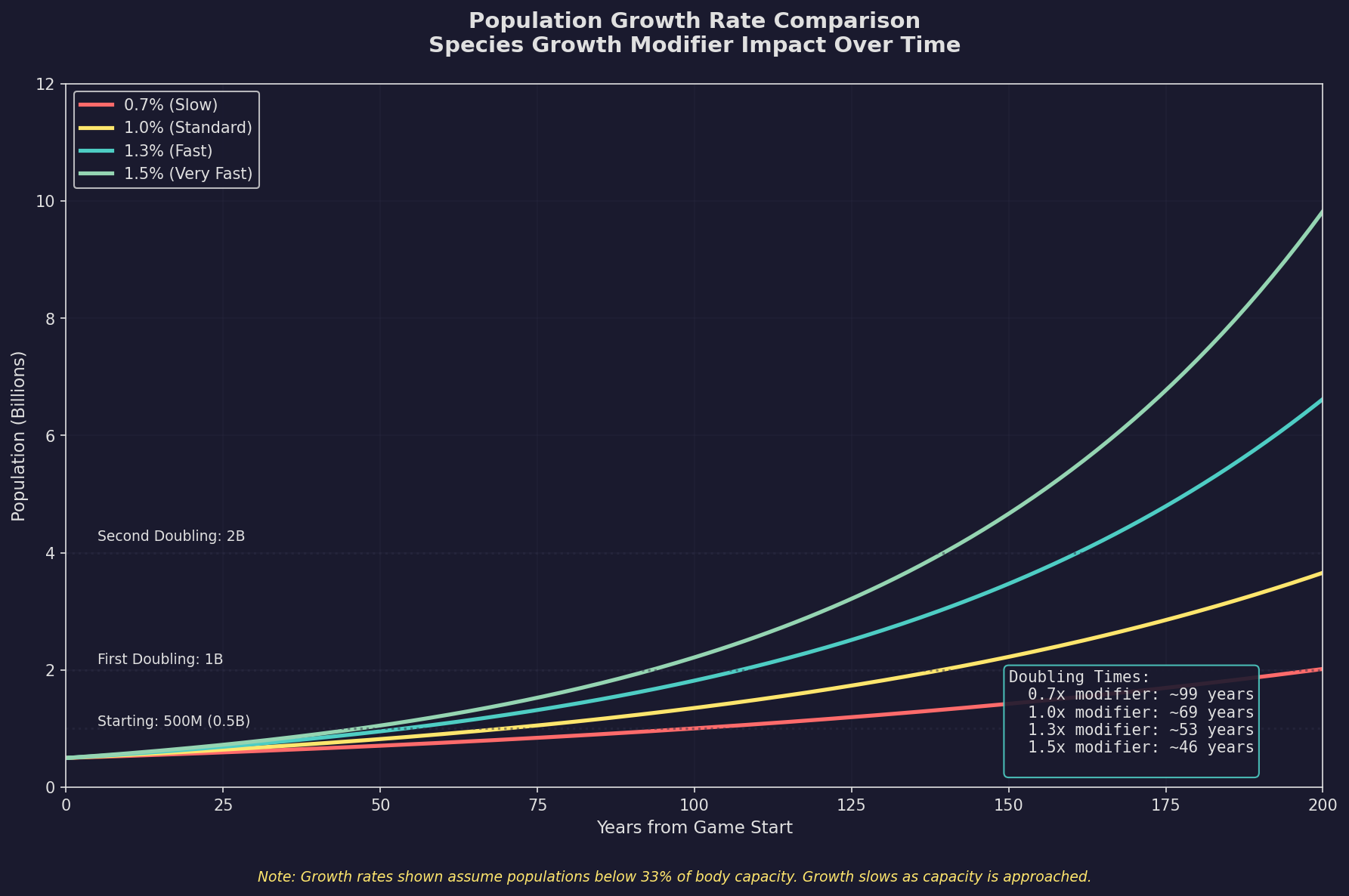
Population growth is a fundamental mechanic in Aurora C# that drives your empire’s expansion potential. More population means more workers for industry, more scientists for research, and more manpower for your military.
5.2.1.1 Base Growth Rate
Population grows at a base annual rate that can be modified by several factors:
- Default Growth Rate: The base annual growth rate is set during game creation (typically 1-2% per year for a standard game), modified by species-specific PopulationGrowthModifier (default 1.0 for humans). \hyperlink{ref-5.2-12}{[12]}
- Calculation: Growth is applied to the total population each year. A colony of 100 million with 2% growth adds 2 million per year.
- Compound Growth: Like interest, population growth compounds. A 2% growth rate doubles population in approximately 35 years (ln(2)/0.02 = 34.7 years).
5.2.1.2 Factors Affecting Growth
Positive Modifiers:
- Adequate Infrastructure: When infrastructure meets or exceeds the colony’s needs, population grows at full rate. (requires live testing — #736)
- Sector Governor Bonus: Governors (see Section 16.1 Officer Generation) with population growth bonuses increase the rate for their assigned colony. (requires live testing — #736)
- Low Overcrowding: When a colony is well below its carrying capacity, growth proceeds normally. (requires live testing — #736)
Negative Modifiers:
- Insufficient Infrastructure: If infrastructure is below the required level for the current population and colony cost, growth is reduced. Severe shortfalls can cause population decline (deaths from life support failure). (requires live testing — #736)
- Overcrowding: When population exceeds the colony’s comfortable capacity, growth slows. (requires live testing — #736)
- Environmental Damage: Radiation, extreme temperatures without adequate infrastructure, or toxic atmosphere breaches slow growth. (requires live testing — #736)
- Lack of Employment: Extreme unemployment can reduce growth rates as economic conditions deteriorate. (requires live testing — #736)
5.2.1.3 Population Decline
Population can decrease in several situations:
- Infrastructure Failure: If infrastructure drops below critical levels (due to maintenance failure, enemy bombardment, or transportation issues), population will die. (requires live testing — #736)
- Orbital Bombardment: Enemy attacks on a colony directly kill population (see Section 12.1 Fire Controls). (requires live testing — #736)
- Environmental Catastrophe: Loss of atmosphere containment on hostile worlds. (requires live testing — #736)
- Emigration: Population may leave a colony for better opportunities elsewhere (primarily a civilian economy mechanic). (requires live testing — #736)
5.2.1.4 Managing Growth Strategically
- Early Game: Growth is your most precious resource. Protect your homeworld population and resist sending too many colonists away at once.
- Mid Game: Once your homeworld exceeds 1-2 billion, you can afford to seed new colonies more aggressively.
- Late Game: With multiple established colonies, compound growth across your empire generates enormous population increases each year.
Tip: In the early game, every million colonists you send to a new colony is a million fewer growing at your homeworld. Consider waiting until your homeworld reaches a comfortable population before aggressively colonizing. A homeworld with 500 million people growing at 2% generates 10 million new colonists per year – enough to seed new colonies without stunting homeworld growth.
5.2.2 Ark Modules and Orbital Population (v2.0.0)
Updated: v2026.01.30
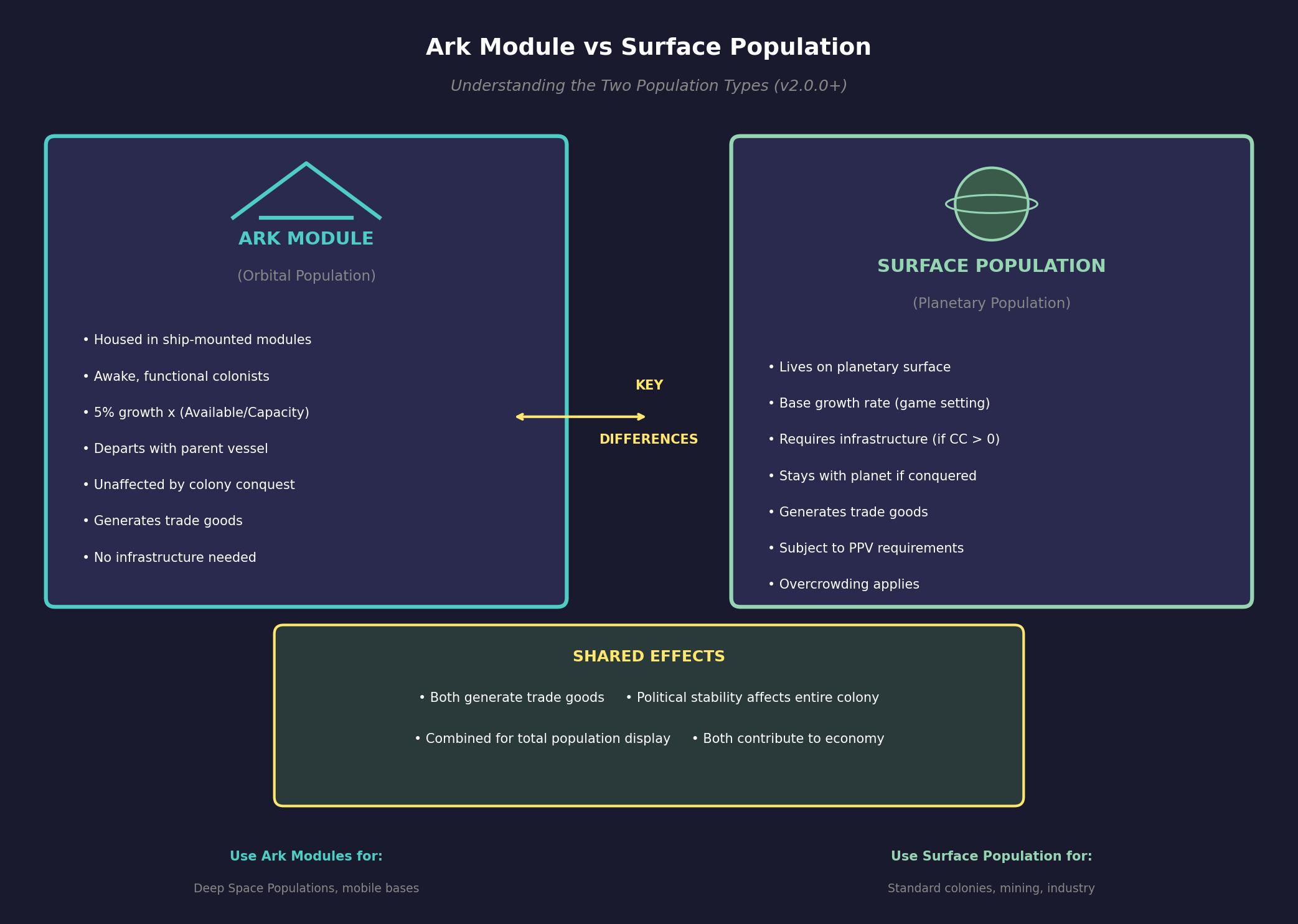
In v2.0.0, Orbital Habitat modules are redesignated as Ark Modules, fundamentally changing how orbital and surface populations interact at colonies. The system now separates populations into two distinct categories: surface population and orbital population.
5.2.2.1 Surface vs. Orbital Population
- Surface Population: Colonists residing on the planetary surface, subject to infrastructure requirements and colony cost
- Orbital Population: Colonists housed in Ark Modules aboard ships or stations in orbit around the colony
The two populations are distinct – growth on the surface does not affect the colonists on board Ark Modules, and vice versa.
5.2.2.2 Ark Module Characteristics
- Classified as Colonist Transport category (distinct from Cryogenic Transport)
- Transport awake, functional colonists (not cryogenically frozen)
- Provide population capacity while the parent vessel remains in colony orbit
- Colonists automatically depart with the vessel when it leaves orbit
5.2.2.3 Orbital Population Growth
Orbital population growth operates at: 5% annual rate x (Available Space / Total Capacity) \hyperlink{ref-5.2-13}{[13]}
If an Ark Ship is only carrying 75% of capacity, the annual population growth will be 1.25% (5% x 25% available space). \hyperlink{ref-5.2-13}{[13]}
5.2.2.4 Infrastructure and Stability Rules
- Infrastructure requirements consider only surface population
- Overcrowding unrest applies exclusively to surface population
- PPV (Planetary Protection Value) requirements apply only to surface population
- Political stability impacts affect the entire colony despite originating from a single population source
5.2.2.5 Conquest and Transfer Mechanics
If a colony is conquered, the population in the Ark Modules will not be affected unless the Ark itself surrenders. Upon colony conquest, the Ark will be unassigned from the conquered colony.
5.2.2.6 Economic Contributions
Both orbital and surface populations generate trade goods. An orbital-only colony, including a Deep Space Population (DSP), will produce trade goods.
5.2.3 Population Capacity
Updated: v2026.01.30
Every colony has a maximum population it can reasonably support, determined by the body’s physical characteristics. Population capacity represents the maximum population that can be maintained on a single body and is determined primarily by surface area. This is the total of all populations on the same body, not per population (in multi-race games).
5.2.3.1 Base Capacity Calculation
The foundational formula uses Earth as the reference point:
Maximum Capacity = (Body Surface Area / Earth Surface Area) x 12 billion \hyperlink{ref-5.2-10}{[10]}
This baseline assumes an Earth-sized planet can sustain approximately 12 billion inhabitants. \hyperlink{ref-5.2-10}{[10]}
5.2.3.2 Growth Rate Interaction
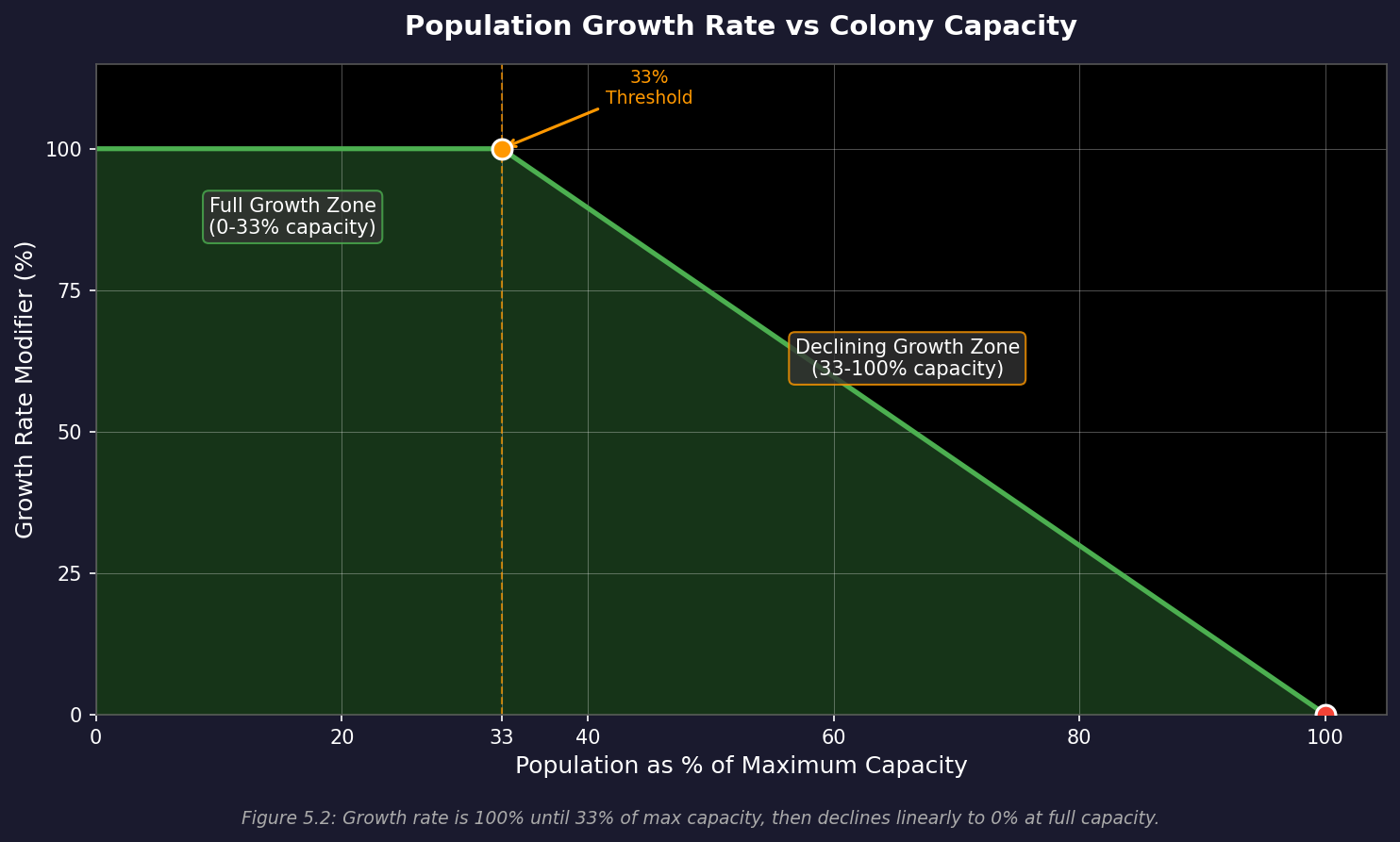
Population grows normally up to 33% of maximum capacity. Beyond this threshold, growth declines linearly, reaching zero at maximum capacity. \hyperlink{ref-5.2-14}{[14]} This mirrors real-world demographic trends where population growth rates peaked at approximately 2.1% when the world population was around 4 billion (one-third of estimated carrying capacity).
5.2.3.3 Spreading Colonies for Faster Growth
Because growth rate is highest when a colony is at roughly 33% of its maximum supported population, distributing colonists across multiple colonies – even multiple colonies within the same system – can produce faster overall population growth than concentrating everyone on a single world. For example, three colonies each at 33% capacity all grow at the full base rate, while a single colony at 100% capacity has zero growth. This makes early investment in colony ships and infrastructure across several viable bodies a powerful long-term strategy, as it maximizes the time your total population spends in the high-growth zone.
5.2.3.4 Water Coverage Modifier
Once water coverage exceeds 75%, population capacity diminishes linearly:
- At 75% water coverage: full capacity
- At 100% water coverage: capacity drops to just 1% of normal (representing scattered islands or floating colonies) \hyperlink{ref-5.2-14}{[14]}
- Below 75%: no reduction from water coverage
5.2.3.5 Tide-Locked Worlds
Tide-locked planets receive only 20% of normal population capacity, reflecting that habitation is confined to the temperate band between the permanently lit and permanently dark hemispheres. As compensation, these worlds receive an 80% reduction in temperature-based colony costs. \hyperlink{ref-5.2-14}{[14]}
5.2.3.6 Species Variation
Each species has an adjustable population density modifier (baseline 1.0), allowing variance based on biology and culture. This modifier scales the base capacity calculation up or down.
5.2.3.7 Minimum Threshold
Regardless of other calculations, any non-gas giant body with gravity at or below the species’ maximum tolerance maintains a floor capacity of 50,000 inhabitants. \hyperlink{ref-5.2-14}{[14]}
5.2.3.8 Infrastructure as a Limiting Factor
On non-ideal worlds (colony cost > 0), infrastructure provides an additional population cap below the body’s physical capacity:
- Formula: Maximum Supported Population = Infrastructure / (Colony Cost x 100) (in millions) \hyperlink{ref-5.2-1}{[1]}
- Building more infrastructure raises this cap toward the body’s physical limit
- Infrastructure can be built locally (using construction factories) or transported from elsewhere
- Exceeding infrastructure capacity causes population losses due to inadequate life support
5.2.3.9 Practical Population Limits
Beyond physical capacity and infrastructure, practical considerations limit how large a colony should grow:
Employment: Population needs jobs. Unemployed population still consumes resources but produces nothing. Key employment sources:
- Mining installations
- Construction factories
- Research labs
- Naval shipyards
- Ground force training facilities
- Maintenance facilities
- Various other installations
Resource Consumption: Larger populations consume more fuel for heating/cooling (on non-ideal worlds) and place greater demands on the logistics network.
Diminishing Returns: At very large population levels, the administrative overhead of maintaining the colony can outweigh the benefits of additional growth.
5.2.3.10 Balancing Population Across Colonies
A common challenge is balancing population distribution across your empire:
- Your homeworld typically has the most people and highest production
- New colonies need population to function but shouldn’t drain the homeworld excessively
- Specialized colonies (mining, fuel production) may need relatively small populations
- Industrial colonies benefit from large populations to staff construction factories
Tip: A useful rule of thumb: aim for population to match employment. If a colony has 50 mines and 20 construction factories, it needs roughly 3.5 million people to fully staff them. Sending more population than can be employed wastes colonist transport capacity.
5.2.4 Workforce Allocation
Updated: v2026.02.15
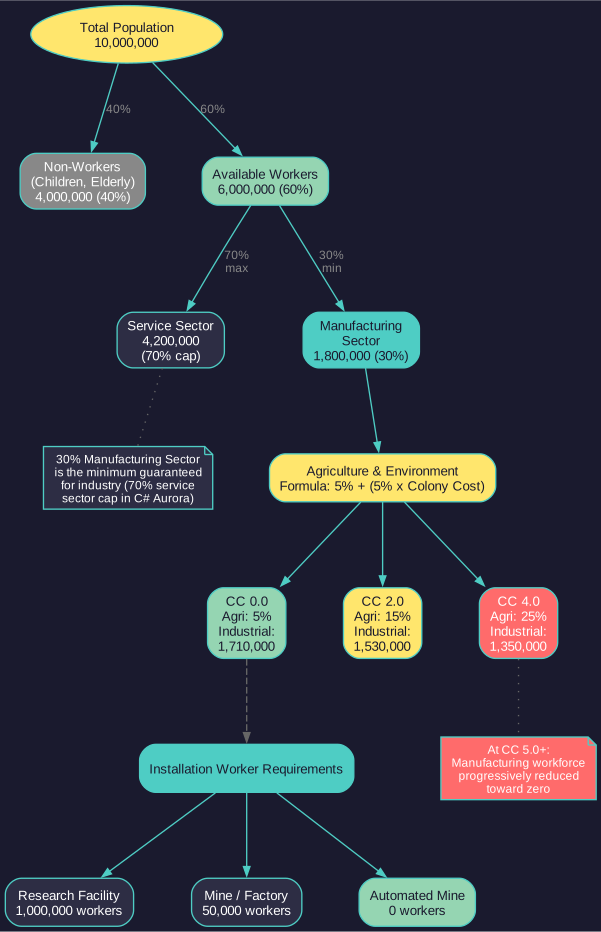
Not all population is available for manufacturing and mining work. Approximately 60% of total population is available as workers (the remainder being children, elderly, and service sector). (requires live testing — #736 – percentage not stored in database) Of that workforce, a portion is further allocated to agriculture and environment based on the world’s colony cost.
5.2.4.1 Agriculture & Environment Workers
Formula: Agriculture & Environment Workers = 5% + (5% x Colony Cost) \hyperlink{ref-5.2-11}{[11]}
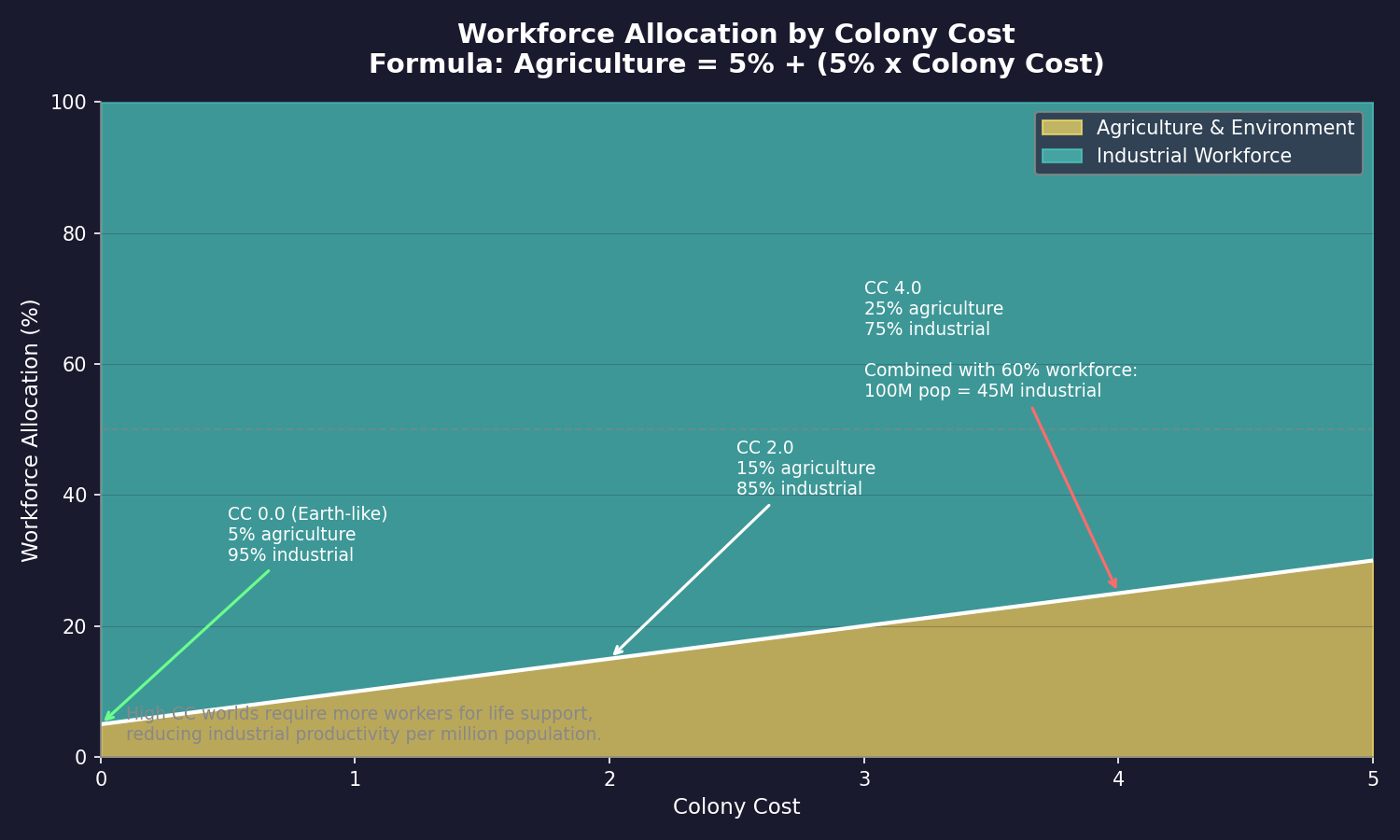
This represents the workforce needed to maintain food production and environmental systems on increasingly hostile worlds:
| Colony Cost | Agriculture Workers | Effective Industrial Workforce |
|---|---|---|
| 0.0 (Earth-like) | 5% of workers | 95% available for industry |
| 1.0 | 10% of workers | 90% available for industry |
| 2.0 | 15% of workers | 85% available for industry |
| 3.0 | 20% of workers | 80% available for industry |
| 4.0 | 25% of workers | 75% available for industry |
This allocation reduces the effective manufacturing and mining workforce. On a CC 4.0 world, one quarter of your available workers are occupied maintaining agriculture and environmental systems rather than operating factories or mines. Combined with the 60% base workforce availability, a CC 4.0 colony with 10 million population has only 4.5 million effective industrial workers (10M x 60% x 75%).
(Community Tip) Factor this workforce reduction into your colony planning. High colony cost worlds not only require more infrastructure but also yield fewer productive workers per million population. This compounds with the colony cost mining penalty, making hostile worlds doubly expensive to operate.
5.2.4.2 Population Milestones
Key population thresholds unlock civilian economy features and production stability:
| Population | Significance |
|---|---|
| 10,000 (0.01M) | Infrastructure trade goods become available \hyperlink{ref-5.2-8}{[8]} |
| 3 million | Basic trade goods unlock (Textiles, Machinery, Construction Materials) \hyperlink{ref-5.2-8}{[8]} |
| 5 million | Additional trade goods unlock (Precious Metals, Consumer Electronics, Pharmaceuticals, etc.) \hyperlink{ref-5.2-8}{[8]} |
| 10 million | Civilian destination threshold; remaining trade goods unlock (Spices, Luxury Food, Wines, etc.) \hyperlink{ref-5.2-8}{[8]} |
| 25 million | Trade goods production becomes viable for sustained civilian routes (unverified — #1259) |
| 100 million | Manufacturing workforce stabilizes; governor bonuses become significant (unverified — #1259) |
| 300 million | Large-scale industrial colony; growth rate may exceed colonist shipment rates (unverified — #1259) |
These milestones represent natural breakpoints in colony development. Trade goods begin unlocking as early as 10,000 population (Infrastructure), with most basic goods available at 3-5 million and all standard goods available at 10 million. The civilian destination threshold for shipping lines is the lower of 10 million or half the system body’s capacity. Above 100 million, the colony’s industrial base is large enough that workforce fluctuations from colonist arrivals have minimal impact on production planning.
5.2.5 Labor and Employment
Updated: v2026.02.15
Population in Aurora C# is not just a number – it represents the workforce that operates your installations, staffs your shipyards, and drives your industrial output.
5.2.5.1 How Employment Works
Each installation type requires a specific number of workers to operate at full capacity. Workers are only required where they would meaningfully impact gameplay – automated or minimal-staffing installations are exempt.
Very High Worker Demand (1,000,000 workers per installation): \hyperlink{ref-5.2-2}{[2]}
- Ground Force Construction Complex
- Research Facility
High Worker Demand (125,000-250,000 workers per installation): \hyperlink{ref-5.2-2}{[2]}
- Genetic Modification Centre (250,000)
- Terraforming Installation (125,000)
Medium Worker Demand (50,000 workers per installation): \hyperlink{ref-5.2-2}{[2]}
- Construction Factory
- Ordnance Factory
- Fighter Factory
- Fuel Refinery
- Mine
- Conventional Industry
- Maintenance Facility
- Financial Centre
Low Worker Demand (5,000 workers per installation): \hyperlink{ref-5.2-2}{[2]}
- Forced Labour Construction Camp
- Forced Labour Mining Camp
No Worker Requirements:
- Infrastructure
- Deep Space Tracking Station
- Automated Mine
- Military Academy
- Sector Command
- Mass Driver
- Civilian Mining Complex
- Refuelling Station
- Naval Headquarters
- Ordnance Transfer Station
- Cargo Shuttle Station
Naval Shipyard Workers: Shipyard worker requirements are calculated separately based on shipyard size (250 workers per ton of shipyard capacity for naval shipyards). (requires live testing — #736 – formula not stored in installation table)
5.2.5.2 Manufacturing Sector and Service Sector
A colony’s population is divided between the manufacturing sector and the service sector. The service sector cap in C# Aurora is 70% (reduced from 75% in VB6), meaning the manufacturing sector comprises at least 30% of the population. \hyperlink{ref-5.2-15}{[15]} On a homeworld operating at maximum service sector, this means 30% of population is available for manufacturing work.
This change was made to accommodate the increased worker requirements for shipyards, financial centres, and maintenance facilities in C# Aurora.
Note: The “approximately 60% available as workers” figure (unverified – #1257) in Section 5.2.4 and the “30% manufacturing sector” figure here describe different partitioning models of the same population. The 60% figure accounts for non-working population (children, elderly, etc.), while the 70% service sector cap \hyperlink{ref-5.2-15}{[15]} further subdivides the working population between service and manufacturing roles. These two models are not reconciled: if 60% of population are workers and 70% of those are in the service sector, only 18% of total population would be in manufacturing – yet the 30% manufacturing sector figure \hyperlink{ref-5.2-15}{[15]} implies a different calculation. The effective manufacturing workforce depends on which model the game applies in a given context, and the exact interaction between these figures has not been confirmed in the database (unverified – #1257).
5.2.5.3 Production and Population
An installation’s output is directly tied to whether it has sufficient workers:
- Fully Staffed: Installation operates at 100% efficiency
- Partially Staffed: If the colony’s manufacturing population is insufficient to staff all installations, each installation operates at reduced efficiency proportional to available workforce. (unverified — #1211 — community sources indicate the efficiency penalty is applied uniformly to all production rather than by installation priority; the v1.12.0 priority allocation claim could not be verified against the changelog)
- Overstaffed: Having more manufacturing population than installations require does not boost production beyond 100% – the excess population is simply unemployed
5.2.5.4 Unemployment Effects
High unemployment can have negative effects on a colony:
- Reduced political stability (unverified — #1211 — no database field links unemployment to stability; may not exist as a mechanic)
- Slower population growth (unverified — #1211 — no database field links unemployment to growth; may not exist as a mechanic)
- No direct production benefit from unemployed workers
- Consider building additional installations or relocating excess population
5.2.5.5 Workforce Allocation Priority
When a colony doesn’t have enough population to staff all installations, Aurora prioritizes allocation. Generally: (unverified — #1211 — community sources indicate there is no priority list; the game calculates total worker shortage and applies a uniform manufacturing efficiency penalty to all production equally)
- Life-critical installations first
- Military installations
- Industrial installations
- Others
You cannot manually set workforce priorities – the game handles allocation automatically. If you want specific installations to be fully staffed, ensure your population meets or exceeds total employment requirements.
5.2.5.6 Optimizing Production
To maximize a colony’s output:
- Match Population to Installations: Calculate total employment needed and ensure population meets it.
- Build Incrementally: Add installations as population grows, rather than building 100 mines on a colony with 1 million people.
- Use Automation Where Appropriate: Automated mines on low-population bodies save the logistical headache of colonist transport.
- Consider Governor Bonuses: Governors with manufacturing or mining bonuses effectively increase per-installation output, getting more from the same workforce.
5.2.5.7 Wealth and Economic Activity
In C# Aurora, wealth generation is tied to industrial output rather than total population. Each 1 million workers in TN installations produces a baseline of 100 wealth per annum, regardless of whether their assigned installation is actively building or producing.
- Worker-Based Wealth: Only workers assigned to TN installations generate wealth. Workers in Conventional Factories and Forced Labour Camps do not generate wealth. \hyperlink{ref-5.2-3}{[3]}
- Wealth Generation Technology: A dedicated tech line (see Section 7.1 Technology Tree) increases wealth output, starting at 120 wealth per million workers (3,000 RP), then 140 (5,000 RP), and continuing upward. \hyperlink{ref-5.2-4}{[4]}
- Financial Centres: Generate supplementary wealth equal to the tax from 250,000 workers. Unlike VB6, financial centres can be transported between colonies. \hyperlink{ref-5.2-5}{[5]}
- Tax Rate: Adjustable to balance income vs. population satisfaction.
- Civilian Economy: Larger populations support more robust civilian shipping and industry.
Warning: A common mistake is building installations faster than population can staff them. Each unstaffed installation is wasted construction effort that could have gone toward something useful. Track your employment ratio (total jobs vs. total population) and keep it roughly balanced. If you find yourself with hundreds of idle installations, stop building and start shipping colonists.
5.2.6 Forced Labour Camps
Updated: v2026.01.30
Forced Labour Camps are a specialized installation type that provides production at the cost of population consumption and unrest.
5.2.6.1 Types and Stats
| Property | Value |
|---|---|
| Types | Forced Labour Construction Camp, Forced Labour Mining Camp \hyperlink{ref-5.2-6}{[6]} |
| Build Cost | 40 BP each \hyperlink{ref-5.2-6}{[6]} |
| Output | Equivalent to one Construction Factory or one Mine (depending on type) \hyperlink{ref-5.2-6}{[6]} |
| Transport Size | 100,000 cargo points (4x a standard construction factory) \hyperlink{ref-5.2-6}{[6]} |
| Initial Population Cost | Consumes 100,000 population upon construction (requires live testing — #736) |
| Ongoing Workers | 5,000 population needed as overseers \hyperlink{ref-5.2-6}{[6]} |
| Unrest Penalty | +5 points of unrest instantly when built (requires live testing — #736) |
5.2.6.2 Key Mechanics
- Can be built at any population, not exclusively occupied ones
- Respond to all standard production modifiers affecting factories and mines (radiation, unrest, economic, and political factors)
- Workers in Forced Labour Camps do not generate wealth
5.2.6.3 Strategic Uses
- Conquered populations: Making conquered populations productive despite occupation penalties
- High-unrest colonies: Generating additional production in your own colonies, accepting unrest as a tradeoff
- Remote operations: Establishing mining operations on hostile worlds with minimal infrastructure support
5.2.6.4 Trade-offs
Despite cheap construction costs (40 BP), camps present significant drawbacks:
- The substantial transport requirement (100,000 cargo points) means equivalent freighter capacity could move four times as many traditional mines or factories
- Each camp consumes 100,000 population when built, permanently removing those colonists
- The +5 unrest per camp can spiral into instability if built in quantity
5.2.7 Occupation and Policing
Updated: v2026.01.30
When a population is conquered or occupied, ground forces must maintain order. The occupation system uses strength calculations and police modifiers to determine unrest reduction.
5.2.7.1 Required Occupation Strength
Formula: ((Determination + Militancy + Xenophobia) / 300) x Population Amount x Political Status Modifier (community-derived formula — requires live testing — #736)
Political Status Modifiers:
| Status | Modifier |
|---|---|
| Slave Colony | 1.5 \hyperlink{ref-5.2-7}{[7]} |
| Conquered | 1.0 \hyperlink{ref-5.2-7}{[7]} |
| Occupied | 0.75 \hyperlink{ref-5.2-7}{[7]} |
| Subjugated | 0.25 \hyperlink{ref-5.2-7}{[7]} |
| All Others | 0 |
5.2.7.2 Actual Occupation Strength
Actual Occupation Strength is derived from individual ground element strengths combined (see Section 13.1 Unit Types and Formation Design).
Element Occupation Strength per unit: (Square Root of Size x Units x Morale) / 10,000 (community-derived formula — requires live testing — #736)
5.2.7.3 Police Modifier and Unrest Reduction
When occupation strength exceeds the requirement, the surplus functions as policing:
- Police Strength = Actual Occupation Strength - Required Occupation Strength
- Effective Population Size = ((Determination + Militancy + Xenophobia) / 300) x Population Amount
- Police Modifier = Police Strength / Effective Population Size
- Unrest Reduction Rate = 100 x Police Modifier (points per year) (requires live testing — #736)
This means sufficient occupation forces not only prevent rebellion but actively reduce existing unrest over time.
5.2.8 Colony Unrest and Protection
Updated: v2026.02.15
Colonies display two related but distinct stability systems: internal unrest (managed by police strength) and external protection (managed by military presence). Both are visible in the colony management window.
5.2.8.1 Unrest and Resistance
Each colony has a “resistance” value representing overall population morale and stability:
Radiation Unrest Exemption (v2.6.0)
Added: v2.6.0
Radiation unrest is no longer generated on colonies without surface population. This change ensures that orbital-only colonies, automated mining outposts, and Deep Space Populations are not penalized by radiation effects that would only meaningfully affect ground-based inhabitants. The check specifically considers surface population – orbital population housed in Ark Modules does not trigger radiation unrest calculations.
This exemption applies to:
- Colonies with zero surface population but orbital population in Ark Modules
- Automated mining colonies with no colonists
- Deep Space Populations (which have no surface component)
-
Forward bases awaiting colonist delivery
- Low unrest (1-10): Negligible impact on colony operations (unverified — #1228)
- Moderate unrest (10-39): Minor morale penalties but no production impact (unverified — #1228)
- High unrest (40+): Production penalties begin, with output numbers visibly declining (requires live testing — #736)
- Severe unrest: Continued increases can spiral into significant production loss (unverified — #1228)
Unrest Sources:
- Insufficient protection (see below)
- Forced labour camp construction (+5 per camp)
- Conquered/occupied population status
- Unemployment and economic factors
Reducing Unrest:
- Ground troops designated as security forces serve as the police force
- Police strength above the required threshold actively reduces unrest over time
- The formula for unrest reduction is covered in Section 5.2.7 Occupation and Policing
Tip: The homeworld has a natural resistance to unrest effects – small amounts of unrest on Earth will rarely impact your operations. Outer colonies are more sensitive and should be monitored more closely.
5.2.8.2 Protection Required vs. Protection Actual
Once colonization outside the homeworld begins, colonies develop a “Protection Required” value representing the population’s need for visible military security against external threats. This is separate from the police/unrest system, which handles internal stability.
Protection Required:
- A numeric value displayed in the colony window (e.g., Luna might show a Protection Required of 5)
- Increases as colony population grows and as the empire expands (unverified — #1228)
- Represents the colony’s perceived need for defense against external threats
Protection Actual:
- Populated by having military ships (ships with weapons) present in the system
- Contribution is based on the number and strength of weapons on the ship (unverified — #1228)
- Example: A frigate with 4 lasers might contribute approximately 8 points of protection (unverified — #1228)
- Multiple armed ships in-system combine their contributions (unverified — #1228)
Consequences of Insufficient Protection:
- When Protection Actual is below Protection Required, the population’s resistance modifier decreases (unverified — #1228)
- The goal is to keep all modifiers at 100%
- The longer protection remains below requirements, the worse the impact becomes (unverified — #1228)
- Eventually drives up unrest, which then causes production penalties (unverified — #1228)
- Manifests as “Unrest is increasing” alerts in the event log (unverified — #1228)
Key Distinction:
- Police Strength / Resistance: Handles internal colony stability (ground forces as police)
- Protection Required / Protection Actual: Handles external threat perception (orbital warships)
Warning: The display labels for these two systems are somewhat confusingly arranged in the colony window. Protection uses “Required” and “Actual” labels, while the police system uses “Strength” and “Resistance” – but the mechanics are entirely separate. Ensure you are addressing the correct deficiency when stability problems arise.
5.2.8.3 Maintaining Colony Stability
For a stable colony, both systems should be satisfied:
- Station armed ships in-system to meet Protection Required (even a single armed frigate can cover small colonies)
- Garrison ground forces designated as security to provide police strength above the threshold
- Monitor the resistance value – if it starts climbing above 40, take immediate action
- Prioritize outer colonies – the homeworld is naturally resistant to unrest, but distant colonies are vulnerable
See also: Section 9.4 Fleet Organization for managing system defense fleets, and Section 13.1 Unit Types and Formation Design for security force configuration.
5.2.9 Stockpile Transfers
Updated: v2026.02.02
In v2.0.0, components and ordnance can be transferred between populations on the same celestial body using the “Transfer Comp” and “Transfer Missile” buttons.
5.2.9.1 Transfer Process
When a player selects a component or ordnance type from their stockpile and activates the corresponding button, a popup window displays all other populations on that body, including known alien populations.
5.2.9.2 Information Displayed
The transfer window shows:
- Population Name
- Population Race (using alien race name where needed)
- Population Species (allows differentiation between different target populations)
- Available inventory quantities at each destination
5.2.9.3 Transfer Mechanics
Players specify destination and quantity, then confirm. The system includes safeguards:
- Transfers fail if the amount is set to zero or negative
- Quantities exceeding available inventory automatically reduce to the maximum available
5.2.10 Logistics Eligibility Display (v2.8.0)
Updated: v2026.02.02
The Population window includes a checkbox option to display logistics eligibility codes alongside each population entry. When enabled, these codes indicate which logistics operations the colony can perform, helping players quickly identify supply chain capabilities across their empire. \hyperlink{ref-5.2-9}{[9]} \hyperlink{ref-5.2-16}{[16]}
5.2.10.1 Population Logistics Codes
Added: v2026.02.02
| Code | Meaning |
|---|---|
| R | Refuelling Capability |
| O | Ordnance Transfer Capability |
| C | Cargo Handling Capability |
| M | Eligible for Orbital Mining |
5.2.10.2 Using the Display
Enable the checkbox in the Population window to see codes appended to population names. A colony showing [R][O][C] can refuel ships, transfer ordnance, and handle cargo, but cannot support orbital mining. This provides a quick visual reference when planning logistics routes without checking each colony’s installations individually.
Tip: The logistics codes are particularly useful when managing large empires with many colonies. Sort by population name to group colonies by capability, or use the display to verify that new colonies have the installations needed to support fleet operations before deploying ships to that system.
UI References and Screenshots
Updated: v2026.02.02
- Colony Window Layout — population statistics and growth display
Related Sections
- Section 6.2 Mining – Mining installations and employment
- Section 7.1 Technology Tree – Wealth generation and production technologies
- Section 12.1 Fire Controls – Orbital bombardment and colony attacks
- Section 13.1 Unit Types and Formation Design – Occupation forces and policing
- Section 16.1 Officer Generation – Governor bonuses and assignment
- Appendix A: Formulas – Population growth and capacity formulas
References
\hypertarget{ref-5.2-1}{[1]}. Aurora C# game database (AuroraDB.db v2.7.1) – DIM_PlanetaryInstallation: Infrastructure (ID 9) has InfrastructureValue=1.0, confirming the infrastructure-to-population formula: Max Supported Population = Infrastructure / (Colony Cost x 100) in millions.
\hypertarget{ref-5.2-2}{[2]}. Aurora C# game database (AuroraDB.db v2.7.1) – DIM_PlanetaryInstallation Workers column (values in millions): Ground Force Construction Complex (ID 17) Workers=1.0, Research Facility (ID 8) Workers=1.0, Genetic Modification Centre (ID 40) Workers=0.25, Terraforming Installation (ID 6) Workers=0.125, Construction Factory (ID 5) Workers=0.05, Ordnance Factory (ID 34) Workers=0.05, Fighter Factory (ID 35) Workers=0.05, Fuel Refinery (ID 3) Workers=0.05, Mine (ID 7) Workers=0.05, Conventional Industry (ID 38) Workers=0.05, Maintenance Facility (ID 21) Workers=0.05, Financial Centre (ID 25) Workers=0.05, Forced Labour Construction Camp (ID 47) Workers=0.005, Forced Labour Mining Camp (ID 48) Workers=0.005. All values confirmed.
\hypertarget{ref-5.2-3}{[3]}. Aurora C# game database (AuroraDB.db v2.7.1) – DIM_PlanetaryInstallation: Conventional Industry (ID 38) has TaxableWorkers=0, Forced Labour Construction Camp (ID 47) and Forced Labour Mining Camp (ID 48) have TaxableWorkers=0, confirming these installations do not generate wealth.
\hypertarget{ref-5.2-4}{[4]}. Aurora C# game database (AuroraDB.db v2.7.1) – FCT_TechSystem: “Wealth Generation per Million TN Workers: 120” (TechSystemID 30851) DevelopCost=3000 RP, “Wealth Generation per Million TN Workers: 140” (TechSystemID 59278) DevelopCost=5000 RP. Both values confirmed. The tech line continues to 600 wealth at 1,200,000 RP.
\hypertarget{ref-5.2-5}{[5]}. Aurora C# game database (AuroraDB.db v2.7.1) – DIM_PlanetaryInstallation: Financial Centre (ID 25) has FinancialProductionValue=0.25 (representing wealth equal to tax from 250,000 workers), Workers=0.05 (50,000 workers), CargoPoints=25000. Confirmed.
\hypertarget{ref-5.2-6}{[6]}. Aurora C# game database (AuroraDB.db v2.7.1) – DIM_PlanetaryInstallation: Forced Labour Construction Camp (ID 47) has Cost=40.0 BP, Workers=0.005 (5,000), CargoPoints=100000, ConstructionValue=1.0. Forced Labour Mining Camp (ID 48) has Cost=40.0 BP, Workers=0.005 (5,000), CargoPoints=100000, MiningProductionValue=1.0. Standard Construction Factory (ID 5) CargoPoints=25000, confirming the 4x transport size claim.
\hypertarget{ref-5.2-7}{[7]}. Aurora C# game database (AuroraDB.db v2.7.1) – DIM_PopPoliticalStatus: Slave Colony (StatusID 5) OccupationForceMod=1.5, Conquered (StatusID 2) OccupationForceMod=1.0, Occupied (StatusID 3) OccupationForceMod=0.75, Subjugated (StatusID 4) OccupationForceMod=0.25. All values confirmed.
\hypertarget{ref-5.2-8}{[8]}. Aurora C# game database (AuroraDB.db v2.7.1) – DIM_TradeGoods: Infrastructure (TradeGoodID 16) PopRequired=0.01 (10,000 pop). Textiles (9), Machinery (11), Construction Materials (14) PopRequired=3.0 (3M). Precious Metals (1), Consumer Electronics (7), Civilian Transport (8), Chemicals (10), Pharmaceuticals (12), Plastics (13) PopRequired=5.0 (5M). Spices (2), Luxury Food (3), Entertainment Products (4), Wines (5), Furs (6), Recreational Drugs (17) PopRequired=10.0 (10M). All values confirmed.
\hypertarget{ref-5.2-9}{[9]}. Aurora Forums – https://aurora2.pentarch.org/index.php?topic=13884.msg176533 – Steve Walmsley, January 24, 2026. New checkbox option to display logistics eligibility codes [R/O/C/M] for populations.
\hypertarget{ref-5.2-10}{[10]}. Aurora Forums – C# Aurora Changes List v1.00, https://aurora2.pentarch.org/index.php?topic=8495.0 – Steve Walmsley. “The max capacity of a body will be equal to: (Surface Area / Earth Surface Area) * twelve billion.” Establishes 12 billion as the baseline max capacity for an Earth-sized planet.
\hypertarget{ref-5.2-11}{[11]}. Aurora Forums – “Available Worker for populations by Colony Cost”, https://aurora2.pentarch.org/index.php?topic=12258.0 – Community analysis of game mechanics. Formula confirmed: “Agriculture and Environmental (%) = 5 + Colony Cost x 5”.
\hypertarget{ref-5.2-12}{[12]}. Aurora C# game database (AuroraDB.db v2.7.1) – FCT_Species: PopulationGrowthModifier column. Human species (SpeciesID 748) has PopulationGrowthModifier=1.0 (baseline). Species modifiers scale base growth rate set during game creation.
\hypertarget{ref-5.2-13}{[13]}. Aurora Forums – C# Aurora v2.0.0 Changes, https://aurora2.pentarch.org/index.php?topic=13593.0 – Steve Walmsley. Ark Module orbital population growth: “5% annual rate x (Available Space / Total Capacity)”.
\hypertarget{ref-5.2-14}{[14]}. Aurora Forums – C# Aurora Changes List v1.00, https://aurora2.pentarch.org/index.php?topic=8495.0 – Steve Walmsley. Population capacity mechanics: growth declines linearly from 33% to 100% of max capacity; water coverage >75% reduces capacity linearly to 1% at 100%; tide-locked planets have 20% capacity with 80% temperature cost reduction; minimum floor of 50,000 for non-gas giant bodies within gravity tolerance.
\hypertarget{ref-5.2-15}{[15]}. Aurora Forums – C# Aurora Changes List v1.00, https://aurora2.pentarch.org/index.php?topic=8495.0 – Steve Walmsley. Service sector cap: “The service sector cap in C# Aurora is 70% (reduced from 75% in VB6)” to accommodate increased worker requirements for shipyards, financial centres, and maintenance facilities.
\hypertarget{ref-5.2-16}{[16]}. Aurora Forums – Steve Walmsley post, January 31, 2026 – population logistics codes (R/O/C/M) for v2.8.0.