14.2 Maintenance
Updated: v2026.02.02
Every ship in Aurora C# accumulates wear over time, eventually leading to component failures if not properly maintained. The maintenance system creates a persistent logistical challenge that prevents indefinite deployments without support infrastructure, and rewards careful planning with reliable fleet operations.
Contents
Updated: v2026.02.02
- 14.2 Maintenance
14.2.1 Maintenance Clock and Deployment Clock
Updated: v2026.01.30
Each ship tracks two distinct timers that govern its operational readiness: the maintenance clock and the deployment clock. Both advance continuously while a ship is deployed, but they measure different concerns and are reset by different actions.
14.2.1.1 Maintenance Clock
The maintenance clock tracks how long it has been since the ship’s last overhaul. As this clock advances, the probability of component failures increases, eventually making the ship unreliable or even dangerous to operate.
How the Maintenance Clock Works
- Starting Point: When a ship is first built or completes an overhaul, its maintenance clock resets to zero
- Clock Advancement: The clock advances in real time as the game progresses, regardless of whether the ship is moving, in orbit, or idle
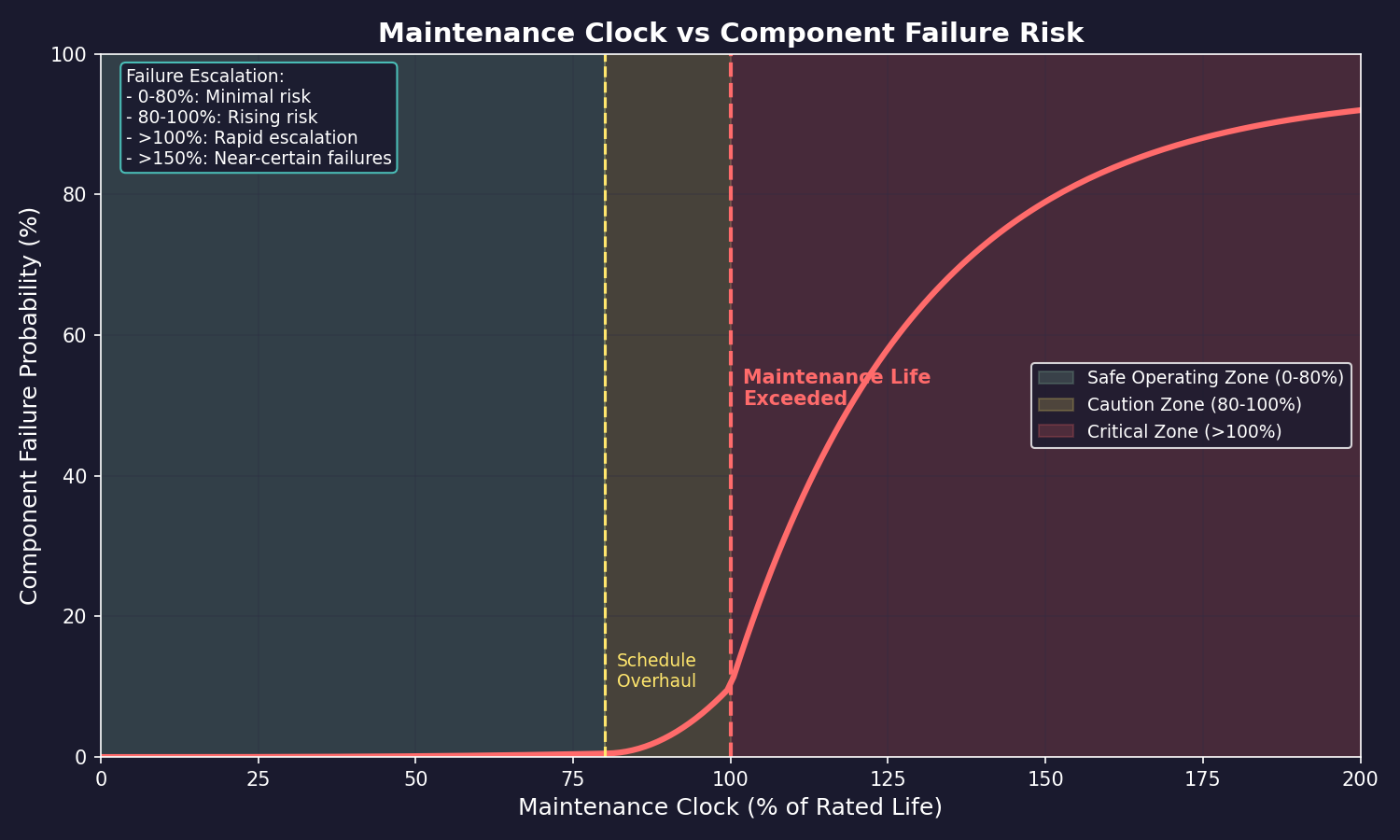
- Failure Probability: As the clock advances past the ship’s expected maintenance life, the probability of random component failures increases
- Expected Maintenance Life: Determined by the ship’s Maintenance Life rating, which is a function of its components and overall design
Maintenance Life
A ship’s Maintenance Life is displayed in the ship design window and represents the expected period before maintenance becomes critical:
- Base Life: Each component has a maintenance life contribution; the ship’s overall maintenance life is calculated from these
- Deployment Time: The maintenance clock begins ticking from the moment the ship launches from the shipyard
- Failure Curve: The probability of failure is near zero early in the maintenance life, then increases gradually, eventually becoming near-certain for extended deployments beyond the rated life
Component Failures
When a maintenance failure occurs, a random component on the ship is damaged:
- Random Selection: The failed component is selected randomly from all components on the ship that are eligible for failure. Maintenance failures are only checked against components that can actually fail, preventing erroneous explosions on carriers and tankers from non-failing components such as hangars or fuel storage
- Damage: The component ceases to function until repaired
- Critical Failures: If engines fail, the ship is immobilized. If fuel tanks fail, fuel may be lost. Sensor failures blind the ship
- Cascading Problems: On long-overdue ships, multiple failures can occur in quick succession
- Repair: Failed components can be repaired using Maintenance Supply Points (MSP) if the ship has them available (see Maintenance Supply Points below)
- Damage Attribution: Maintenance failure damage is correctly attributed as maintenance-related in the ship’s event log, rather than being incorrectly reported as enemy action. This prevents false combat alerts when ships suffer routine wear failures
Maintenance Failure Event
Added: v2.6.0
A dedicated Maintenance Failure event type provides clearer notification of maintenance-related problems:
- Dedicated Event Category: Maintenance failures now appear as a distinct event type in the event log, replacing the generic “maintenance problem” notifications used previously
- Failure Types Covered: The event encompasses unrepairable weapon failures, life support failures, and general maintenance malfunctions
- Event Log Filtering: The dedicated event type allows filtering the event log to show only maintenance-related incidents, making it easier to track ship reliability across your fleet
- Distinguishing Failures: Each maintenance failure event includes details about the specific failure type, helping you identify patterns (e.g., frequent weapon failures may indicate a design flaw or overstressed components)
Factors Affecting Maintenance
Several factors influence how quickly maintenance becomes a problem:
- Ship Size: Larger ships generally have longer maintenance lives due to redundancy
- Component Quality: Higher-technology components tend to have better maintenance characteristics
- Engineering Spaces: The engineering section of a ship (crew quarters, maintenance capacity) affects maintenance life
- Deployment Pattern: Ships in continuous operation accumulate maintenance time faster than ships periodically returned for overhaul
Overcrowding from Destroyed Crew Quarters
When crew quarters are destroyed by maintenance failures (or combat), the ship becomes overcrowded. Overcrowding accelerates the rate at which deployment time accumulates, with observed multipliers of 4-5x the normal rate (unverified — #1353). This creates a dangerous feedback loop:
- Extended over-deployment causes maintenance failures
- Maintenance failures destroy components, including crew quarters
- Destroyed crew quarters cause overcrowding
- Overcrowding accelerates deployment time accumulation (4-5x rate)
- Faster deployment accumulation causes more frequent maintenance failures
- The cycle repeats, rapidly degrading the ship
This “death spiral” can progress from manageable damage to total ship loss within weeks of game time (unverified — #1353).
Catastrophic Ship Destruction
Ships at extreme over-deployment (observed at 1000%+ deployment) with multiple destroyed components can suffer catastrophic failure and explode, destroying the ship entirely (unverified — #1353). Surviving crew are placed in life pods. The exact threshold and probability for catastrophic destruction are unknown, but the risk increases with the severity and number of unrepaired component failures.
Life Pod Endurance
Crew who survive a ship’s destruction are placed in life pods with limited endurance. Observed life pod endurance is approximately 15 days, after which all crew in the pods perish (unverified — #1353). Rescue operations must be mounted quickly — any task group can pick up life pods using the “Rescue Survivors” order or the “Pickup Nearest Lifepod” standing order (see Section 9.5.4 Standing Orders).
Warning: Once the overcrowding death spiral begins, the ship may be beyond saving. If crew quarters are destroyed and the ship is far from a shipyard, consider whether a rescue mission can reach the ship before cascading failures destroy it. Detaching an immobilized ship (dead engine) from a task group prevents it from limiting the group’s speed to 1 km/s.
Practical Tips:
- Track your ships’ maintenance status regularly; the fleet window shows current maintenance clock status as a percentage of rated life
- When a ship hits 100% of its maintenance life, failures become increasingly likely; plan to overhaul before this point
- Do not wait for failures before scheduling overhauls; the cost of a critical failure (especially engine or fuel tank) far exceeds the cost of preventive maintenance
- Long-range exploration ships (see Section 17.1 Geological Survey) are particularly vulnerable to maintenance issues due to their extended deployments far from shipyards
- Consider maintenance life when designing ships; sometimes accepting slightly lower performance for better maintenance characteristics is worthwhile
- If a ship’s crew quarters are destroyed, prioritize immediate return to port — the overcrowding death spiral can destroy the ship within weeks
14.2.1.2 Deployment Clock
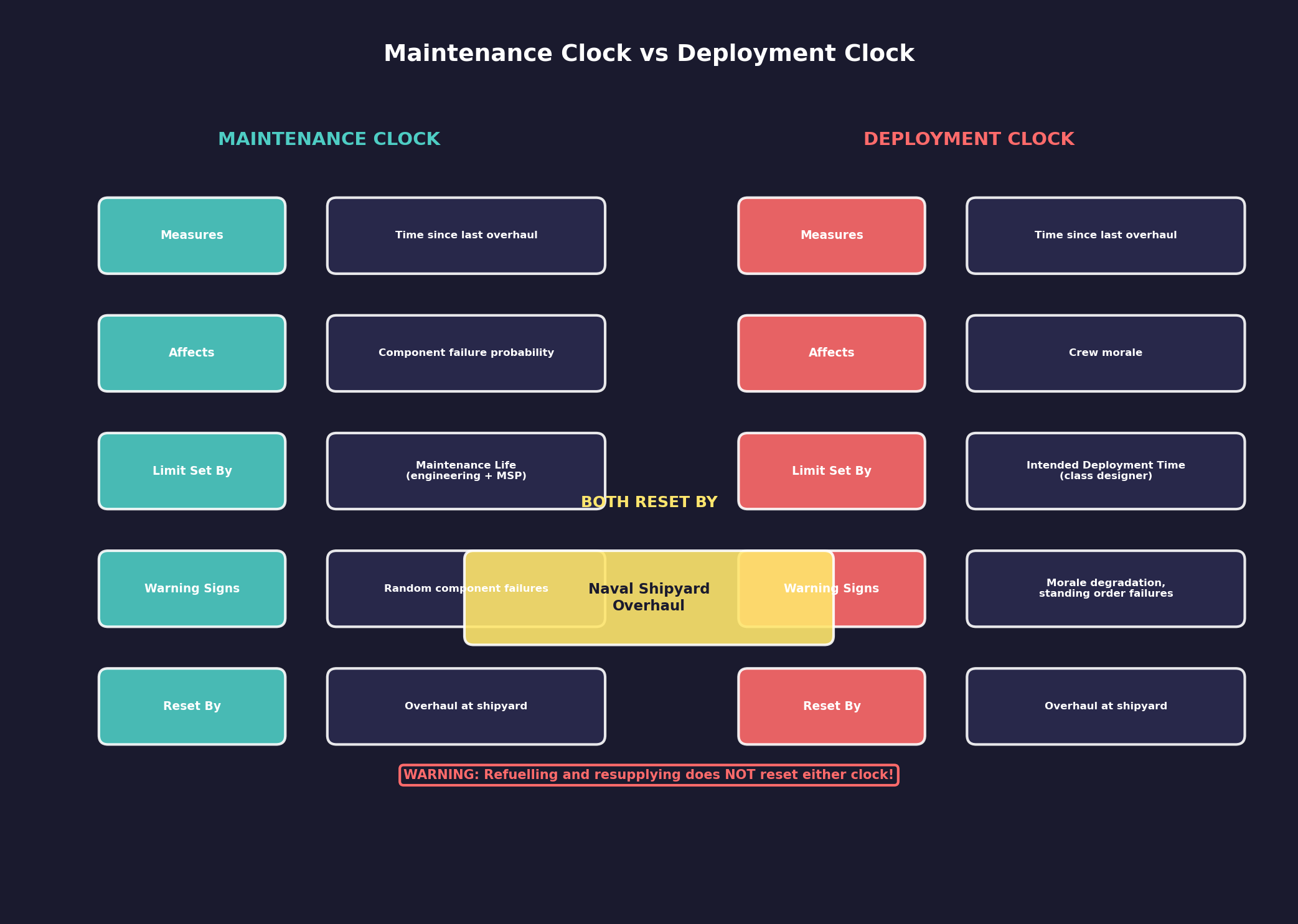
The deployment clock is a separate timer that tracks how long a ship has been away from port since its last overhaul. Unlike the maintenance clock (which affects component failure probability), the deployment clock governs crew morale and operational readiness.
How the Deployment Clock Works
- Starting Point: The deployment clock resets to zero when a ship completes an overhaul at a naval shipyard
- Clock Advancement: The clock advances continuously in real time, regardless of whether the ship is moving, idle, or in combat
- Deployment Time Setting: Each ship class has an “Intended Deployment Time” (measured in months) set in the Class Design window (see Section 8.6 Other Components – Deployment Time). The default is 3 months for new designs \hyperlink{ref-14.2-6}{[6]}
- Exceeding Deployment Time: When the deployment clock exceeds the class’s intended deployment time, crew morale begins to degrade, reducing operational effectiveness
- Fleet Window Display: The fleet window shows the current deployment status as a percentage of the class’s intended deployment time
Morale Degradation
When deployment time is exceeded:
- Crew morale checks become required (the designer displays “Morale check required: Yes” when deployment time is configured)
- Ship effectiveness degrades as crew fatigue and dissatisfaction accumulate
- At 95%+ deployment, ships may trigger “unable to carry out standing orders” messages due to mechanical reliability concerns
- Extended over-deployment compounds with maintenance clock issues, creating cascading operational problems
Deployment Clock vs. Maintenance Clock
| Aspect | Deployment Clock | Maintenance Clock |
|---|---|---|
| Measures | Time since last overhaul | Time since last overhaul |
| Affects | Crew morale | Component failure probability |
| Limit set by | Intended Deployment Time (class designer) | Maintenance Life (engineering spaces + MSP) |
| Warning signs | Morale degradation, standing order failures | Random component failures |
| Reset by | Overhaul at naval shipyard | Overhaul at naval shipyard |
| Typical limit | 3-60 months (player-configured) | Varies by engineering spaces |
Both clocks are reset simultaneously by completing an overhaul. There is no way to reset only one clock independently – a full overhaul at a naval shipyard is the only mechanism to restore both timers to zero.
Tip: When designing ships, set the intended deployment time to match the ship’s operational role. Combat ships patrolling near bases can use short deployment times (3-6 months). Survey ships exploring distant systems need long deployment times (36-60 months) to avoid constant morale problems. Always verify that maintenance life exceeds deployment time in the class designer.
Warning: A ship at 95%+ deployment is at serious risk. It may refuse to execute standing orders, and mechanical failures become increasingly likely. Do not push ships past their deployment limits unless absolutely necessary – the compounding effects of morale degradation and maintenance failures can render a ship combat-ineffective far from any repair facilities.
14.2.2 Maintenance Facilities and Capacity
Updated: v2026.01.30
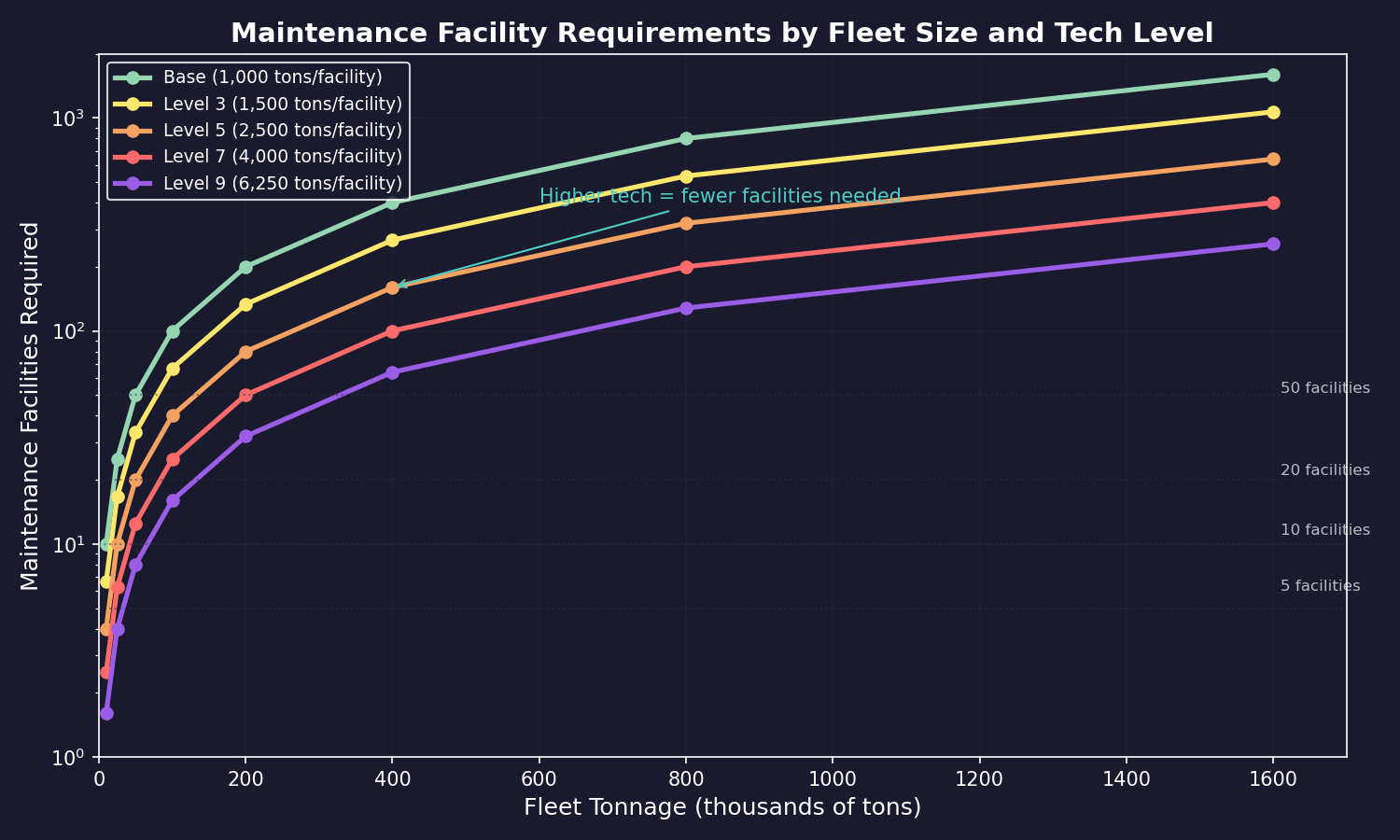
The C# Aurora maintenance system uses a tonnage-based capacity model. Maintenance facilities and modules work together at a single location to support all ships present.
14.2.2.1 Maintenance Facility Basics
- Size: 25,000 tons (one standard cargo hold) \hyperlink{ref-14.2-1}{[1]}
- Cost: 60 BP (Build Points) per facility \hyperlink{ref-14.2-1}{[1]}
- Materials: 30 Duranium + 30 Neutronium \hyperlink{ref-14.2-1}{[1]}
- Workers: 50,000 per facility \hyperlink{ref-14.2-1}{[1]}
- Basic Capacity: Each maintenance facility or module has a basic capacity of 1,000 tons \hyperlink{ref-14.2-2}{[2]}
- Technology Progression: Capacity upgrades across 9 tech tiers from 1,000 to 6,250 tons, with research costs from 1,000 RP to 250,000 RP \hyperlink{ref-14.2-2}{[2]}
- MSP Production: Maintenance facilities are the only source of Maintenance Supply Points in C# Aurora
- MSP Production Rates: Base production of 20 MSP/year per facility (starting tech), upgradeable across 10 tech levels to a maximum of 100 MSP/year (research costs from 3,000 RP to 1,200,000 RP) \hyperlink{ref-14.2-3}{[3]}
14.2.2.2 Maintenance Modules
Maintenance modules are ship-mounted components that provide mobile maintenance capacity. As of v2.0.0, maintenance modules cost 100 Build Points (reduced from 200 BP) \hyperlink{ref-14.2-4}{[4]}. This cost reduction makes ship-based maintenance infrastructure more accessible for forward-deployed fleet support.
14.2.2.3 Combined Maintenance Capacity
Multiple populations and maintenance ships of the same faction at one location combine their capacities into a Total Maintenance Capacity. This enables deep space bases with only maintenance modules and no planetary infrastructure (unverified — #849, requires live testing).
14.2.2.4 Effective Maintenance Rate (EMR)
When total ship tonnage exceeds maintenance capacity, the system calculates:
EMR = Total Maintenance Capacity / Total Ship Tonnage
Each vessel then uses proportionally reduced MSP and experiences reduced maintenance failure chances at the same ratio.
Example: With 80,000 tons of maintenance capacity maintaining 100,000 tons of ships, the EMR is 80%. Each vessel consumes 80% of normal MSP, and maintenance failure chance is reduced by 80% (i.e., only 20% failure rate applies).
14.2.2.5 Capacity Modifiers
Maintenance capacity receives adjustments based on:
- Population manufacturing efficiency
- Radiation production modifier
- Political stability and status modifiers
- Racial economic production modifier (debt-to-income ratio)
14.2.2.6 MSP Requirements Per Ship
- Normal Maintenance: Ships require MSP equal to Class Cost / 4, adjusted by EMR percentage (unverified — #837, requires live testing – hardcoded game logic)
- Overhaul: Ships require MSP equal to Class Cost, adjusted by EMR percentage (unverified — #837, requires live testing – hardcoded game logic)
14.2.2.7 Facility Design Notes
Despite the cost reduction to 60 BP, maintenance facilities retained their transport size, manning requirements, and target size. The increased demand for facilities (since you can no longer share facilities across ships without sufficient tonnage capacity) creates additional pressure on worker allocation through increased demands for shipyard workers and financial centers.
14.2.3 Maintenance Supply Points
Updated: v2026.01.30
Maintenance Supply Points (MSP) are the consumable resource used to repair component failures in the field. Ships carry MSP in their maintenance storage, and colonies stockpile MSP for their orbital assets.
MSP Production
Maintenance Supply Points are produced exclusively by maintenance facilities:
- Sole Source: Maintenance facilities are the only source of MSP; construction factories can no longer produce them
- Base Production Rate: 20 MSP per facility per year at starting technology \hyperlink{ref-14.2-3}{[3]}
- Technology Progression: MSP production rate is upgradeable across 10 tech levels, from 20 MSP/year to 100 MSP/year per facility (research costs range from 3,000 RP to 1,200,000 RP) \hyperlink{ref-14.2-3}{[3]}
- Automatic Production: MSP production is continuous as long as minerals are available
MSP Mineral Requirements:
MSP production consumes three minerals (unverified — #837, requires live testing – hardcoded game logic, not present in database):
| Mineral | Amount per MSP |
|---|---|
| Duranium | 0.1 tons |
| Gallicite | 0.1 tons |
| Uridium | 0.05 tons |
This streamlined formula (reduced from eight minerals in earlier versions) was based on analysis of the most common minerals used in ship components subject to maintenance. Duranium and Gallicite are roughly equivalent in usage, while Uridium represents approximately half that consumption level.
Minimum Supply Level: Ship classes can be configured with a minimum maintenance supply threshold, analogous to the minimum fuel level setting. Ships will not unload or transfer maintenance supplies below this level, ensuring operational reserves for contingencies. This provides explicit player control over supply logistics rather than relying on implicit percentage-based limitations.
Ship MSP Storage
Ships can carry MSP for field repairs: \hyperlink{ref-14.2-5}{[5]}
- Maintenance Storage: Ships have a maintenance storage capacity determined by their design. Maintenance Storage Bay components provide MSP capacity in sizes from Fighter (5 MSP) to Large (2,500 MSP)
- Loading MSP: Ships load MSP from colony stockpiles when in orbit of a colony with available MSP
- Automatic Repair: When a component fails, the ship automatically uses MSP from its storage to repair the damage (if sufficient MSP are available)
- Repair Time: Repairs using MSP are not instantaneous; they take time based on the complexity of the failed component
- MSP Depletion: Each repair consumes MSP from the ship’s storage. Extended deployments without resupply will eventually exhaust the ship’s MSP reserves
Colony MSP Stockpile
Colonies maintain MSP reserves for their own use and to supply visiting ships:
- Reserve Building: Colonies accumulate MSP from their maintenance facilities over time
- Ship Resupply: Ships in orbit automatically replenish their MSP storage from the colony’s reserves (up to their storage capacity)
- Priority: If colony MSP reserves are low, you may need to prioritize which ships receive resupply
- Monitoring: The colony economy screen shows current MSP stockpile and production rate
Population Maintenance Supply Warnings
Added: v2.6.0
Colonies can be configured to alert you when maintenance supply stockpiles fall below a customizable threshold:
- Threshold Configuration: Set a maintenance supply warning level for each population, expressed as a quantity of MSP
- Notification Modes: Choose between single notification (one alert when the threshold is crossed) or constant notification (repeated alerts while below threshold)
- Strategic Planning: Use these warnings to trigger resupply missions or increase maintenance facility construction before critical shortages develop
- Per-Colony Settings: Each colony can have different thresholds based on the number of ships it supports and its strategic importance
- Combined with Fuel Warnings: This feature works alongside the fuel warning system (see Section 14.1 Fuel), allowing comprehensive logistics monitoring for each population
Damage Control
When MSP are unavailable for a failed component:
- The component remains non-functional until MSP become available (either from resupply or return to a colony)
- The ship operates with reduced capability (missing the function of the failed component)
- Additional failures compound the problem, potentially rendering the ship combat-ineffective
- In extreme cases, a ship with multiple unrepaired failures may need to be towed back for overhaul
Practical Tips:
- Always ensure ships have adequate MSP storage for their planned deployment length; running out of MSP far from home is a serious problem
- Build maintenance facilities at all major colonies; MSP production is relatively cheap and prevents crises
- Ships with longer maintenance lives still need MSP; they may not fail as often, but when they do, they still need supplies for repair
- Monitor fleet-wide MSP levels; if multiple ships are running low, it indicates your resupply logistics need attention
- Consider carrying a dedicated supply ship with MSP storage to accompany long-range task groups (see Section 14.3 Supply Ships)
- Engineering spaces on ships serve double duty: they extend maintenance life and provide MSP storage capacity
14.2.4 Overhaul
Updated: v2026.01.30
Overhaul is the process of completely resetting a ship’s maintenance clock by returning it to a shipyard for comprehensive refurbishment. This is the only way to fully restore a ship’s maintenance status and prevent ongoing component failures.
Overhaul Requirements
To overhaul a ship, the following conditions must be met:
- Shipyard: The ship must be docked at a naval shipyard (not a commercial shipyard) with sufficient capacity for the ship’s tonnage
- Shipyard Size: The shipyard must be large enough to accommodate the ship. A shipyard can only overhaul ships up to its maximum tonnage capacity
- Time: Overhaul takes time based on the ship’s size and complexity. Larger ships take proportionally longer
- Minerals: Overhaul consumes minerals from the colony’s stockpile, representing replacement parts and refurbishment materials
- No Other Activity: A shipyard slip performing an overhaul cannot simultaneously build or refit ships in that slip
Overhaul Process
- Return to Port: Move the ship to orbit of a colony with an appropriately sized naval shipyard
- Dock the Ship: Issue the order to dock the ship at the shipyard
- Begin Overhaul: Select the overhaul option from the shipyard management window
- Wait: The overhaul proceeds over time. Progress is shown in the shipyard window
- Completion: When complete, both the maintenance clock and the deployment clock reset to zero, all pending maintenance issues are resolved, and crew morale is restored
What Overhaul Resets
An overhaul is the only mechanism that resets both operational timers simultaneously:
- Maintenance clock resets to zero (component failure probability returns to baseline)
- Deployment clock resets to zero (crew morale fully restored, deployment percentage returns to 0%)
- Failed components are repaired (all pending maintenance damage resolved)
- Combat damage is also repaired during overhaul
- MSP stores are replenished from the colony’s stockpile
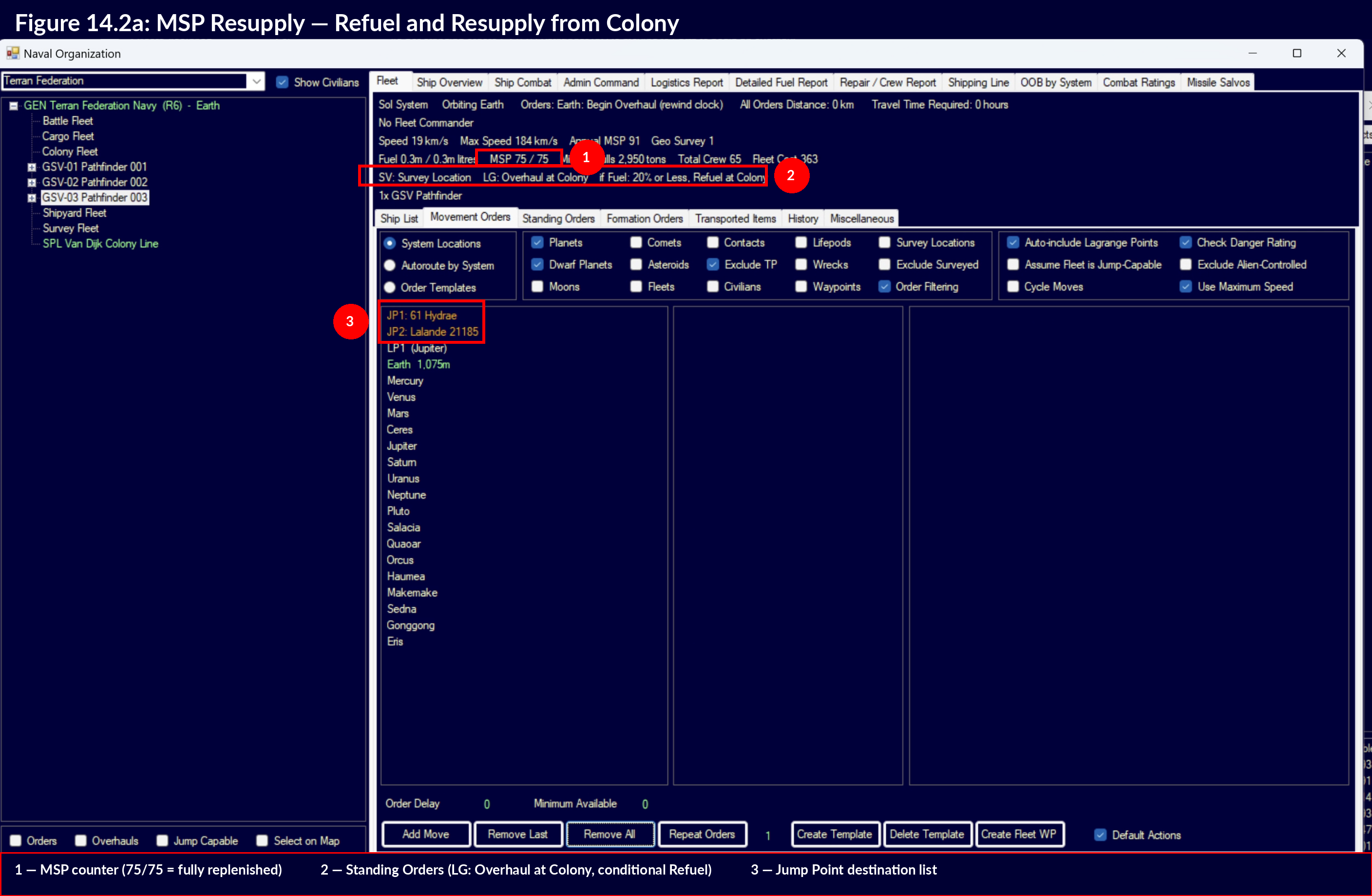
Warning: Refuelling and resupplying a ship does NOT reset either clock. Only a full overhaul at a naval shipyard resets the deployment and maintenance timers. A ship that refuels and resupplies without overhauling will continue to accumulate deployment time and maintenance failures.
Warning: The “LG: Overhaul at Colony” standing order resets the deployment clock and restores morale (shore leave), but does not resupply MSP from the colony stockpile. Ships completing a standalone overhaul via this standing order will depart with their current MSP level — potentially 0. To ensure MSP are loaded, use the “Refuel, Resupply, and Overhaul” conditional order (Section 14.2.5.2), or add a separate “Refuel and Resupply from Colony” movement order before or after the overhaul \hyperlink{ref-14.2-8}{[8]}.
Overhaul Duration
The time required for overhaul depends on:
- Ship Tonnage: Larger ships take longer to overhaul
- Shipyard Capacity: A shipyard with more slips can overhaul more ships simultaneously (one per slip)
- Technology: Research in shipyard operations can reduce overhaul times
- Damage: Ships with many failed components may take additional time as those are repaired during the overhaul
Overhauls and Movement Orders
During overhaul, any movement orders in the queue are ignored and the fleet remains stationary. Upon overhaul completion, the fleet begins following queued movement orders set to occur after the overhaul. This allows organized sequences such as: overhaul, transit, resupply, combat maneuvers. When the cycle orders flag is enabled, a completed overhaul order is added to the end of the queue, and the Repeat option works with order lists containing overhaul commands.
Abandon Overhaul (Leave Overhaul)
The Abandon Overhaul order (also referred to as “Leave Overhaul”) allows ships undergoing maintenance to immediately return to operational status rather than waiting for the overhaul to complete. As of v2.1.0, this order can be issued at the fleet level, affecting all ships in a fleet simultaneously rather than requiring individual ship commands. This is useful in emergencies when hostile vessels are approaching and combat-ready ships are needed immediately.
Ships that abandon overhaul suffer severe performance penalties that gradually improve over 30 days. The ship receives an “Overhaul Factor” starting at 0.01 that increases linearly to 1.0 over thirty days \hyperlink{ref-14.2-7}{[7]}.
Performance impacts (all proportional to the Overhaul Factor):
| Days Since Abandon | Overhaul Factor | Effective Performance |
|---|---|---|
| 0 | 0.01 | 1% |
| 6 | 0.20 | 20% |
| 15 | 0.50 | 50% |
| 30 | 1.00 | 100% |
The Overhaul Factor affects:
- Weapon Chance to Hit – Reduced proportionally
- Engine power – Decreased significantly
- Maximum shield strength – Drops proportionally
- Maintenance failure likelihood – Increased
- Jump shock duration – Extended
- Fleet training capability – Diminished
Ships in overhaul cannot move, fire weapons, launch missiles, or generate shields. The Abandon Overhaul order provides tactical flexibility with substantial trade-offs.
Scheduling Overhauls
Effective overhaul scheduling keeps your fleet combat-ready:
- Rotation: Cycle ships through overhaul in rotation so that you always have combat-ready vessels available
- Timing: Schedule overhauls before ships hit 100% maintenance life to avoid operating with failure-prone vessels
- Planning Margin: Allow a buffer in your scheduling; wartime demands may prevent timely overhauls
- Fleet Size: Your fleet should be large enough that ships in overhaul do not create critical capability gaps
Overhaul vs. Field Repair
| Situation | Approach |
|---|---|
| Minor component failure during deployment | Field repair with MSP |
| Ship approaching maintenance life limit | Schedule overhaul |
| Multiple failures, MSP exhausted | Emergency return for overhaul |
| Ship severely damaged in combat | Overhaul (also repairs combat damage) |
| Routine between-deployment servicing | Overhaul resets the clock |
Practical Tips:
- Plan your shipyard capacity to support regular overhauls; if all your slips are building new ships, you have no capacity for maintenance
- A useful rule of thumb: dedicate at least one shipyard slip per 4-6 active combat ships for overhaul rotation
- Overhaul also repairs all combat damage, so it serves double duty after battles
- Commercial shipyards cannot perform overhauls; you need naval shipyard capacity specifically
- Build shipyards at forward bases if your operational area is far from your home system; transiting ships back for overhaul wastes operational time
- Do not neglect overhauls during peacetime; a fleet that enters a war with deferred maintenance will suffer failures at the worst possible moments
- Track overhaul schedules for your entire fleet; a spreadsheet or notes can help manage this for large navies
14.2.5 The Replenish Standing Order
Updated: v2026.01.30
The “Replenish” standing order automates the process of returning ships to base when they need fuel, maintenance supplies, or overhaul. Combined with conditional orders, it enables fully autonomous fleet logistics where ships return to port, service themselves, and resume their mission without player intervention.
14.2.5.1 Replenish at Colony
The “Replenish at Colony” conditional order directs a fleet to travel to the nearest colony with appropriate facilities and perform refuelling and resupply operations. This is the basic building block for autonomous logistics.
Typical conditional triggers for Replenish:
- Fuel below X% – Triggers when fuel drops below a threshold (commonly 25-30%)
- MSP below X% – Triggers when maintenance supplies are depleted
- Deployment Exceeded – Triggers when the deployment clock exceeds the class’s intended deployment time
Example – Survey Ship Configuration:
A typical autonomous survey ship uses conditional orders to return for servicing:
- When fuel at 30% -> Replenish at Colony
- When deployment exceeded -> Refuel, Resupply, and Overhaul at Colony
- Standing Order: Survey system bodies and locations
With this configuration, the ship surveys autonomously until it runs low on fuel (triggering condition 1) or exceeds its deployment time (triggering condition 2). After servicing, it resumes surveying.
14.2.5.2 Refuel, Resupply, and Overhaul
The “Refuel, Resupply, and Overhaul” conditional order is a specialized combination order that performs three operations sequentially at a single destination:
- Refuel – Replenishes the ship’s fuel tanks from the colony’s stockpile
- Resupply – Replenishes Maintenance Supply Points from the colony’s MSP reserves
- Overhaul – Resets both the maintenance clock and deployment clock to zero
Destination Requirements:
- The destination must have sufficient maintenance capacity for the ship’s tonnage
- The destination check only verifies maintenance capacity, not fuel or MSP availability – this prevents a scenario where depleted fuel reserves could block the conditional order from executing
- A naval shipyard with adequate slip capacity must be present for the overhaul portion
Key Distinction: The “Refuel, Resupply, and Overhaul” order is the only automated order that resets the deployment clock. A simple “Replenish at Colony” refuels and resupplies but does NOT perform an overhaul and does NOT reset either clock.
Tip: Prefer “Refuel, Resupply, and Overhaul” over the standalone “LG: Overhaul at Colony” standing order for routine maintenance cycles. The standalone overhaul resets deployment and morale but does not load MSP, fuel, or ordnance. Only the combined order handles all resupply alongside the overhaul \hyperlink{ref-14.2-8}{[8]}.
14.2.5.3 Setting Up Automated Return-to-Base
To configure a fleet for fully autonomous operations with maintenance cycling:
Step 1: Configure Conditional Orders (in priority order)
| Priority | Condition | Order | Purpose |
|---|---|---|---|
| 1 | Fuel below 30% | Replenish at Colony | Prevent fuel exhaustion |
| 2 | Deployment exceeded | Refuel, Resupply, Overhaul | Reset deployment clock |
| 3 | MSP below threshold | Replenish at Colony | Prevent MSP exhaustion |
Step 2: Set Standing Order
Assign the appropriate standing order for the ship’s mission (survey, patrol, escort, etc.). The ship executes this order whenever no conditional triggers are active.
Step 3: Verify Colony Infrastructure
Ensure the return destination has:
- Fuel stockpile (or fuel production via refineries)
- MSP stockpile (or MSP production via maintenance facilities)
- Naval shipyard with adequate slip capacity for overhaul
- Sufficient maintenance capacity for the ship’s tonnage
Order of Operations
When a conditional order triggers, the fleet:
- Abandons its current standing order activity
- Plots a course to the nearest qualifying colony
- Performs the specified operations (refuel, resupply, and/or overhaul)
- Upon completion, resumes the standing order from its new position
The fleet pathfinding respects the “Avoid Danger” and “Avoid Alien Systems” fleet settings when selecting a return destination (see Section 9.5 Orders – Standing Orders).
14.2.5.4 Practical Tips for Replenish Orders
Tip: Always place the fuel condition at higher priority than the deployment condition. A ship that runs out of fuel while trying to reach a distant overhaul facility is stranded. By checking fuel first, the ship refuels at the nearest colony before attempting a potentially longer trip for overhaul.
Tip: Set fuel thresholds conservatively (25-30%) to account for the transit distance to the nearest colony. A ship at 10% fuel in a distant system may not have enough to reach port.
Tip: For patrol fleets operating in systems with fuel depots but no shipyards, use a two-tier approach: “Replenish at Colony” for routine fuel stops within the patrol system, and “Refuel, Resupply, and Overhaul” for periodic returns to a rear-area colony with full shipyard facilities.
Tip: Save your conditional order configurations as Fleet Order Templates (see Section 9.5 Orders – Fleet Order Templates) so you can quickly apply the same autonomous behavior to new ships of the same class.
Warning: The “Deployment Exceeded” conditional order triggers as soon as the deployment clock passes the class’s intended deployment time. If your deployment time is set too short (e.g., the 3-month default), patrol ships will constantly interrupt their missions to return for overhaul. Set deployment times appropriately for each ship class’s intended role.
UI References and Screenshots
Updated: v2026.02.02
- Fleet Window Layout — maintenance status and MSP tracking
- Forum screenshots (archived – pentarch.org URLs no longer accessible as of 2026-01):
- Logistics (was: pentarch.org/steve/Screenshots/Logistics004.PNG) – maintenance scheduling
Related Sections
- Section 6.3 Construction – Building maintenance facilities
- Section 8.6 Other Components – Engineering sections, deployment time setting, and maintenance module design
- Section 9.5 Orders – Standing orders, conditional orders, and the Replenish/Overhaul order configurations
- Section 12.6 Damage and Armor – Damage control and MSP consumption in combat
- Section 12.7 Planetary Defence Centres – PDC maintenance-free advantage over ships
- Section 14.3 Supply Ships – Mobile maintenance and MSP resupply
- Section 16.2 Skills and Bonuses – Chief engineer maintenance bonuses
- Appendix A: Formulas – Maintenance clock and failure probability formulas
References
\hypertarget{ref-14.2-1}{[1]}. Aurora C# game database (AuroraDB.db v2.7.1) – DIM_PlanetaryInstallation table, PlanetaryInstallationID=21 (Maintenance Facility). Verified: Size=25,000 tons, Cost=60 BP, Duranium=30, Neutronium=30, Workers=50,000.
\hypertarget{ref-14.2-2}{[2]}. Aurora C# game database (AuroraDB.db v2.7.1) – FCT_TechSystem table, TechTypeID=210 (Maintenance Capacity Per Facility). Verified: 9 tech levels from 1,000 tons (1,000 RP) to 6,250 tons (250,000 RP).
\hypertarget{ref-14.2-3}{[3]}. Aurora C# game database (AuroraDB.db v2.7.1) – FCT_TechSystem table, TechTypeID=209 (MSP Production Rate). Verified: 10 tech levels from 20 MSP/year (3,000 RP) to 100 MSP/year (1,200,000 RP).
\hypertarget{ref-14.2-4}{[4]}. Aurora C# game database (AuroraDB.db v2.7.1) – FCT_ShipDesignComponents table, SDComponentID=27611 (Maintenance Module). Verified: Cost=100 BP, Size=100 HS (5,000 tons), Crew=50, ComponentValue=200 (maintenance capacity in tons).
\hypertarget{ref-14.2-5}{[5]}. Aurora C# game database (AuroraDB.db v2.7.1) – FCT_ShipDesignComponents. Maintenance Storage Bays verified: Fighter (ID 82471) 0.01 HS/5 MSP/0.04 BP; Tiny (ID 76181) 0.05 HS/25 MSP/0.2 BP; Small (ID 76179) 0.2 HS/100 MSP/0.8 BP; Standard (ID 76178) 1.0 HS/500 MSP/4 BP; Large (ID 27132) 5.0 HS/2,500 MSP/20 BP.
\hypertarget{ref-14.2-6}{[6]}. Aurora C# game database (AuroraDB.db v2.7.1) – FCT_ShipClass table schema. Verified: PlannedDeployment column has DEFAULT 3 (months). Column definition: “PlannedDeployment Double DEFAULT 3”.
\hypertarget{ref-14.2-7}{[7]}. Aurora C# game database (AuroraDB.db v2.7.1) – FCT_Ship table. OverhaulFactor column exists with DEFAULT 1 (full performance). The 30-day linear recovery from 0.01 to 1.0 is consistent with the column’s purpose; exact recovery rate is game logic.
\hypertarget{ref-14.2-8}{[8]}. In-game testing (Game 2 playthrough, Discussion #1350) – Confirmed: “LG: Overhaul at Colony” standing order completed overhaul (deployment reset, morale restored) but MSP remained at 0/75 despite colony having 147,000+ MSP. A separate “Refuel and Resupply from Colony” order was required to load MSP.