2.1 New Game Options
Updated: v2026.02.02

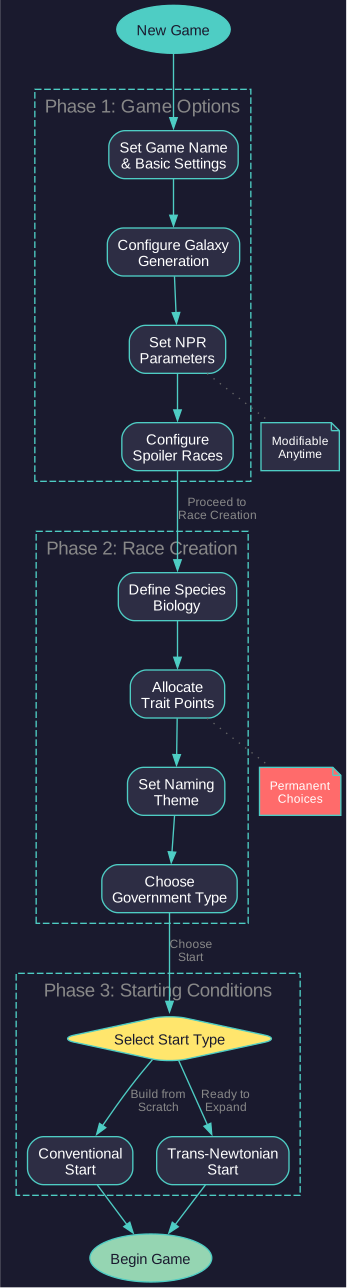
When creating a new game in Aurora C#, you begin with the Game Information window. The window is organized into five visual columns:
- Far Left — Text fields (Game Name through Sol Disaster)
- Center-Left — NPR numeric values
- Center — First checkbox column
- Center-Right — Second checkbox column (continuation)
- Far Right — Startup-only settings
The center columns share the header “These game options can be modified at any time” while the far right column has the header “These game options can be modified at start only” — indicating which settings can be changed mid-game versus only at game creation.
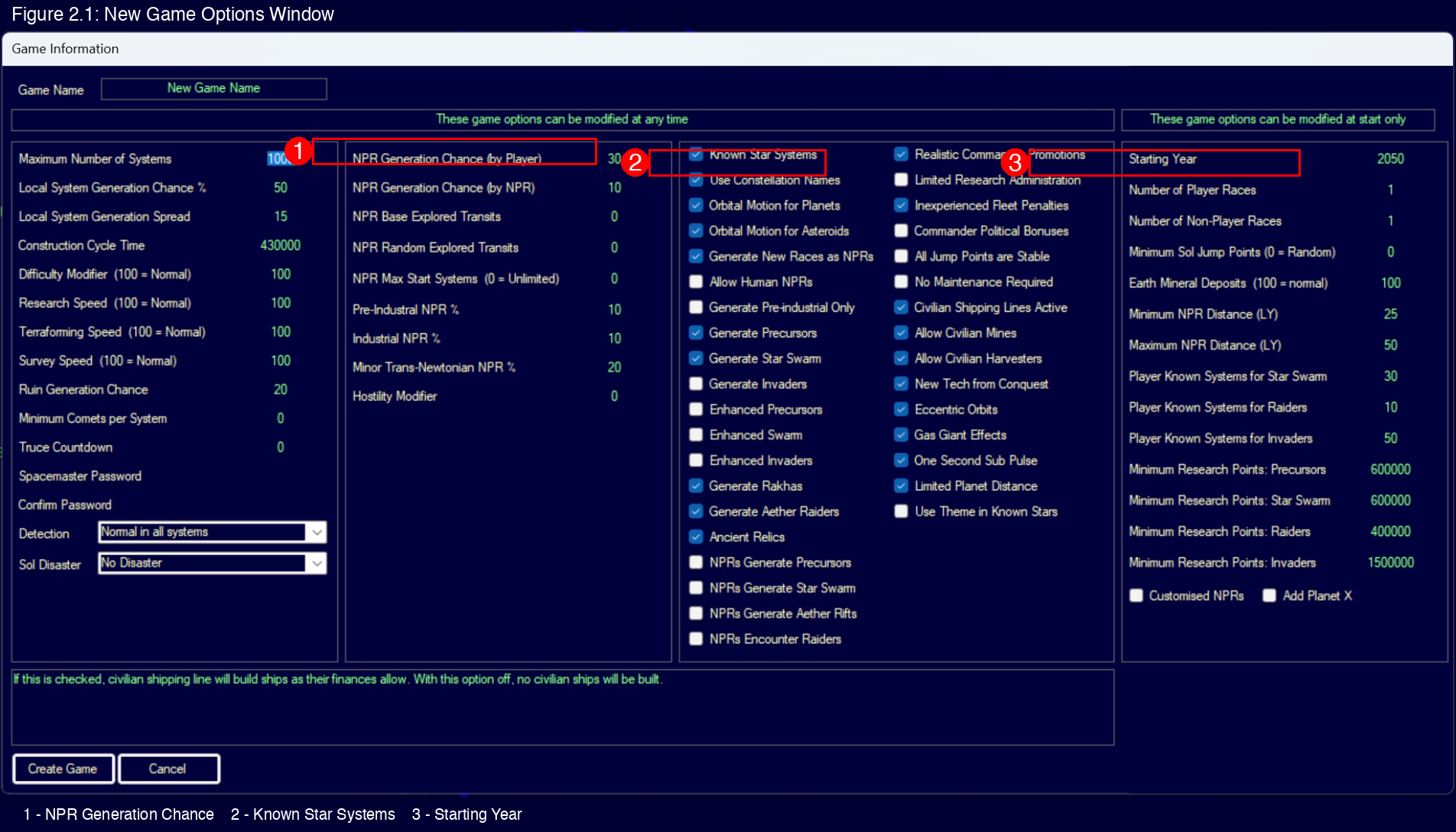
This section documents each setting in the order it appears on screen from top to bottom within each column.
Contents
Updated: v2026.02.02
- 2.1 New Game Options
2.1.1 Far Left Column
Updated: v2026.01.30
Text fields, from top to bottom:
-
Game Name: A descriptive label for your game. This is primarily for your own reference when managing multiple games in the same database. Choose something meaningful — you may have this game running for months of real time.
-
Maximum Number of Systems: Limits the total number of star systems that can exist in the game. The default is 1000 systems \hyperlink{ref-2.1-1}{[1]}. Once this limit is reached, jump point transits will no longer generate new systems. Lower values create a smaller, more constrained galaxy; higher values allow for larger-scale games but increase database size and processing requirements.
-
Local System Generation Chance %: The probability that a newly generated system will be connected to nearby existing systems rather than appearing in isolation. The default is 50% \hyperlink{ref-2.1-1}{[1]}. Higher values create denser clusters of interconnected systems; lower values spread systems more evenly across the galaxy.
-
Local System Generation Spread: Controls how far from existing systems new systems can be generated when local generation triggers. The default is 15 \hyperlink{ref-2.1-1}{[1]}. Higher spread values create looser clusters with more distance between systems; lower values create tighter groupings.
-
Construction Cycle Time (v2.7.1): Controls the frequency at which production activities are processed, measured in seconds. The default is 5 days (432,000 seconds) \hyperlink{ref-2.1-1}{[1]}. This determines how often mining, construction, shipbuilding, and other economic activities are calculated and updated. Shorter cycles provide smoother, more granular production output but increase processing time per turn increment. Longer cycles reduce processing overhead but result in lumpier production where output arrives in larger, less frequent batches. For most games the default is appropriate, but players running very large empires may increase this value to reduce turn processing time.
-
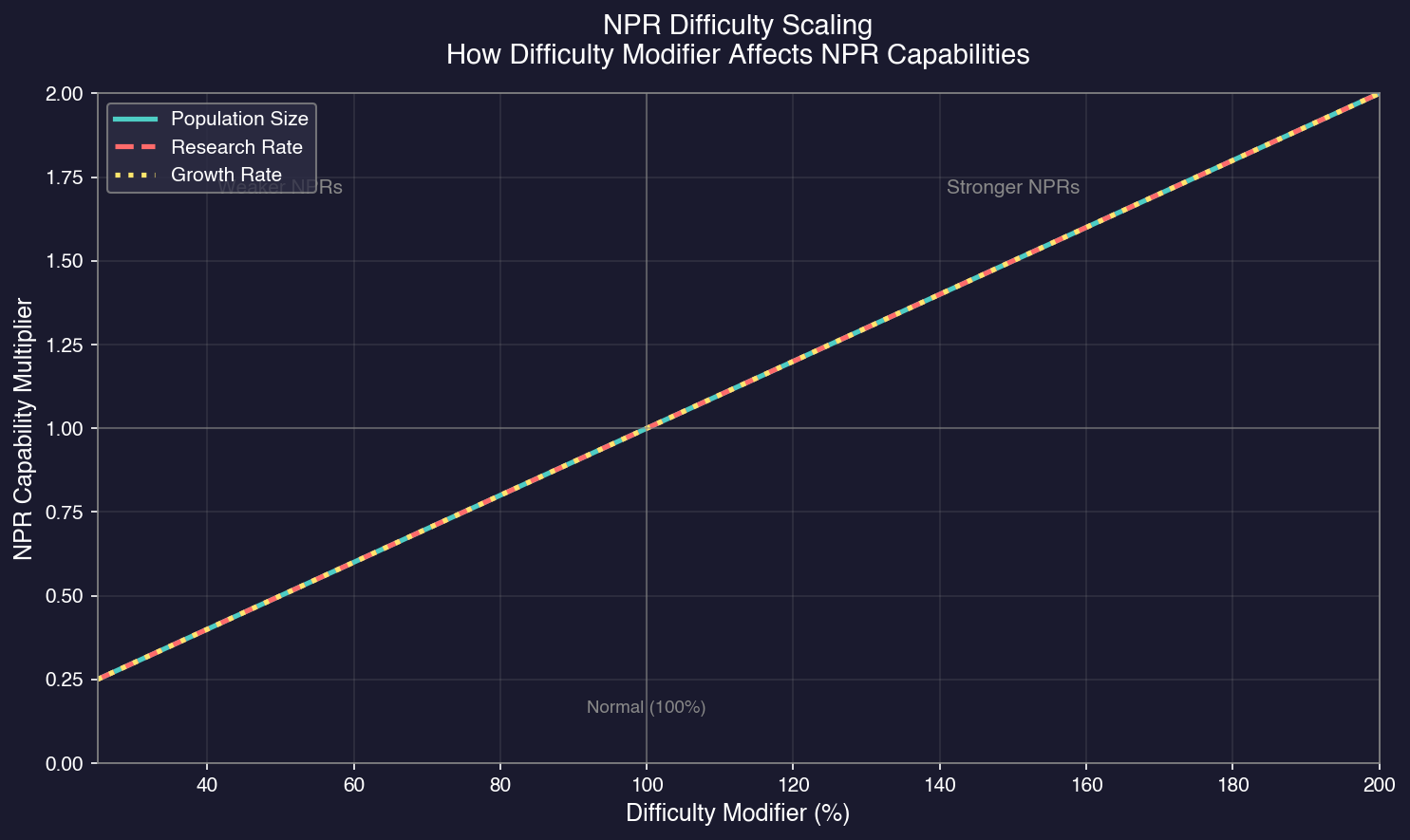
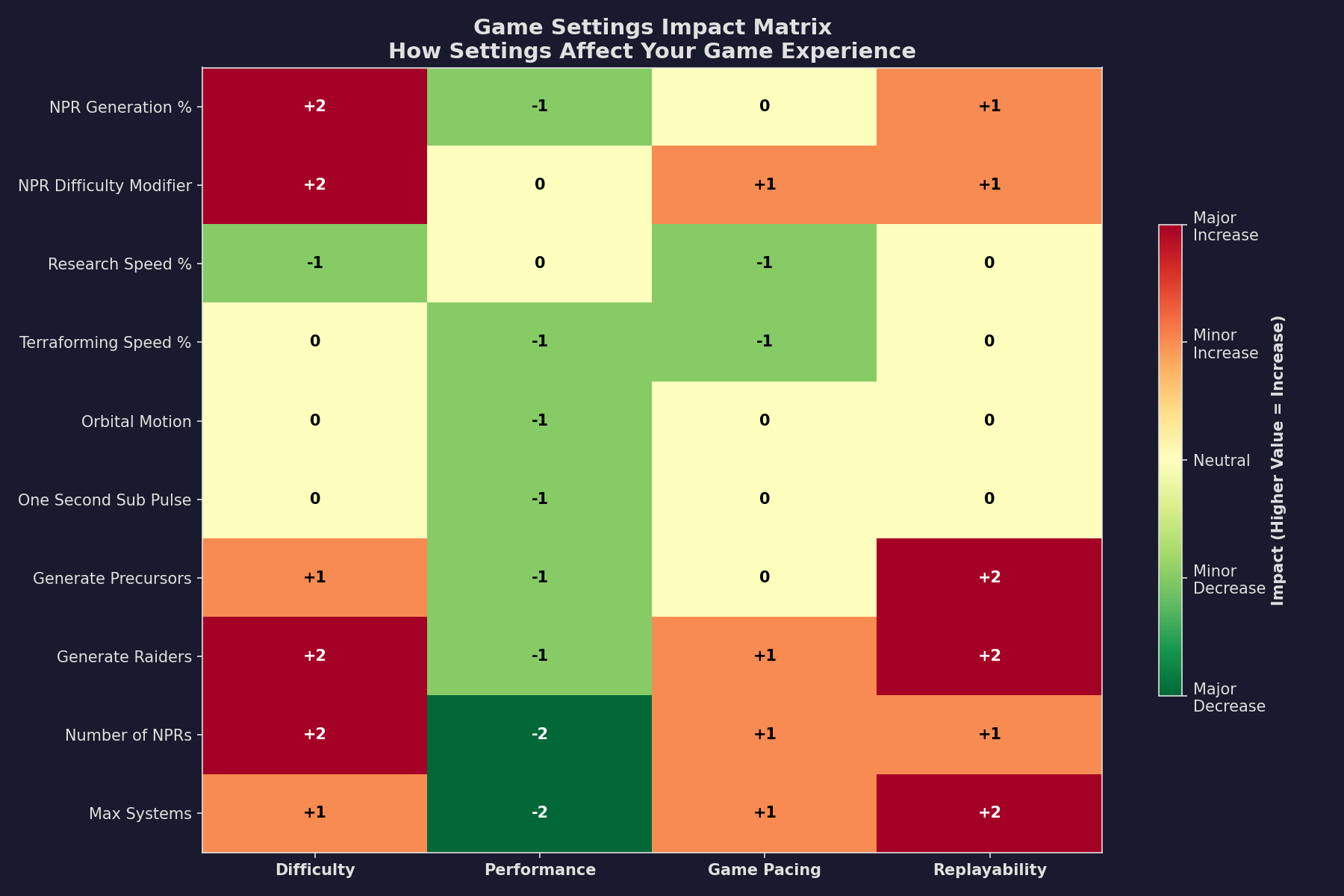
Difficulty Modifier (100 = Normal): A scaling factor that affects Non-Player Races (NPRs) only \hyperlink{ref-2.1-1}{[1]} \hyperlink{ref-2.1-2}{[2]}. This modifier adjusts three NPR characteristics: starting population size, research rate, and population growth rate. At 100%, NPR homeworld populations are generated on a bell curve centered on the largest player race’s population, with proportional industrial and research capacity. Values below 100% shift the bell curve downward, creating weaker NPRs on average; values above 100% shift it upward, creating stronger NPRs. The modifier stacks multiplicatively with universal speed settings — for example, 50% Research Speed combined with 150% Difficulty gives NPRs an effective 75% research rate while players retain 50%. This setting does not affect combat damage, player statistics, or resource availability.
-
Research Speed (100 = Normal): A percentage multiplier affecting how quickly research projects complete (see Section 7.1 Technology Tree) for all player races \hyperlink{ref-2.1-1}{[1]}. Reducing this makes technology advancement slower and more considered; increasing it accelerates the pace of the game.
-
Terraforming Speed (100 = Normal): A percentage multiplier for terraforming speed affecting all factions \hyperlink{ref-2.1-1}{[1]}.
-
Survey Speed: Adjusts survey point generation rate for survey ships \hyperlink{ref-2.1-1}{[1]}. A value of 100 is standard; 50 makes surveys take twice as long; 125 makes them 25% faster. Only affects survey point production, not other survey mechanics.
-
Ruin Generation Chance: The default probability of ruins appearing on qualifying bodies is 20% \hyperlink{ref-2.1-1}{[1]}. Qualifying bodies must be terrestrial worlds, terrestrial moons, or small terrestrial moons with gravity greater than 0.4G and temperatures between 200K and 360K (approximately -73C to +87C) \hyperlink{ref-2.1-14}{[14]}.
-
Minimum Comets per System: Sets the minimum number of comets generated in each star system. The default is 0 \hyperlink{ref-2.1-1}{[1]}. Comets can provide harvestable resources, particularly for fuel production. Higher values ensure more comet availability but may increase system complexity.
-
Truce Countdown: Sets the duration of truces in game time \hyperlink{ref-2.1-1}{[1]}. When factions agree to a truce, this value determines how long the truce lasts before diplomatic relations can shift again. Longer truce durations provide more stability but reduce diplomatic flexibility.
-
Spacemaster Password: Sets a password required to access SpaceMaster mode \hyperlink{ref-2.1-1}{[1]}. SpaceMaster mode allows direct editing of game data, spawning entities, and other administrative functions. Setting a password prevents accidental access.
-
Combat Password: Sets a password for race-specific protection in multiplayer games \hyperlink{ref-2.1-8}{[8]}. In multiplayer hotseat games, each race can be password-protected to prevent other players from accessing that faction’s information or issuing orders. The Combat Password works alongside the SpaceMaster Password to provide layered access control — SpaceMaster mode grants full administrative access, while race passwords protect individual factions.
-
Detection: Controls how the game handles sensor detection calculations for Non-Player Races in systems where the player has no ships \hyperlink{ref-2.1-1}{[1]}. This is a performance optimization that trades realism for speed. Options:
- Normal (default \hyperlink{ref-2.1-12}{[12]}): Full sensor calculations always run. Most realistic – NPRs detect each other normally in all systems.
- Never: No sensor checks in player-unobserved systems. NPRs cannot detect each other there, preventing NPR-vs-NPR combat and wreck generation in those systems. Fastest performance but least realistic.
- Automatic: NPRs automatically know all ship positions in player-unobserved systems (no calculations needed). When a player ship enters, detection reverts to Normal. Best balance between performance and realism.
Tip: The “Automatic” setting is recommended for most players. It preserves NPR-vs-NPR interactions while eliminating the sensor check interrupts that cause “end of turn syndrome” in late-game scenarios with many NPRs.
- Sol Disaster: Dropdown selecting which disaster scenario (if any) affects the Sol system. Options include “No Disaster”, Earth Death Spiral rates, and Solar System Destruction difficulties. See Section 2.1.4 Disaster Scenarios for details on each option.
Tip: At the default 100% research speed, technology frequently outpaces production capacity. Players often research a new engine generation before they can build ships using the previous one. The community recommends reducing research speed to 50% for better-paced gameplay where production can keep up with discoveries.
Tip: A common community guideline for balancing these modifiers: set terraforming speed and survey speed to no more than your research speed value and no less than half that value. For example, with research speed at 50%, set terraforming and survey speeds between 25% and 50%.
2.1.2 Center Columns — Modifiable Anytime
Updated: v2026.01.30
Header: “These game options can be modified at any time”
2.1.2.1 Center-Left Column
-
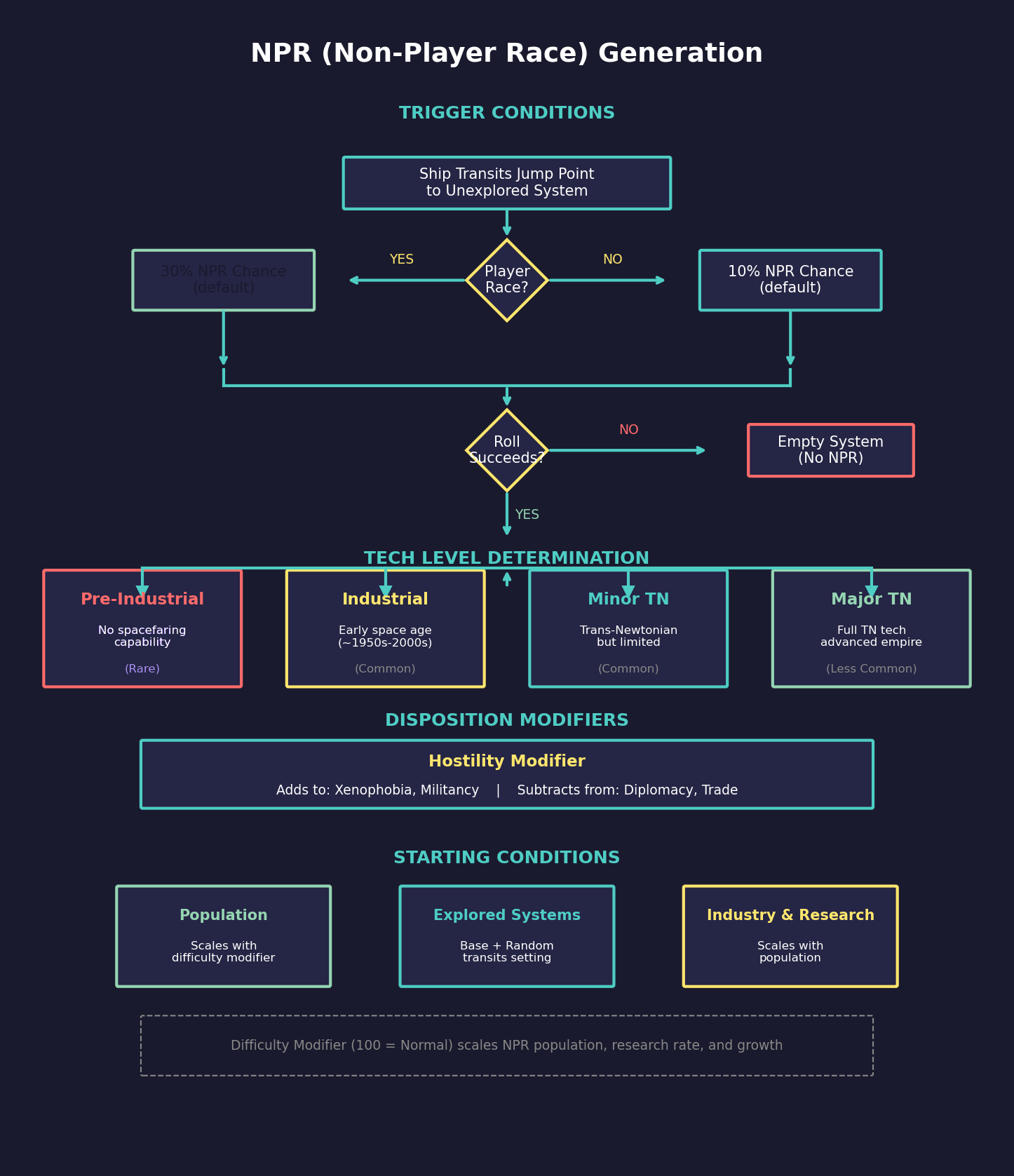
NPR Generation Chance (By Player): The percentage chance of generating a new NPR when a player-controlled ship transits a jump point into an unexplored system. The default is 30% \hyperlink{ref-2.1-1}{[1]} \hyperlink{ref-2.1-2}{[2]}. Higher values create a more populated galaxy through exploration.
-
NPR Generation Chance By NPR%: The percentage chance of generating a new NPR when an NPR-controlled ship transits a jump point into an unexplored system. The default is 10% \hyperlink{ref-2.1-1}{[1]}. This allows the galaxy to become more populated even without player exploration.
-
NPR Base Explored Transits: The base number of jump points that a newly generated NPR has already explored. The default is 0 \hyperlink{ref-2.1-1}{[1]}. This determines how much of the galaxy the NPR has already mapped when they first appear.
-
NPR Random Explored Transits: Additional random number of explored jump points added to the base value. The default is 0 \hyperlink{ref-2.1-1}{[1]}. Combined with the base value, this creates variation in how extensively new NPRs have explored their surroundings.
-
NPR Max Start Systems (0 = Unlimited): Limits the maximum number of star systems a newly generated NPR can control at creation. The default is 0 (unlimited) \hyperlink{ref-2.1-1}{[1]} – the NPR’s starting territory is determined entirely by other factors.
-
Pre-Industrial NPR %: Percentage of generated NPRs that are pre-industrial civilizations. The default is 0% \hyperlink{ref-2.1-1}{[1]}. These races have not yet developed industrial technology and pose no immediate military threat, though they may advance over time.
-
Industrial NPR %: Percentage of generated NPRs that are industrial (conventional technology) civilizations. The default is 0% \hyperlink{ref-2.1-1}{[1]}. These races have achieved industrial capability but lack Trans-Newtonian technology.
-
Minor Trans-Newtonian NPR %: Percentage of generated NPRs that are minor Trans-Newtonian powers. The default is 25% \hyperlink{ref-2.1-1}{[1]}. These races have discovered TN technology but are less developed than major powers.
-
Hostility Modifier: A percentage modifier that adjusts NPR diplomatic disposition at generation. The default is 0% \hyperlink{ref-2.1-1}{[1]}. The modifier value is added to an NPR’s Xenophobia and Militancy traits while being subtracted from their Diplomacy and Trade Interest traits. Higher values create NPRs that are more isolationist, aggressive, and less interested in peaceful commerce. At 0%, NPR traits are generated using standard random distributions; at 100%, NPRs are significantly more hostile on average.
The remaining percentage (100% minus the sum of Pre-Industrial, Industrial, and Minor Trans-Newtonian values) determines the proportion of major Trans-Newtonian NPRs – fully developed spacefaring civilizations that can pose significant threats.
2.1.2.2 Center Column
From top to bottom as they appear on screen:
-
Known Star Systems: Aurora can generate a galaxy based on real stellar data from our neighborhood. As of v2.4.0, the Known Stars database was massively expanded from approximately 4,500 to over 63,000 stars within 775 light years of Sol, sourced from the Hipparcos Catalogue with extensive data cleansing using the Simbad database \hyperlink{ref-2.1-3}{[3]}. Stars are placed at their actual relative positions with accurate spectral types.
-
Use Constellation Names: When using real star data, enables traditional astronomical naming using Bayer designations (Greek letters like Alpha, Beta, Gamma) and Flamsteed numbers for stars within constellations. For example, “Alpha Centauri” or “61 Cygni” rather than catalog numbers like “HIP 71683”. This provides more recognizable names for nearby stars that have traditional designations.
-
Orbital Motion for Planets: When enabled, planets move along their orbital paths as game time advances. Orbital positions update every 5 days of game time \hyperlink{ref-2.1-10}{[10]}. This affects travel distances between bodies, which impacts transit times and fuel consumption for interplanetary missions. Sensor ranges and detection are also affected as distances change. Performance impact is low to moderate — the calculation is straightforward but applies to all bodies in all systems. Disabled by default \hyperlink{ref-2.1-1}{[1]} for simplified gameplay where planets remain stationary.
-
Orbital Motion for Asteroids: When enabled, asteroids move along their orbital paths as game time advances \hyperlink{ref-2.1-1}{[1]}. Similar to planetary orbital motion but applies to asteroid belts and individual asteroids. This affects mining operations, travel times to asteroid mining sites, and sensor detection. Performance impact can be higher than planetary motion due to the larger number of asteroid bodies in most systems.
-
Generate New Races as NPRs: When enabled, new AI races can spawn during the game as jump points are explored \hyperlink{ref-2.1-1}{[1]}. This prevents the galaxy from feeling “empty” even after you have explored most known systems.
-
Allow Human NPRs: When enabled, newly generated NPRs can be human civilizations rather than alien races \hyperlink{ref-2.1-1}{[1]}. This creates alternate human factions that may have diverged from Earth or represent lost colonies that developed independently.
- Lost Colonies (v2.8.0): When enabled, creates a 40% chance of discovering lost human colonies during exploration \hyperlink{ref-2.1-13}{[13]}. A discovery check occurs when all of the following conditions are met:
- A new system is generated during jump point exploration
- The exploring race is player-controlled
- The system contains a body suitable for the starting species
- An NPR generation check has passed (for minor, industrial, or pre-industrial race)
v2.8.0+: Lost colonies range from pre-industrial to Trans-Newtonian (TN) technology levels, matching the tech distribution set by NPR generation percentages. Unlike standard NPRs, lost colonies have no military infrastructure or forces regardless of their tech level.
Lost colonies have distinct characteristics compared to standard NPRs:
- Technology ranges from pre-industrial to Trans-Newtonian (based on NPR generation settings)
- Population is approximately 25% smaller than equivalent NPR populations
- No military forces or military infrastructure at any tech level
- Minimal research and construction facilities
This option provides an alternative to encountering only alien NPRs during exploration. When combined with “Allow Human NPRs”, you may find both lost colonies (passive, no military) and independent human powers (fully developed, potentially hostile).
-
Generates Pre-Industrial Only: Restricts all generated NPRs to pre-industrial technology level \hyperlink{ref-2.1-1}{[1]}, regardless of the NPR Type Distribution percentages. Useful for scenarios where the player is the only spacefaring civilization.
-
Generates Precursors: Enables ancient alien ruins on planets \hyperlink{ref-2.1-1}{[1]}. These provide research bonuses and recovered technology, adding an exploration incentive.
-
Enhanced Precursors: Increases the power and technology level of Precursor ruins and defenses \hyperlink{ref-2.1-1}{[1]}. Creates more challenging archaeological sites with greater rewards.
-
Enhanced Swarm: Increases the strength and aggression of Star Swarm entities \hyperlink{ref-2.1-1}{[1]}. Makes Swarm encounters more dangerous but potentially more rewarding.
-
Enhanced Invaders: Increases Invader military capability and expansion rate \hyperlink{ref-2.1-1}{[1]}. Makes the Invader faction a more significant threat.
-
Generates Rakhas: Enables the Rakhas spoiler faction, a ground-based alien threat. Unlike other spoiler factions, Rakhas do not build or operate spacecraft — they exist only as ground forces on planetary surfaces \hyperlink{ref-2.1-5}{[5]}. Rakhas spawn on planets meeting specific criteria: a temperature band approximately 100 degrees wide, some oxygen, no hazardous gases, and at least one mineral present. If a planet meets these requirements, there is a 30% chance Rakhas will spawn there \hyperlink{ref-2.1-5}{[5]}. They pose a significant ground combat threat but cannot threaten ships in orbit. See Section 18.3 Spoiler Races for detailed Rakhas mechanics.
-
Generates Aether Raiders: Enables Aether Raiders, an advanced raider faction that travels through Aether Gates rather than conventional jump points \hyperlink{ref-2.1-6}{[6]}. Aether Gates are temporary portals that allow Aether Raiders to enter and exit systems without using standard jump points — they cannot be blocked by guarding jump points. Aether Raider ships emphasize cloaking and thermal reduction, making detection challenging. In default settings, they begin appearing when 10 systems (including the starting system) are discovered \hyperlink{ref-2.1-6}{[6]}. Raiders retain their identities across jumps, so the same ship may be encountered in different systems. They employ fast beam warships and conservative tactics, typically retreating unless victory seems assured.
-
NPRs Generate Precursors: When enabled, NPR exploration can trigger Precursor discovery events \hyperlink{ref-2.1-1}{[1]}.
-
NPRs Generate Star Swarm: When enabled, NPR activity can trigger Star Swarm emergence \hyperlink{ref-2.1-1}{[1]}.
-
NPRs Generate Aether Rifts: When enabled, NPR activity can cause Aether Rift formation \hyperlink{ref-2.1-1}{[1]}.
-
NPRs Generate Invaders: When enabled, NPR exploration can trigger Invader arrival \hyperlink{ref-2.1-1}{[1]}.
- NPRs Encounter Raiders: When enabled, NPR fleets can encounter and engage Raider forces \hyperlink{ref-2.1-1}{[1]}. This allows NPR-vs-Raider combat to occur independently of player involvement.
2.1.2.3 Center-Right Column
From top to bottom as they appear on screen:
-
Realistic Commander Promotions (v2.7.1): Adds political value as a factor in the officer promotion formula \hyperlink{ref-2.1-1}{[1]}. When enabled, commanders gain political influence over the course of their careers that affects their advancement prospects. Officers with higher political value receive promotion advantages.
-
Limited Research Administration: When enabled, scientists can only administer a fraction of their normal laboratory capacity \hyperlink{ref-2.1-1}{[1]}. Scientists gain additional administration capacity through experience. This creates a research bottleneck early in the game, forcing players to prioritize research directions and develop their scientific corps over time rather than pursuing all paths simultaneously from the start.
-
Inexperienced Fleet Penalties (v2.7.1): When enabled, requires fleets to undergo training after commissioning before reaching full effectiveness \hyperlink{ref-2.1-1}{[1]}. New crews start at a lower training grade and must accumulate training time before reaching their full operational capability. This adds a realistic readiness dimension to fleet management – newly constructed ships cannot immediately perform at peak efficiency.
-
All Jump Points are Stable: When enabled, all jump points in the game start pre-stabilized \hyperlink{ref-2.1-1}{[1]}, meaning any ship can transit them immediately without requiring jump drives or jump gates. When disabled, jump points must be stabilized before non-jump-capable ships can use them. Stabilization requires either a ship with a jump drive to “hold open” the jump point for a fleet, or construction of a jump gate for permanent stabilization. Note: There is no “unstable” jump point type – all jump points are permanent and bidirectional regardless of this setting. The setting only controls whether stabilization is required for transit.
-
No Overhauls Needed: Completely disables the maintenance and overhaul system \hyperlink{ref-2.1-1}{[1]}. When enabled, ships never break down from maintenance failures and overhauls are not required. Maintenance facilities, MSP production, and maintenance clock advancement are all disabled. Use this setting for simplified gameplay where you want to ignore maintenance logistics entirely.
-
Civilian Shipping Lines Active: Toggle whether NPC merchant fleets are constructed and operate \hyperlink{ref-2.1-1}{[1]}. When disabled, no civilian shipping lines will form, requiring the player to handle all cargo transport.
-
Civilian Miners: Controls whether civilian mining colonies can be established \hyperlink{ref-2.1-1}{[1]} (default enabled). See Section 6.5.2 Civilian Mining for mechanics.
-
New Tech from Conquest: When enabled, capturing enemy ships or installations can provide research bonuses toward technologies the enemy possesses \hyperlink{ref-2.1-1}{[1]}. This rewards aggressive expansion and creates incentives for capturing rather than destroying enemy assets.
-
Eccentric Orbits: When enabled, planetary orbits can have higher eccentricity values, creating more elliptical orbits \hyperlink{ref-2.1-1}{[1]}. This affects seasonal temperature variations and orbital mechanics. Disabled by default for more circular, stable orbits.
-
One Second Sub Pulse: Enabled by default \hyperlink{ref-2.1-1}{[1]}. When active, combat is resolved in one-second subdivisions within each five-second pulse. This provides more granular damage application and weapons fire timing during engagements. The setting only affects combat resolution — it does not change available time increments or general game processing. Performance impact is moderate and limited to active combat situations. Disabling creates chunkier combat with all damage applied at five-second intervals.
-
Limited Planet Distance: Enabled by default \hyperlink{ref-2.1-1}{[1]} \hyperlink{ref-2.1-4}{[4]}. When enabled, enforces distance constraints on how far planets can be generated from their parent star. This keeps all meaningful system bodies within practical survey and travel limits (approximately 10-12 billion kilometers). Survey ships searching for the nearest body use a 10 billion km radius \hyperlink{ref-2.1-11}{[11]}, and NPRs are placed within 12 billion km of the primary star \hyperlink{ref-2.1-4}{[4]}. When disabled, planets can spawn at greater distances, creating larger systems where some bodies may fall outside practical survey ranges.
-
Use Theme in Known Stars (v2.6.0): When enabled, applies the selected naming theme (set in race configuration) to known star systems rather than using their real astronomical names \hyperlink{ref-2.1-1}{[1]}. This overrides both catalog numbers and constellation names – if both “Use Constellation Names” and “Use Theme in Known Stars” are enabled, the theme takes precedence for naming. Useful for players who prefer a consistent naming scheme across all systems rather than mixing real star names with themed names for discovered systems.
2.1.3 Far Right Column — Start Only
Updated: v2026.01.30
Header: “These game options can be modified at start only”
-
Starting Year: The calendar year the game begins. The default is 2050 \hyperlink{ref-2.1-1}{[1]}. This primarily affects the calendar display. Note that for Earth Death Spiral and Solar System Destruction scenarios, the starting year determines the timeline for disaster progression. Some players use far-future dates for more science-fiction oriented games, or historical dates for alternate-history scenarios.
-
Number of Player Races: The number of player-controlled races at game start \hyperlink{ref-2.1-1}{[1]}. Multiple player races allow for multiplayer games or for single players to manage multiple factions simultaneously.
-
Number of Non-Player Races: The number of NPRs to generate at start \hyperlink{ref-2.1-1}{[1]}. More NPRs create a more competitive galaxy but also increase processing time per turn.
-
Minimum Sol Jump Points (0 = Random) (v2.7.1): Specifies the number of jump points generated in the home system at game start. A value of 0 uses the standard random generation. Setting a specific number directly controls how many initial routes exist from your home system, affecting both defensibility and early expansion options. Fewer jump points create more defensible chokepoints but limit expansion directions; more jump points offer greater exploration opportunities but require broader defensive coverage. The community recommends 5-6 jump points for balanced games that provide meaningful strategic choices without overwhelming early-game defense requirements.
-
Earth Mineral Deposits (100 = normal): Adjusts the mineral abundance on Earth as a percentage \hyperlink{ref-2.1-1}{[1]}. A value of 100 uses standard deposits; higher values increase starting minerals, lower values create resource scarcity forcing earlier expansion.
-
Minimum NPR Distance (LY): A light-year entry field that sets the minimum distance from Sol where non-player races can be generated \hyperlink{ref-2.1-1}{[1]}. Higher values create buffer zones around the player’s starting system.
-
Maximum NPR Distance (LY): Sets the maximum distance from Sol where non-player races can be generated \hyperlink{ref-2.1-1}{[1]}. Combined with the minimum distance, this creates a band where NPRs can spawn, preventing them from appearing too far away to ever be encountered.
-
Customized NPRs: Displays the count of NPRs that have been manually configured through the race editor before game start \hyperlink{ref-2.1-1}{[1]}. This is a read-only display field showing how many of the starting NPRs have custom configurations (species traits, starting installations, starting technology, etc.) rather than being randomly generated. Customized NPRs retain their manually set configurations throughout the game.
2.1.3.1 Starting System
Aurora C# always starts the player in the Sol system (Earth) by default. There is no dropdown to select a different starting system during game creation.
Note: While the default start is always Sol, experienced players can use SpaceMaster mode after game creation to set up a custom starting system. This involves creating a throwaway game, using SM tools to generate and customize a new system, then establishing your race there. See Section 2.5.3.2 Custom Start via SpaceMaster for the complete process.
2.1.3.2 Spoiler Race Trigger Thresholds
These settings control when spoiler factions become active based on player exploration progress \hyperlink{ref-2.1-1}{[1]}:
-
Player Known Systems for Star Swarm: Number of star systems the player must discover before Star Swarm activation timer begins.
-
Player Known Systems for Raiders: Number of star systems the player must discover before Raiders activation timer begins.
-
Player Known Systems for Invaders: Number of star systems the player must discover before Invaders activation timer begins.
2.1.3.3 Minimum Research Point Thresholds
These settings add an additional trigger condition based on total research points accumulated \hyperlink{ref-2.1-1}{[1]}:
-
Minimum Research Points: Precursors: Research point threshold that must be reached before Precursor-related events can trigger.
-
Minimum Research Points: Raiders: Research point threshold for Raiders activation.
-
Minimum Research Points: Invaders: Research point threshold for Invaders activation.
-
Add Planet X: Optional inclusion of the hypothetical Planet X in Sol System scenarios, adding an additional outer system body.
Practical Tips:
- For a first game, consider starting with 1-2 NPRs or none at all. This lets you learn mechanics without the pressure of an arms race.
- NPRs with a head start (low Pre-Industrial %, many explored transits) can be shockingly powerful when encountered. A first-contact war against a well-developed NPR is a common cause of early game-overs.
- NPR processing adds the most time to turn advancement. If your turns are taking too long, the number and complexity of NPRs is usually the culprit.
- Even after game creation, you can use SpaceMaster mode to manually create, edit, or delete NPRs. This is useful for setting up specific scenarios or adding narrative elements to your game.
See Section 18.3 Spoiler Races for detailed mechanics on each spoiler faction.
2.1.4 Disaster Scenarios
Updated: v2026.02.02
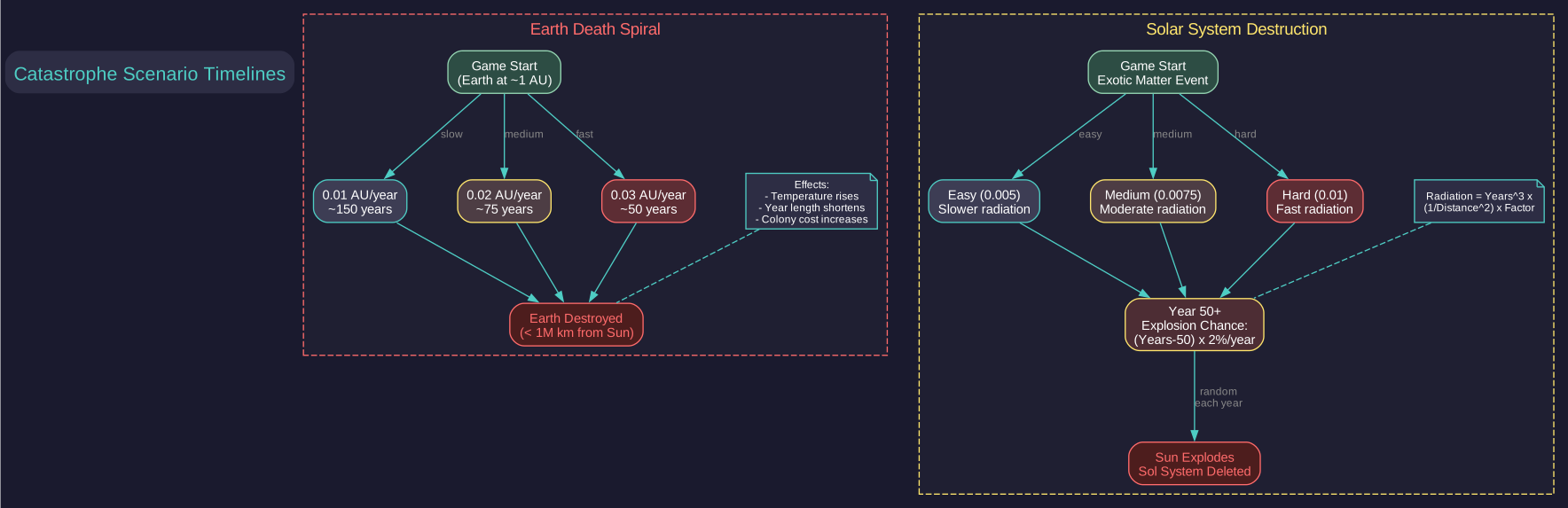
Aurora provides several disaster scenarios that add existential challenges to the game.
2.1.4.1 Earth Death Spiral
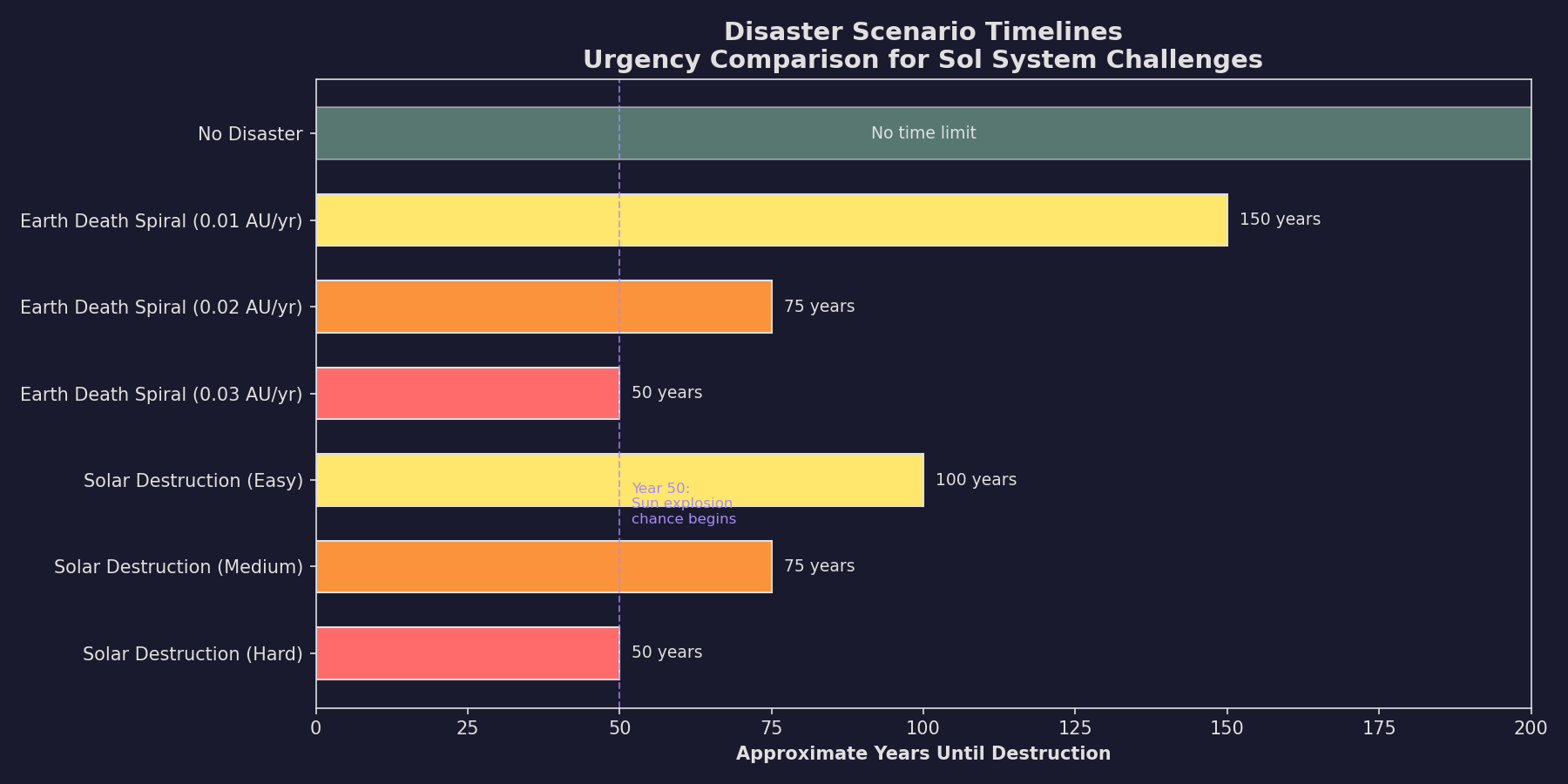
The Earth Death Spiral scenario causes Earth to gradually spiral toward the Sun, creating an evacuation deadline for humanity \hyperlink{ref-2.1-9}{[9]}.
Speed Options:
| Rate | Approximate Time to Destruction |
|---|---|
| 0.01 AU per year | ~150 years |
| 0.02 AU per year | ~75 years |
| 0.03 AU per year | ~50 years |
Mechanics:
- Temperature, year length, and other environmental parameters adjust dynamically as distance to the Sun decreases \hyperlink{ref-2.1-9}{[9]}
- Colony cost increases progressively as conditions deteriorate
- When Earth moves within one million kilometres of the Sun, it is destroyed due to tidal stresses \hyperlink{ref-2.1-9}{[9]}
- Any remaining populations on Earth are also destroyed
This scenario forces players to prioritize interstellar colonization and industrial evacuation over traditional development strategies. See Section 5.3.5 Earth Death Spiral for detailed environmental mechanics.
2.1.4.2 Solar System Destruction (v2.7.0)
A new apocalyptic disaster option where exotic matter disrupts the sun, causing escalating radiation that forces evacuation.
Difficulty Variants:
| Scenario Factor | Difficulty |
|---|---|
| 0.005 | Easy |
| 0.0075 | Medium |
| 0.01 | Hard |
Radiation Formula \hyperlink{ref-2.1-7}{[7]}:
Annual Radiation = ((Years since start) ^ 3) × (1 / (Body Distance AU ^ 2)) × Scenario Factor
Solar Explosion \hyperlink{ref-2.1-7}{[7]}: After year 50, the sun has an annual explosion probability of (Game Years - 50) × 2%. When the sun explodes, the Sol system is permanently deleted and all jump point connections to Sol are severed.
Strategic Impact:
- Inner planets become uninhabitable first (distance-squared scaling)
- Urgent pressure to establish interstellar colonies and relocate infrastructure
- Jump point exploration and colonization become existential priorities
2.1.5 Recommended Starting Configurations
Updated: v2026.01.30
(Editorial suggestions – not sourced from a single community consensus document)
The following presets represent suggested configurations for different experience levels. Note that “Auto-Assign Tech Points” and starting installations are set during race creation (see Section 2.2 Race Creation), not on the game options screen.
2.1.5.1 Beginner Configuration
A forgiving setup that lets new players learn mechanics without overwhelming pressure.
- Start Type: Conventional Start with TN tech unlocked
- NPR Difficulty: Lower (fewer NPRs, higher Pre-Industrial %)
- Construction Cycle: Default (5 days)
- Sol jump points: 5-6 (manageable defense with meaningful expansion)
- Inexperienced Fleets: OFF
- Commander Political: OFF
- Auto-Assign Tech Points: ON (race creation setting – see Section 2.2)
- Suggested Government: Representative Democracy or Meritocracy (race creation setting – see Section 2.2.7 Government Type)
2.1.5.2 Standard Configuration
The intended Aurora experience with all systems active.
- Start Type: Trans-Newtonian Start
- NPR Difficulty: Normal generation settings
- All Other Settings: Default values
- Inexperienced Fleets: ON
- Commander Political: ON
- Sol jump points: 0 (random generation)
2.1.5.3 Challenge Configuration
For experienced players seeking a demanding early game and slower progression.
- Start Type: Conventional Start (no TN tech)
- NPR Difficulty: Lower Pre-Industrial %, more starting NPRs
- Inexperienced Fleets: ON
- Commander Political: ON
- Auto-Assign Tech Points: OFF (race creation setting – see Section 2.2)
- Starting Resources: Reduced mineral availability
- Suggested Government: Autocracy or Military Dictatorship (race creation setting – see Section 2.2.7 Government Type)
Related Sections
- Section 7.1 Technology Tree – Research speed and technology settings
- Section 14.1 Fuel – Fuel consumption and maintenance mechanics
- Section 15.1 Alien Races – NPR diplomatic behavior
- Section 16.1 Officer Generation – Commander generation and promotion
- Section 17.1 Geological Survey – Survey mechanics and system discovery
- Appendix A: Formulas – Detailed calculation formulas
References
\hypertarget{ref-2.1-1}{[1]}. Aurora C# game database (AuroraDB.db v2.7.1) – FCT_Game table default values. All checkbox and numeric settings verified against schema default columns.
\hypertarget{ref-2.1-2}{[2]}. Aurora4x Fandom Wiki, “New game creation” – aurora4x.fandom.com
\hypertarget{ref-2.1-3}{[3]}. Aurora Forums, “v2.4.0 Changes List” – Known Stars database expanded from ~4,500 to 63,000+ stars using Hipparcos Catalogue, Gliese catalogue, and Simbad database
\hypertarget{ref-2.1-4}{[4]}. Aurora Forums, “v2.6.0 Changes List” – Limited Planet Distance constrains bodies to within 12 billion km
\hypertarget{ref-2.1-5}{[5]}. Aurora Forums, “How rare are Rakhas?” – Spawn conditions and 30% probability on qualifying planets
\hypertarget{ref-2.1-6}{[6]}. Aurora Wiki, “Aether Raiders” – aurorawiki2.pentarch.org
\hypertarget{ref-2.1-7}{[7]}. Aurora Forums, “v2.7.0 Changes List” – Solar System Destruction scenario mechanics and radiation formula
\hypertarget{ref-2.1-8}{[8]}. Aurora Forums, “Race-specific passwords for better MP” – aurora2.pentarch.org
\hypertarget{ref-2.1-9}{[9]}. Aurora Forums, “C# Aurora Changes List v1.12.0” – Earth Death Spiral: 0.01/0.02/0.03 AU per year rates, dynamic environmental changes, destruction at 1 million km from Sun. aurora2.pentarch.org
\hypertarget{ref-2.1-10}{[10]}. Aurora C# game database (AuroraDB.db v2.7.1) – FCT_Game.MinConstructionPeriod default = 432,000 seconds (5 days). Orbital motion updates are processed on the same cycle as the construction period.
\hypertarget{ref-2.1-11}{[11]}. Aurora Forums, “Survey mechanics and distance limits” – Survey ships use a 10 billion km search radius when locating the nearest unsurveyed body
\hypertarget{ref-2.1-12}{[12]}. Aurora C# game database (AuroraDB.db v2.7.1) – FCT_Game.NonPlayerSystemDetection default = 0 (Normal mode). Values: 0=Normal, 1=Never, 2=Automatic.
\hypertarget{ref-2.1-13}{[13]}. Aurora Forums, “v2.8.0 Changes List” – Lost Colonies option: 40% discovery chance, triggering conditions, colonies range from pre-industrial to Trans-Newtonian tech levels, population approximately 25% smaller than NPRs, no military forces or infrastructure at any tech level, minimal research/construction facilities. aurora2.pentarch.org
\hypertarget{ref-2.1-14}{[14]}. AuroraWiki, “Ruins” – Ruin generation qualifying body conditions: terrestrial worlds, terrestrial moons, or small terrestrial moons with gravity > 0.4G and temperature between 200K and 360K (-73C to +87C).