2.3 System Generation
Updated: v2026.01.30

Contents
Updated: v2026.01.30
2.3.1 Star Types and Distribution
Updated: v2026.01.30
Each star system is created when discovered (through jump point transit) or at game start, with properties that affect habitability, resource availability, and strategic value.
Stellar Classification: Stars are classified using the standard spectral type system. Aurora’s implementation closely follows real-world astronomical values \hyperlink{ref-2.3-5}{[5]}:
| Class | Color | Temperature (Main Seq.) | Notes |
|---|---|---|---|
| O | Blue | 30,000-50,000K | Extremely luminous, short-lived |
| B | Blue-White | 11,000-28,000K | Hot, luminous |
| A | White | 7,750-10,000K | Bright, moderate habitable zones |
| F | Yellow-White | 6,150-7,500K | Good habitable zone candidates |
| G | Yellow | 5,100-6,000K | Sun-like, excellent for habitable worlds |
| K | Orange | 3,650-5,000K | Cooler, closer habitable zones |
| M | Red | 2,300-3,920K | Red dwarfs |
Multiple Star Systems: Systems can contain multiple stars in binary, trinary, or quaternary configurations \hyperlink{ref-2.3-1}{[1]}.
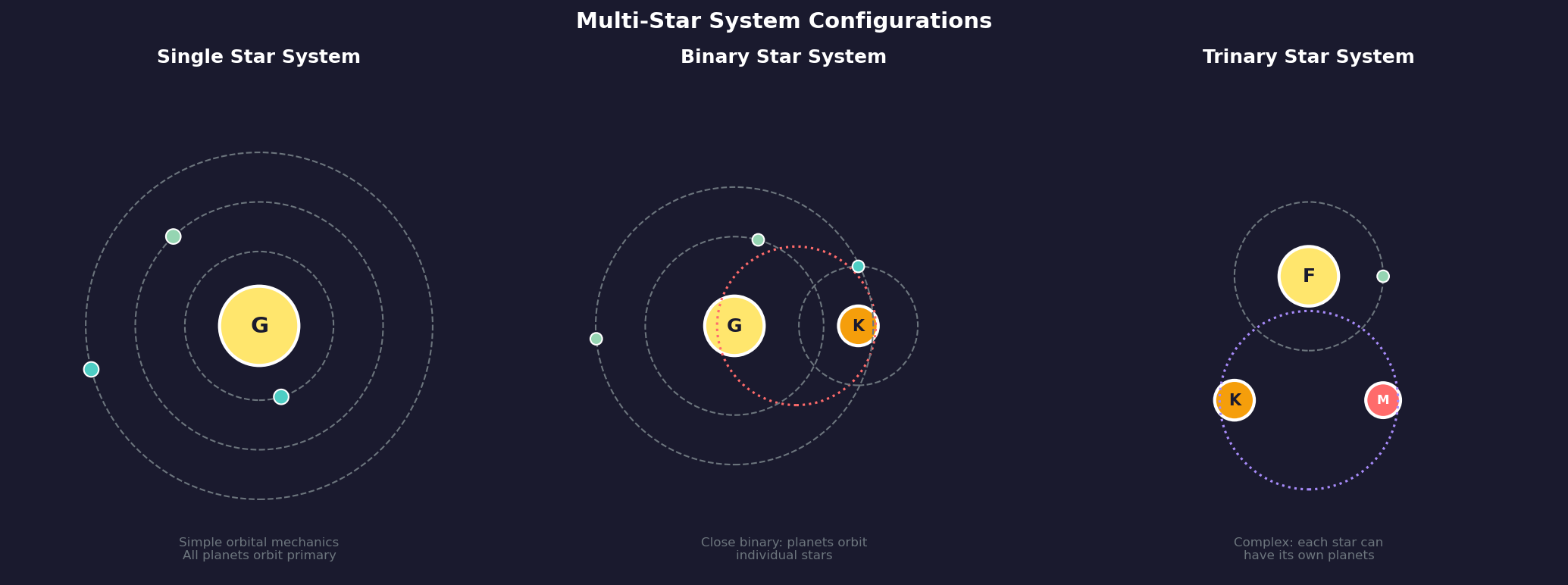
Star Properties Affecting Gameplay:
- Luminosity: Determines the habitable zone distance — where liquid water can exist on a planet’s surface. More luminous stars have habitable zones farther out.
- Stellar Mass: Affects the number and distribution of orbital bodies (unverified — #837 – requires live testing to confirm correlation).
- Binary/Trinary Systems: Multiple stars create complex orbital arrangements \hyperlink{ref-2.3-9}{[9]}. Planets orbit individual stars rather than the system barycenter. Each star in a multi-star system can have its own complement of orbital bodies.
- Stellar Age: Systems are assigned ages during generation \hyperlink{ref-2.3-10}{[10]}. The DIM_SystemAge table contains modifiers by spectral class that may influence generation (unverified — #837 – specific effects on mineral distribution require live testing).
- Luminosity Class: Giant and supergiant stars have much larger habitable zones but are rarer \hyperlink{ref-2.3-11}{[11]}. Dwarf stars (class V) have the highest generation probability (MaxChance total of 547,315), followed by giants (class III at 492,895). Supergiants (class Ia) are rare (MaxChance 199,810).
2.3.2 Orbital Bodies
Updated: v2026.01.30
Each star system contains a procedurally generated collection of planets, dwarf planets, moons, asteroids, and comets. These bodies are your primary targets for colonization and resource extraction.
Planet Types:
- Terrestrial Planets: Rocky worlds ranging from Mercury-sized to super-Earths. These are the primary colonization targets. They have defined atmospheres, temperatures, gravity, and surface conditions.
- Gas Giants: Jupiter-like worlds that cannot be colonized in the traditional sense but serve as fuel sources. Sorium (fuel) can be harvested from gas giant atmospheres using fuel harvester ships.
- Gas Giant Moons: Moons of gas giants are often terrestrial bodies in their own right and can be excellent colonization targets. Large gas giants may have many moons.
- Dwarf Planets: Smaller bodies (Pluto-like) with minimal atmospheres. Useful for mining but rarely suitable for large colonies.
- Asteroids: Small rocky bodies, usually found in belts. They can contain minerals and can be mined but do not support populations.
- Comets: Icy bodies in distant orbits. Rarely significant strategically.
Planetary Properties:
Each terrestrial body has detailed properties:
- Radius and Gravity: Affects habitability and infrastructure requirements
- Orbital Distance: Determines base temperature from stellar heating
- Atmospheric Composition: The specific gases present and their concentrations (nitrogen, oxygen, carbon dioxide, methane, chlorine, etc.)
- Atmospheric Pressure: From vacuum to crushing super-dense atmospheres
- Surface Temperature: The effective surface temperature considering atmosphere and distance
- Hydrosphere: Percentage of surface covered by liquid (water, other liquids)
- Tectonic Activity: Affects colony infrastructure and mineral accessibility
- Magnetic Field: Affects radiation shielding and habitability
Habitability Assessment: Aurora calculates a Colony Cost for each body, representing how expensive it is to maintain colonists there. A Colony Cost of 0 means the world is naturally habitable (matching your species’ requirements perfectly). Higher values mean infrastructure (environmental protection, heating/cooling) is required, costing resources per unit of population.
Terraforming Potential: Most planets can be modified over time through terraforming:
- Adding or removing atmospheric gases
- Adjusting greenhouse effect (temperature modification)
- Terraforming is slow (decades to centuries) and requires dedicated installations
- Some worlds are more practical terraform targets than others — thin atmospheres are easier to modify than crushing ones
2.3.3 Mineral Distribution
Updated: v2026.01.30
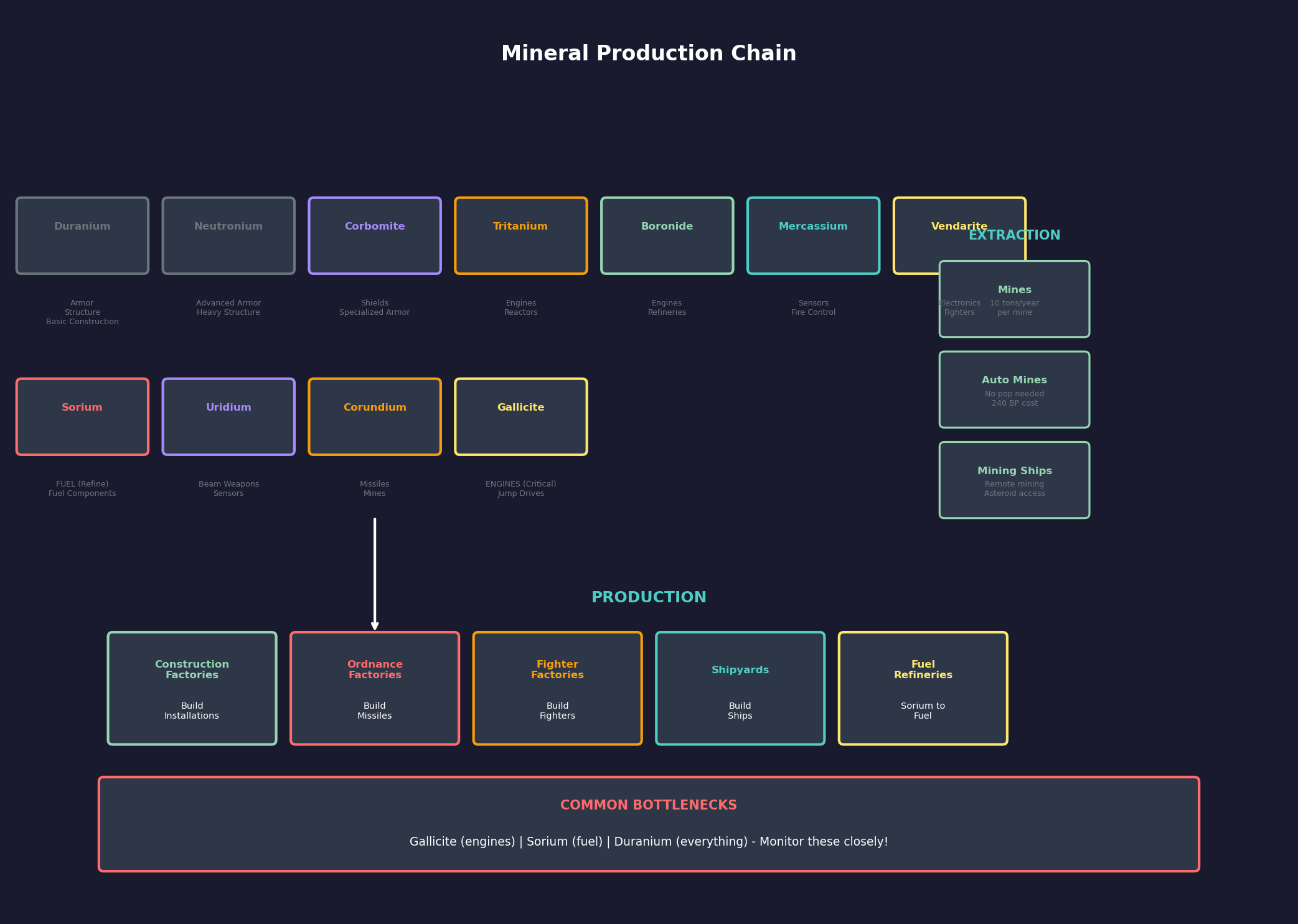
Minerals are Aurora’s fundamental economic resource. Every construction project, ship component, and installation requires specific minerals in specific quantities. Their distribution across orbital bodies drives expansion and strategic decisions.
Mineral Types: Aurora uses eleven minerals \hyperlink{ref-2.3-2}{[2]}, each required for different purposes \hyperlink{ref-2.3-6}{[6]}:
| Mineral | Primary Uses |
|---|---|
| Duranium | Armor, structural components, basic construction |
| Neutronium | Armor (advanced), heavy structural elements |
| Corbomite | Armor (advanced types), specialized shielding |
| Tritanium | Engines, reactor components |
| Boronide | Engines, power systems |
| Mercassium | Electronics, sensors, fire control |
| Vendarite | Electronics, communication systems |
| Sorium | Fuel (refined into fuel), fuel-related components |
| Uridium | Weapons, beam weapon components |
| Corundium | Weapons, missile components |
| Gallicite | Engines (critical), jump drive components |
Mineral Deposits: Each orbital body can have deposits of any or all minerals. A deposit is defined by two values:
- Quantity: How many tons of the mineral are present (can range from hundreds to millions)
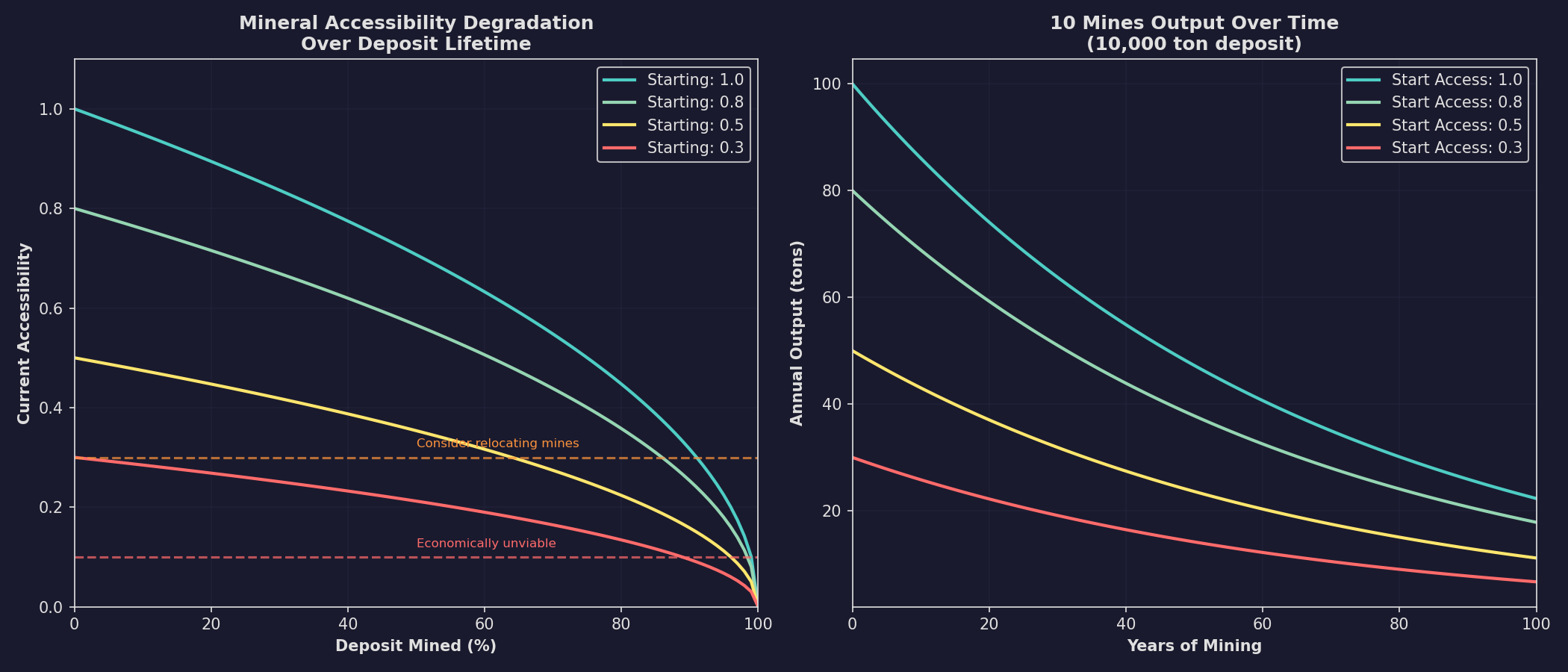
- Accessibility: A value from 0.1 to 1.0 representing how easy the mineral is to extract \hyperlink{ref-2.3-3}{[3]}. Higher accessibility means faster extraction rates. Accessibility decreases as a deposit is mined \hyperlink{ref-2.3-4}{[4]}, eventually reaching very low values where mining becomes inefficient.
Distribution Patterns:
- Larger bodies tend to have more mineral deposits overall (community observation)
- Asteroids often have high accessibility but low total quantity (community observation)
- Gas giants cannot be mined but their moons often have good deposits
- Mineral distribution is randomized but weighted by body type and size
- The game’s mineral availability setting (from game creation) affects overall abundance
Geological Survey: Minerals are not visible until a body has been surveyed by a ship with geological survey sensors (see Section 17.1 Geological Survey). Conducting surveys is a critical early-game activity — you cannot plan colonization without knowing where resources are.
Strategic Implications:
- Gallicite is often the bottleneck mineral — required for engines and in limited supply. Prioritize surveying and mining Gallicite deposits.
- Duranium is needed in large quantities for almost everything. Fortunately, it tends to be more common.
- Sorium for fuel can be mined from deposits or harvested from gas giants. Gas giant harvesting is renewable; mineral deposits deplete over time.
- Finding a body with high-accessibility deposits of multiple critical minerals is a major strategic windfall — these locations often become major mining colonies.
- Poor mineral distribution in your home system is not necessarily a problem — it motivates expansion and creates interesting logistical challenges.
Mining Operations: Minerals are extracted by mining installations (see Section 6.2 Mining) on colonies or automated mining ships (which can operate without a permanent colony). The extraction rate depends on:
- Number of mining installations or mining ship capacity
- Accessibility of the deposit
- Governor bonuses (if applicable)
- Overall, deposits deplete over time and eventually become uneconomical to mine
2.3.4 Regenerating Minerals (SpaceMaster Mode)
Updated: v2026.01.30
In SpaceMaster mode, the System View window includes a “Regen Min” button that allows players to regenerate all mineral deposits in the currently selected system \hyperlink{ref-2.3-8}{[8]}.
2.3.4.1 Process
The regeneration function works as follows \hyperlink{ref-2.3-8}{[8]}:
- Deletion: Removes all current mineral deposits in the selected system.
- Regeneration: Executes the standard mineral generation process for each celestial body.
- Variable Outcomes: Bodies may still result in having no minerals following regeneration.
- Colony Protection: Any bodies with existing colonies are automatically excluded from the regeneration process, preserving active mining operations.
This feature is useful for SpaceMaster mode scenarios where players want to refresh mineral availability in depleted systems or rebalance resource distribution.
2.3.5 NPR Locations and Spoiler Settings
Updated: v2026.01.29
NPR starting locations and spoiler race thresholds are game creation settings configured in the Create Game window. For full documentation:
- NPR starting distances: See Section 2.1 New Game Options (Minimum/Maximum NPR Distance fields). NPR homeworlds must be within approximately 12 billion kilometers of their star system’s primary \hyperlink{ref-2.3-7}{[7]}.
- Spoiler race thresholds: See Section 2.1 New Game Options (Spoiler Race Trigger Thresholds). These settings delay first contact with Aether Raiders, Star Swarm, and Invaders until the player discovers a minimum number of systems.
Note: Delayed spoilers continue developing in the background. A spoiler encountered later may be more powerful than one appearing immediately.
Related Sections
- Section 2.1 New Game Options – NPR distance settings and spoiler thresholds
- Section 6.2 Mining – Mineral extraction and mining operations
- Section 10.1 Movement Mechanics – Jump point transit and system travel
- Section 11.1 Thermal and EM Signatures – Survey sensor mechanics
- Section 17.1 Geological Survey – Gravitational and geological surveys
- Appendix A: Formulas – Mineral generation and accessibility formulas
References
\hypertarget{ref-2.3-1}{[1]}. AuroraWiki C-Systems page; Steve Walmsley forum post “Using Real Stars/Systems” (aurora2.pentarch.org/index.php?topic=1654.0). (VB6-era post ~2005-2008; data import process may differ in C# Aurora — requires verification #855)
\hypertarget{ref-2.3-2}{[2]}. Aurora C# game database (AuroraDB.db v2.7.1) – FCT_MineralDeposit contains 11 distinct MaterialID values. DIM_PlanetaryInstallation has 11 mineral columns: Duranium, Neutronium, Corbomite, Tritanium, Boronide, Mercassium, Vendarite, Sorium, Uridium, Corundium, Gallicite
\hypertarget{ref-2.3-3}{[3]}. Aurora C# game database (AuroraDB.db v2.7.1) – FCT_MineralDeposit.Accessibility confirmed range MIN=0.1, MAX=1.0 across all deposits in database
\hypertarget{ref-2.3-4}{[4]}. Aurora C# game database (AuroraDB.db v2.7.1) – FCT_MineralDeposit schema includes HalfOriginalAmount and OriginalAcc columns, indicating the game tracks original values and adjusts accessibility as deposits are mined
\hypertarget{ref-2.3-5}{[5]}. Aurora C# game database (AuroraDB.db v2.7.1) – DIM_StellarType table. Main sequence (SizeText=’V’) temperature ranges verified: O=30,000-50,000K, B=11,000-28,000K, A=7,750-10,000K, F=6,150-7,500K, G=5,100-6,000K, K=3,650-5,000K, M=2,300-3,920K
\hypertarget{ref-2.3-6}{[6]}. Aurora C# game database (AuroraDB.db v2.7.1) – DIM_PlanetaryInstallation mineral cost columns. Primary mineral uses verified: Duranium/Neutronium for construction and shipyards; Boronide for refineries and fuel infrastructure; Mercassium for electronics and sensors; Vendarite for fighter and communication systems; Uridium for weapons and tracking stations; Corundium for mines; Gallicite for engines
\hypertarget{ref-2.3-7}{[7]}. Aurora Forums, “v2.6.0 Changes List” – Limited Planet Distance constrains bodies to within 12 billion km (also referenced in Section 2.1 as ref-2.1-4)
\hypertarget{ref-2.3-8}{[8]}. Aurora Forums – SpaceMaster mode “Regen Min” button on System View window regenerates mineral deposits for all non-colonized bodies in the selected system. Colony protection confirmed by community testing
\hypertarget{ref-2.3-9}{[9]}. Aurora C# game database (AuroraDB.db v2.7.1) – FCT_Star table schema includes Component and OrbitingComponent columns for multi-star system configuration. FCT_SystemBody.StarID links bodies to specific stars within a system.
\hypertarget{ref-2.3-10}{[10]}. Aurora C# game database (AuroraDB.db v2.7.1) – FCT_System.Age column tracks system age. DIM_SystemAge table contains 14 age range entries with modifiers (Age1-Age10 columns) by spectral class, linked via DIM_StellarType.AgeRangeID.
\hypertarget{ref-2.3-11}{[11]}. Aurora C# game database (AuroraDB.db v2.7.1) – DIM_StellarType.MaxChance column determines generation probability by luminosity class. Totals: class V (dwarf) = 547,315; class III (giant) = 492,895; class IV (subgiant) = 81,350; class Ia (supergiant) = 199,810; class VII (white/brown dwarf) = 296,485.