16.2 Skills and Bonuses
Updated: v2026.02.15
[Screenshot Pending — #1136] Promotion Score Display
[Screenshot Pending — #1127] Commanders Window Skills Tab
Contents
Updated: v2026.02.15
- 16.2 Skills and Bonuses
16.2.1 Skill Categories
Updated: v2026.02.15
Officers in Aurora C# possess skills across multiple categories that determine their effectiveness in various roles. Each skill is rated on a percentage scale, with higher values providing greater bonuses.
16.2.1.1 Naval Skills
Naval skills affect ship and fleet command performance:
v2.8.0+: Commander bonuses for Light Naval vessels (1,000 tons or less) were restructured. The Fighter Combat bonus has been removed and replaced by Light Tactical. The standard Tactical bonus no longer affects Light Naval units. Ships over 1,000 tons receive only half the bonus for: Crew Training, Survey, Engineering, Tactical, Carrier Operations, and Ground Support. See Section 9.6.5 Commander Bonuses for full details.
- Ship Handling: Affects the maneuverability and tactical positioning of ships under this officer’s command. Higher values improve initiative in combat and make ships harder to hit.
- Crew Training: Determines how quickly crews improve their training grade under this officer. Well-trained crews operate their systems more effectively.
- Carrier Operations (renamed from Fighter Operations as of v1.13): Affects the coordination and effectiveness of fighter groups (see Section 12.3 Missiles), and multiplies fuel/supply/ordnance transfer rates to hangared parasites. Critical for carriers and fighter wing commanders. As of v2.8.0, ships >1,000 tons receive only half the Carrier Operations bonus from their commander. (v2.8.0 feature — cannot verify with v2.7.1 database)
- Light Tactical (v2.8.0): A new commander bonus affecting only Light Naval units (<=1,000 tons). The existing Tactical bonus no longer affects Light Naval units. Light Naval unit commanders are assigned based on their Light Tactical bonus. Experience gain is weighted toward Light Tactical in the same way larger warship commanders’ experience weights toward Crew Training. Generation chance is double that of Tactical (same as Survey). (v2.8.0 feature — cannot verify with v2.7.1 database)
- Fleet Tactics: Governs how effectively the officer coordinates multiple ships in a task group. Higher values improve fleet-wide combat performance including coordinated fire and formation integrity.
- Space Tactical Operations (v2.1.1): Formation commanders assigned to Space Tactical Operations roles now receive equivalent ship kill tracking and medal awards as ship commanders, recognizing their direct contribution to combat outcomes.
16.2.1.2 Combat Skills
Combat skills directly affect engagement outcomes:
- Energy Weapons: Improves accuracy and rate of fire for beam weapons (see Section 12.2 Beam Weapons) on ships under this officer’s command.
- Kinetic Weapons: Improves accuracy for railguns and other kinetic weapon systems.
- Missile Operations: Affects the accuracy of fire control solutions for missile-armed vessels and improves anti-missile point defense coordination.
- Electronic Warfare: Improves ECM effectiveness and reduces the impact of enemy ECM on ships under this commander.
16.2.1.3 Administrative Skills
Administrative skills affect non-combat operations:
- Mining: Improves the efficiency of mining operations (see Section 6.1 Minerals) supervised by this officer. Affects both automated mines and manned mining installations.
- Production: Increases the output of construction facilities, shipyards, or ordnance factories overseen by this officer.
- Logistics: Modifies cargo handling speed. Ships with commanders possessing higher logistics bonuses can load and unload cargo more quickly. Two sources can provide logistics bonuses: the ship commander’s personal rating, and an Admin Command bonus if the ship’s fleet is within the command radius of a parent Logistics-type Admin Command. Setting up a network of Logistic-focused Admin Commands can boost cargo handling considerably.
- Population Growth: When assigned as a colony governor, affects the rate of population growth and immigration on that colony.
16.2.1.4 Scientific Skills
Scientific skills determine research effectiveness:
- Biology/Genetics: Speeds research in biological and genetic technology fields.
- Construction/Production: Speeds research in construction and manufacturing technologies.
- Defensive Systems: Speeds research in armor, shields, and defensive technologies.
- Energy Weapons: Speeds research in beam weapon and energy technology.
- Logistics/Ground Combat: Speeds research in logistics, supply, and ground combat technologies.
- Missiles/Kinetics: Speeds research in missile and kinetic weapon technologies.
- Power/Propulsion: Speeds research in engine, reactor, and power plant technologies.
- Sensors/Fire Control: Speeds research in sensor and fire control technologies.
Each scientist officer will have a primary research specialty (their highest scientific skill) and possibly one or more secondary specialties. Assigning a scientist to research in their specialty field produces the fastest results.
16.2.1.5 Diplomatic Skills
Diplomatic skills affect interactions with alien races:
- Diplomacy: Improves the rate of communication development with alien races (see Section 15.2 Communications). Officers with high diplomacy skill are ideal for diplomatic missions and communication efforts.
- Intelligence: Affects ELINT intelligence gathering rate. Higher values multiply the base 1 point/day rate from ELINT modules, producing faster intelligence accumulation about alien populations and sensors. Naval officers only (see Section 15.5 Intelligence Gathering). \hyperlink{ref-16.2-2}{[2]}
16.2.1.6 Ground Combat Skills
Ground combat skills affect army command:
- Ground Combat Tactics: Improves the fighting effectiveness of ground units (see Section 13.1 Unit Types and Formation Design) under this officer’s command. As of v2.1.1, ground forces officers may also gain tactical bonuses at approximately half the rate of naval officers, reflecting cross-training in combat operations.
- Fortification: Increases the defensive bonus of ground units when dug in.
- Anti-Insurgency: Improves effectiveness at suppressing unrest and insurgency on conquered worlds.
16.2.1.7 Skill Restrictions (v2.4.0+)

As of v2.4.0, certain skill types are restricted by commander branch:
- Naval commanders cannot gain the Xenoarchaeology bonus \hyperlink{ref-16.2-1}{[1]}. This skill is exclusive to ground force officers who command archaeological expeditions (see Section 17.3 Xenoarchaeology).
- Ground force commanders cannot gain Diplomacy or Intelligence bonuses \hyperlink{ref-16.2-1}{[1]}. These diplomatic and espionage skills are exclusive to naval officers.
These restrictions prevent unrealistic cross-branch skill acquisition and encourage proper role assignment.
Tip: When assigning scientists to research projects, always check their specialization. A scientist with 40% in Sensors/Fire Control will often outperform one with 60% in Power/Propulsion when assigned to a sensor research project. The matching between skill and research field is the most important factor.
16.2.2 Bonus Generation
Updated: v2026.02.15
When commanders are generated, their bonuses are determined randomly according to probability bands. The following chart and table show the chance each bonus type is generated for new officers (unverified — #1259):
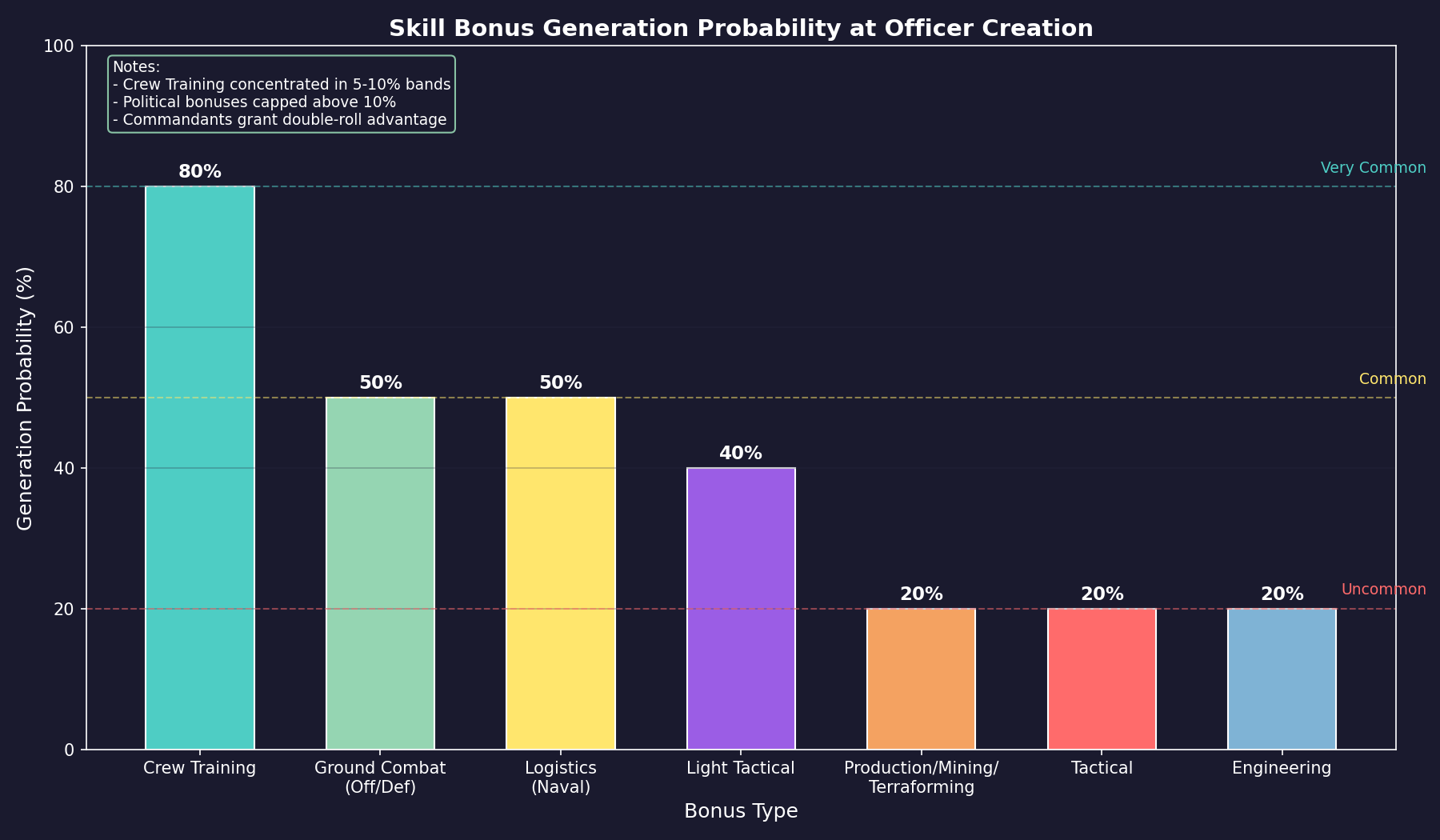
v2.8.0+: Light Tactical replaces the Fighter Combat bonus. Tactical no longer affects Light Naval units.
| Bonus Type | Abbrev | Branch | Generation Chance | Notes |
|---|---|---|---|---|
| Crew Training | CTR | Naval | 80% | Concentrated in 5% and 10% bands |
| Survey | SRV | Naval/Ground | 40% | Available to both branches |
| Carrier Operations | CVOP | Naval | 20% | Critical for carrier/fighter wing commanders |
| Reaction | REAC | Naval | 20% | Affects initiative in combat |
| Tactical | TAC | Naval | 20% | All bands increased equally; does NOT affect Light Naval units (v2.8.0+) |
| Light Tactical (v2.8.0+) | – | Naval | 40% | Same chance as Survey; affects only <=1,000t ships; replaces Fighter Combat |
| Engineering | ENG | Naval | 20% | All bands increased equally |
| Fleet Training | FTR | Naval | 20% | Affects fleet-wide crew training from admin commands \hyperlink{ref-16.2-3}{[3]} |
| Ground Support | GSP | Naval | 20% | Affects orbital bombardment accuracy via FFD \hyperlink{ref-16.2-3}{[3]} |
| Communications | COMM | Naval | 20% | Affects alien communication development rate \hyperlink{ref-16.2-3}{[3]} |
| Intelligence | INT | Naval | 20% | Multiplies ELINT intelligence gathering rate \hyperlink{ref-16.2-3}{[3]} |
| Diplomacy | DIP | Naval | 20% | Affects diplomatic interaction speed \hyperlink{ref-16.2-3}{[3]} |
| Logistics (Naval/Civilian) | LOG | Naval/Civilian | 50% | All bands increased proportionally |
| Production/Mining/Terraforming | PROD/MINE/TERA | Naval/Civilian | 20% | Concentrated in lower bands |
| Ground Combat (Offence/Defence) | GCO/GCD | Ground | 50% | Increases limited to 5% and 10% bands |
| Ground Combat (Manoeuvre/Artillery/AA) | GCM/GCA/GCAA | Ground | 20% | Specialized ground combat roles \hyperlink{ref-16.2-3}{[3]} |
| Ground Combat Logistics | GCL | Ground | 20% | Reduces formation supply consumption \hyperlink{ref-16.2-3}{[3]} |
| Ground Combat Occupation | OCC | Ground | 20% | Reduces required garrison strength \hyperlink{ref-16.2-3}{[3]} |
| Decontamination | DEC | Ground | 20% | Affects radiation/contamination cleanup operations \hyperlink{ref-16.2-3}{[3]} |
| Xenoarchaeology | XEN | Ground | 20% | Exclusive to ground officers; affects ruin excavation \hyperlink{ref-16.2-3}{[3]} |
| Political | POL | All | Variable | Chance of exceeding 10% significantly reduced |
Design Notes:
These generation rates support the on-demand promotion system. Political bonuses are deliberately constrained to prevent commanders with excessively high political advantages from dominating promotions. Crew Training bonuses are common because they are universally useful across ship commands.
16.2.3 Crew Grade and Training
Updated: v2026.02.15
Crew grade represents a ship’s crew training level that develops over time. Higher crew grade provides combat and operational bonuses to the ship.
16.2.3.1 Crew Training System (v1.14.0+)
Crew Training uses a percentage-based system, where each percentage point equals 5 points of the old numeric bonus. The maximum starting bonus is 30% (equivalent to 150 in the previous system), with a ceiling of 50% \hyperlink{ref-16.2-1}{[1]}.
Officer Requirements:
A ship needs either a commander or executive officer with a crew training bonus to conduct training \hyperlink{ref-16.2-5}{[5]}. Each officer’s contribution is calculated separately, then combined.
Bonus Stacking:
Individual officer bonuses can be amplified through parent admin commands and other eligible admin commands within the same hierarchy.
Command Adjustment:
The final bonus is halved for the ship commander. The executive officer uses the full bonus \hyperlink{ref-16.2-5}{[5]}. This asymmetry means executive officers provide greater training benefits.
Points Accumulation:
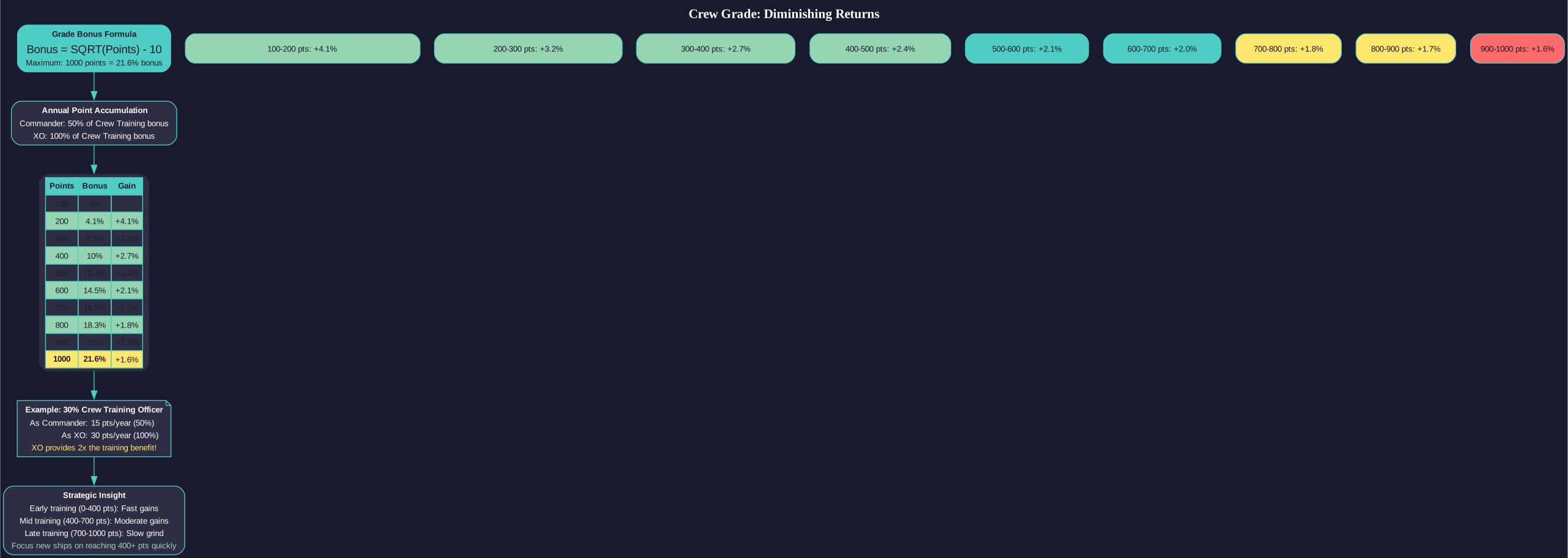
Incremental Crew Grade Points per Year = (50% of Commander Bonus) + (100% of XO Bonus) \hyperlink{ref-16.2-5}{[5]}
Maximum crew grade: 1000 points \hyperlink{ref-16.2-5}{[5]}.
Example: An executive officer with a 20% bonus would contribute their full bonus to crew training, while the ship commander would contribute half their bonus \hyperlink{ref-16.2-5}{[5]}.
16.2.3.2 Grade Bonus Formula
The crew grade bonus is calculated as:
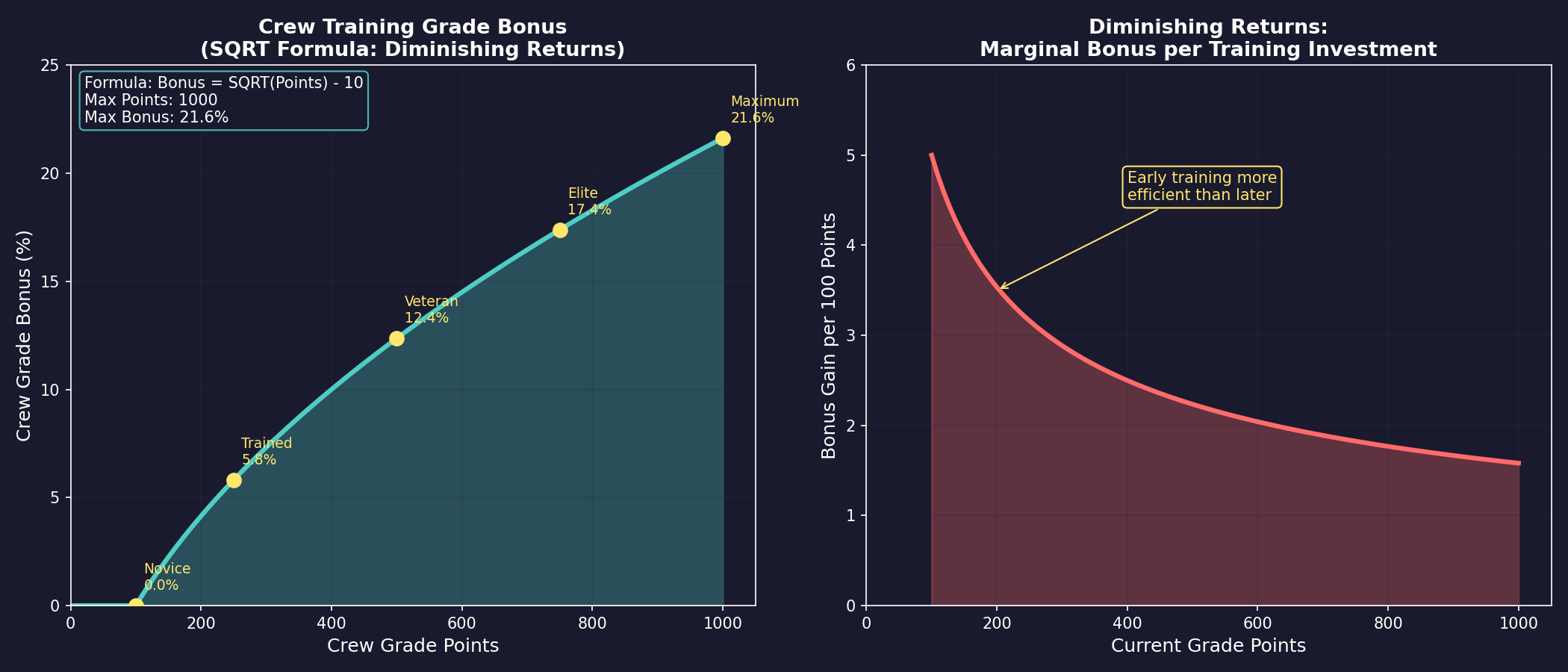
Grade Bonus = SQRT(Grade Points) - 10 \hyperlink{ref-16.2-5}{[5]}
This produces a maximum possible bonus of approximately 21.6% in C# Aurora (assuming 1000 maximum grade points: SQRT(1000) - 10 = 21.6) \hyperlink{ref-16.2-5}{[5]}.
Design Philosophy:
The grade bonus is received more quickly than in VB6 Aurora but has a lower maximum value. The gap is made up by the bonuses of other officers, such as the Tactical Officer or Chief Engineer. This represents a deliberate balance shift – faster initial benefits but requiring multi-officer contributions for peak performance.
16.2.3.3 Fleet Training
Fleet training provides an additional layer of training from administrative command structures:
Base Percentage: Derived from parent admin command crew training ratings:
- Training-type commands: Full bonus applied \hyperlink{ref-16.2-1}{[1]}
- General-type commands: 10% of bonus applied \hyperlink{ref-16.2-1}{[1]}
Multiplier Factors: The base percentage is multiplied by:
- Ship’s current crew grade
- Ship’s morale
- Overhaul factor
Annual Accumulation:
Fleet Training Points accumulate based on parent admin command crew training ratings, multiplied by ship’s crew grade, morale, and overhaul factor.
Maximum fleet training rating: 500 points \hyperlink{ref-16.2-1}{[1]}.
16.2.3.4 Crew Morale
Morale represents the crew’s readiness and affects ship performance. It is checked only for military ships or vessels with geological survey sensors.
Default State: Morale is 100% unless conditions below apply.
Deployment-Based Morale:
When the deployment clock exceeds the intended deployment time:
Morale = Intended Deployment Time / Deployment Clock \hyperlink{ref-16.2-5}{[5]}
For example, a vessel with a 15-month deployment clock against a 12-month intended deployment would have 80% morale.
Crew Complement Impact:
If actual crew falls below half the required complement, morale is multiplied by:
Morale Modifier = (Current Crew / Class Crew) x 2 (unverified — #1259)
Morale Floor: Morale cannot drop below 25% under normal circumstances \hyperlink{ref-16.2-5}{[5]}.
Life Support Failure: When life support systems are destroyed, morale is immediately reduced to 10% \hyperlink{ref-16.2-5}{[5]}.
Deployment Clock Reduction:
- Reduces at 10x the normal rate when at recreational locations \hyperlink{ref-16.2-5}{[5]}
- Recreational locations include ships with recreational modules or populations exceeding 50,000 \hyperlink{ref-16.2-5}{[5]}. Note: recreational modules appear to benefit only the ship carrying the module, not other ships in the same fleet (unverified — #1369)
- Parasites in hangars reduce their clocks based on mothership deployment status
16.2.4 Bonus Stacking
Updated: v2026.01.30
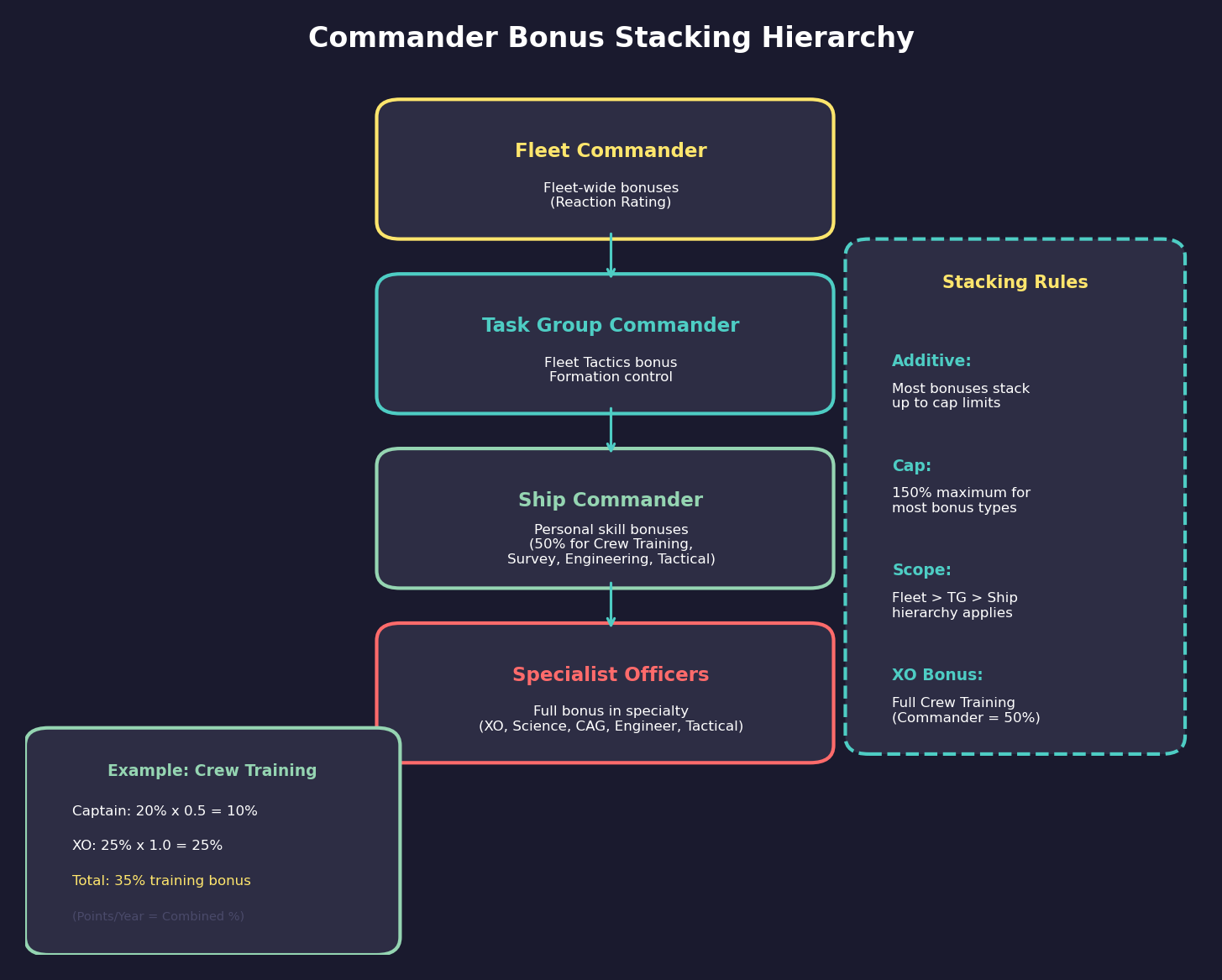
Multiple skill bonuses can apply simultaneously in many situations. Understanding how these bonuses stack is important for optimizing your officer assignments.
16.2.4.1 How Bonuses Are Applied
Most skill bonuses in Aurora C# are applied as percentage modifiers to base effectiveness:
- An officer with 20% in Energy Weapons provides a 20% improvement to beam weapon accuracy for their ship.
- An officer with 35% in Mining provides a 35% improvement to mining output at their colony.
- An officer with 50% in Biology/Genetics provides a 50% improvement to research speed for that field.
16.2.4.2 Commander Hierarchy Bonuses
Ships exist within a command hierarchy, and bonuses can come from multiple levels:
- Ship Commander: The captain of an individual vessel provides their personal skill bonuses to that ship.
- Task Group Commander: The senior officer commanding a task group provides fleet-level bonuses that affect all ships in the group.
- Fleet Commander: If task groups are organized into a fleet, the fleet commander provides additional bonuses.
When multiple commanders provide the same type of bonus, the bonuses are typically additive up to a cap. For example:
- Ship captain with 15% Energy Weapons + Task group commander with 25% Fleet Tactics = improved performance from both bonuses.
However, only the most relevant bonus applies in most cases – a ship captain’s Energy Weapons skill directly affects their ship’s gunnery, while the task group commander’s Fleet Tactics provides a separate fleet-wide coordination bonus.
16.2.4.3 Governor Stacking
Colony governors provide their administrative skill bonuses to the colony they manage:
- A governor’s Mining skill improves all mining operations on that colony.
- A governor’s Production skill improves all construction on that colony.
- A governor’s Population Growth skill affects growth rates.
Only one governor can be assigned to a colony at a time. There is no stacking of governor bonuses – you must choose the governor whose skill profile best matches the colony’s primary function.
16.2.4.4 Research Stacking
Research benefits from the assigned scientist’s relevant skill, but only one scientist can be assigned to each research project. However, you can have multiple research projects running simultaneously with different scientists, each benefiting from their own specialist’s bonus.
Research labs themselves stack – more labs assigned to a project means faster completion. The scientist’s bonus then applies as a multiplier to the total lab output.
16.2.4.5 Diminishing Returns
Most commander bonuses are applied linearly as percentage modifiers. However, the crew grade system uses a square root formula (SQRT(Points) - 10), which inherently produces diminishing returns: the same number of additional grade points produces smaller percentage gains at higher levels \hyperlink{ref-16.2-5}{[5]}. For direct commander skill bonuses (Crew Training, Survey, Tactical, etc.), the bonuses are applied as straight percentage modifiers without explicit diminishing returns in the formula \hyperlink{ref-16.2-6}{[6]}.
16.2.4.6 Trait Interactions
Officer traits can interact with skill bonuses:
- A positive combat trait stacks with combat skill bonuses, potentially making an already-skilled officer exceptionally effective.
- A negative trait may partially or fully negate a high skill value. An officer with 50% Energy Weapons but the “Cautious” trait may not perform as well as expected in aggressive combat scenarios.
Tip: For fleet commands, prioritize Fleet Tactics and Crew Training skills over individual weapon skills. The fleet-wide coordination bonus from a skilled task group commander benefits every ship, while an individual weapon skill only affects the flagship. Save your best gunners for commanding individual capital ships.
16.2.5 Promotion and Experience
Updated: v2026.01.30
Officers gain experience over time and can be promoted to higher ranks, unlocking new command opportunities and improving their effectiveness.
16.2.5.1 Experience Gain
Officers accumulate experience through active service:
- Time in Position: Simply holding an assignment generates experience, though at a slow base rate.
- Combat: Officers who participate in combat engagements gain significant experience. The more intense and successful the engagement, the greater the experience reward.
- Mission Completion: Successfully completing assigned tasks (survey missions, colony establishment, trade runs) provides experience.
- Training Exercises: Officers assigned to training commands or participating in exercises gain moderate experience.
Experience is the primary driver of skill improvement. As officers gain experience, their existing skills gradually improve. The rate of improvement is faster for skills that are actively being used – a ship commander in frequent combat will see their weapon and tactics skills improve faster than their administrative skills.
16.2.5.2 Experience Events Split (v2.7.0)
Commander Experience events are split into four separate event categories for clearer tracking:
- Scientist Experience: Includes the research field being worked on
- Administrator Experience: For officers in administrative/governor roles
- Commander Experience: For assigned naval or ground commanders
- Unassigned Experience: For unassigned commanders gaining passive experience
16.2.5.3 Skill Improvement
All non-team bonuses have a chance to increase with experience, and officers can acquire entirely new bonuses they did not possess at generation \hyperlink{ref-16.2-4}{[4]}. The bonus that increases is related to the officer’s current assignment – for example, a survey ship commander can gain or improve Crew Training, Fleet Initiative, or Survey bonuses, while a carrier commander can gain or improve Crew Training, Fleet Initiative, or Carrier Operations \hyperlink{ref-16.2-4}{[4]}.
- Active Assignment: Skills relevant to the officer’s current role improve most quickly. A mining colony governor’s Mining skill will improve faster than their Fleet Tactics. A planetary governor may advance in any skill that influences a population.
- Unassigned Officers: Unassigned commanders still have a small chance of gaining experience, including acquiring new bonuses, so they may become suitable for assignments they previously lacked qualifications for \hyperlink{ref-16.2-4}{[4]}. However, the chance is small and unassigned officers face doubled retirement risk (see Section 16.1 Officer Generation).
- Ceiling: Skills have a natural ceiling for each officer, determined at generation. Some officers will never exceed 30% in a given skill no matter how much experience they accumulate, while others can reach 80%+.
16.2.5.4 On-Demand Promotion System (v2.0.0)
v2.0.0 replaces the older ratio-based promotion system with an on-demand promotion system that operates during automated assignment phases rather than as a separate process \hyperlink{ref-16.2-9}{[9]}.
How It Works:
When automated assignment cannot find an unassigned officer at the designated rank with the needed specialization, the system searches one rank lower for candidates who meet all of the following criteria:
- Possess the primary bonus for the role
- Have served in their current rank for at least one year
- Lack a “Do Not Promote” flag
Selection Criteria:
If multiple candidates qualify, the system prioritizes the officer with the highest primary bonus. In case of ties, the officer with the best promotion score receives selection and immediate promotion to fill the vacant role.
Scope:
This applies to ship commands, ground force positions, and administrative roles. There will no longer be promotions unless there are roles available to fill – creating a command structure that reflects the player’s chosen military doctrine rather than maintaining preset hierarchical ratios.
Political Bonus Integration:
When optional political bonuses are active, they combine with primary bonuses during candidate evaluation. However, the odds of generating officers with higher political bonuses (above 10%) have been significantly reduced to balance gameplay.
Manual Promotion:
Players can still manually promote eligible officers through the Commanders window at any time, regardless of available positions. There is no penalty for promoting an officer multiple ranks at once (e.g., Lieutenant Commander directly to Admiral) if the player chooses to do so.
Warning: The game does not auto-promote officers unless the automated assignment checkbox is enabled for the relevant position. Promotion is entirely manual by default \hyperlink{ref-16.2-9}{[9]}. Officers without promotions will stagnate and eventually retire.
16.2.5.5 Promotion Score
Each commander accumulates a numeric Promotion Score visible in the Commanders window. This score determines which candidates are selected when the auto-promotion system fills vacant positions, and serves as a general measure of an officer’s career accomplishments.
Score Sources:
Promotion score accumulates from the following sources \hyperlink{ref-16.2-8}{[8]}:
-
Ribbons and Medals: Each medal or ribbon has a configured point value (see Section 16.2.6 Medals). When a commander earns a medal, its point value is added to their promotion score immediately. Medals with higher point values (such as those awarded for combat achievements) contribute more significantly than service milestones.
-
Research Completions (scientists only): Scientists earn promotion score points when they complete research projects. Longer or more expensive projects typically contribute more points upon completion.
Time in Grade:
Promotion eligibility also considers time in grade — how long an officer has served at their current rank. Officers who have served longer in their current rank have better chances for promotion when vacancies open. This is separate from promotion score and ensures that officers are not promoted too rapidly \hyperlink{ref-16.2-8}{[8]}.
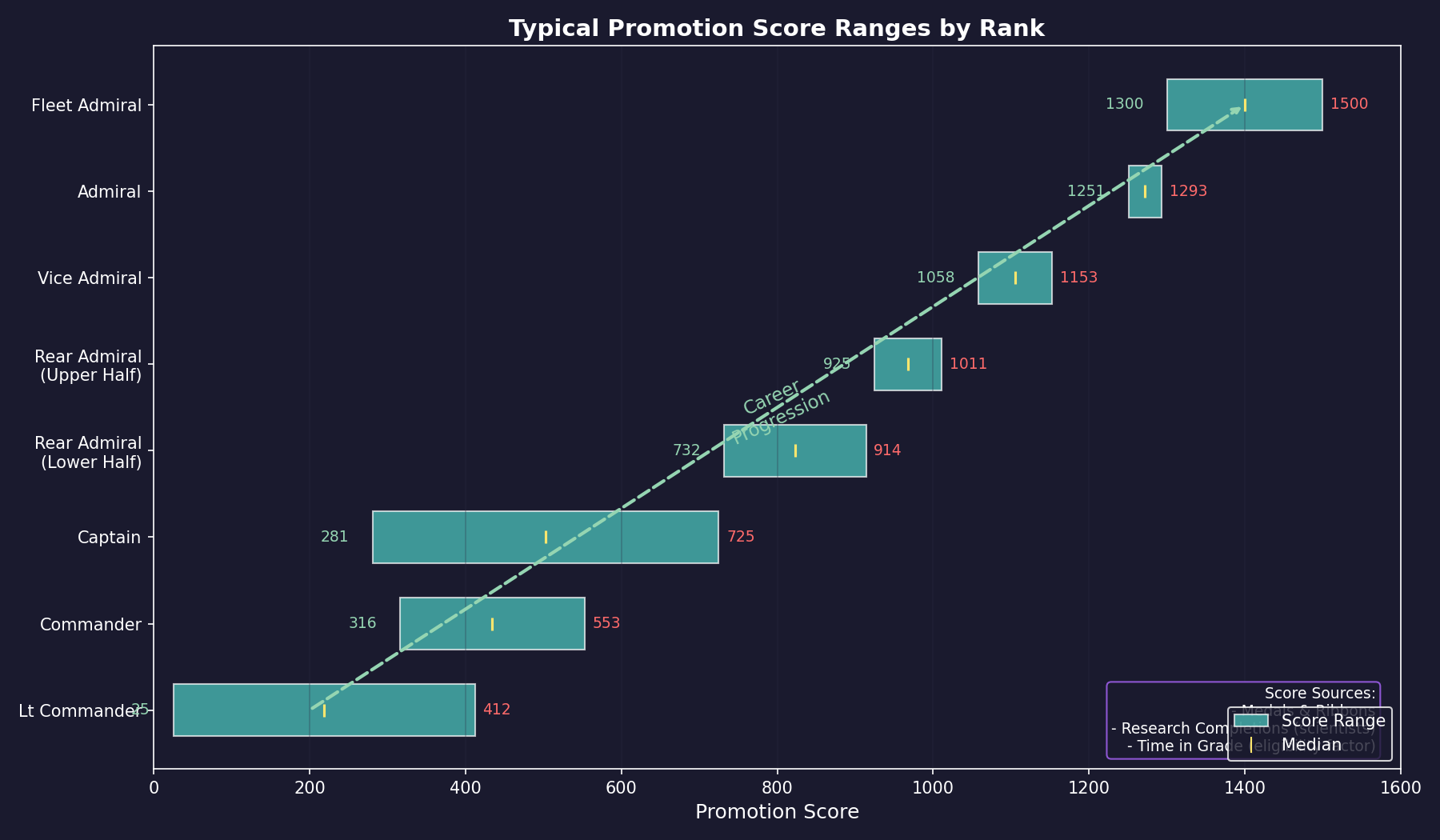
Typical Score Ranges by Rank:
| Rank | Typical Score Range |
|---|---|
| Lieutenant Commander | 25 – 412 |
| Commander | 316 – 553 |
| Captain | 281 – 725 |
| Rear Admiral (Lower Half) | 732 – 914 |
| Rear Admiral (Upper Half) | 925 – 1,011 |
| Vice Admiral | 1,058 – 1,153 |
| Admiral | 1,251 – 1,293 |
| Fleet Admiral | ~1,300+ |
These ranges are drawn from a sample game database \hyperlink{ref-16.2-1}{[1]} and vary significantly based on campaign length, combat frequency, and medal configurations. Early-game scores tend to be lower; long campaigns with frequent combat will produce much higher scores at each rank.
Practical Implications:
- Assignment Matters: Officers in active assignments gain experience (improving their skill bonuses) and accumulate time in grade, both of which affect promotion eligibility. Active service also provides opportunities to earn medals.
- Stagnation Risk: Unassigned officers face doubled retirement chance (40% per year vs 20%) \hyperlink{ref-16.2-7}{[7]} and miss opportunities for skill growth and medals. Assign officers early and often.
- Retirement Extension: Promoting officers to higher ranks extends their minimum service time before retirement eligibility. Lower-ranked officers (Lieutenant Commanders in the fleet, Majors in ground forces) face retirement much sooner than senior officers.
- Health Monitoring: Officers displayed in a different color in the Commanders window indicate “Poor Health” status. These officers can be manually retired if desired rather than waiting for natural retirement.
Tip: Keep an eye on promotion scores when deciding whom to promote manually. An officer with a score of 1,200 at the Captain level has significantly more career accomplishment than one with 600 – and that gap reflects real experience from assignments and achievements that translates into better performance in senior roles.
16.2.5.6 Rank Progression
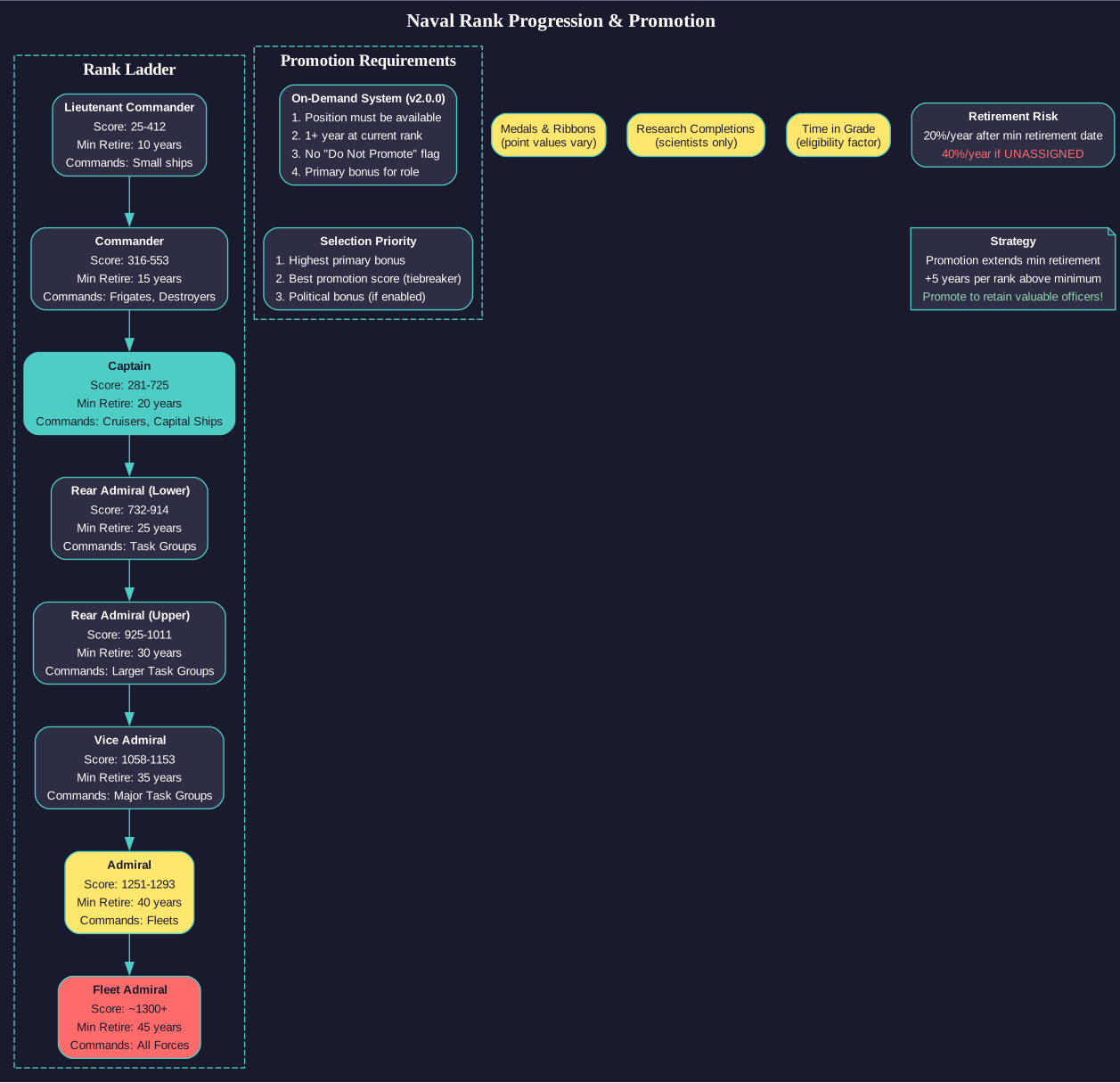
Naval officer ranks progress as follows. Minimum retirement eligibility is 10 years for the lowest rank, plus 5 years for each rank above that \hyperlink{ref-16.2-7}{[7]}:
| Rank | Typical Commands | Min Retirement Eligibility |
|---|---|---|
| Lieutenant Commander | Small ships | 10 years |
| Commander | Frigates, destroyers | 15 years |
| Captain | Cruisers, large ships | 20 years |
| Rear Admiral (Lower Half) | Task groups | 25 years |
| Rear Admiral (Upper Half) | Larger task groups | 30 years |
| Vice Admiral | Major task groups | 35 years |
| Admiral | Fleets | 40 years |
| Fleet Admiral | All forces | 45 years |
Note: The v2.0.0 on-demand promotion system means officers are only promoted when positions are available. Actual time in rank depends on vacancies, not minimum service requirements. Once past minimum retirement eligibility, officers face a 20% retirement chance each year (doubled if unassigned) \hyperlink{ref-16.2-7}{[7]}.
16.2.5.7 Benefits of Promotion
Promotion provides several benefits:
- New Commands: Higher ranks unlock the ability to command larger ships, task groups, and fleets.
- Morale Boost: Promoted officers receive a morale and loyalty improvement.
- Authority: Higher-ranked officers in the command hierarchy provide their bonuses to more subordinate ships.
- Prestige: High-ranking officers with combat experience become named figures whose loss would be significant.
16.2.5.8 Promotion Strategy
When deciding who to promote:
- Match to Need: Promote officers who will fill roles you actually need filled. If you need a task group commander, promote your best captain.
- Skill Alignment: Consider the officer’s skill profile. Promoting a captain with high administrative skills to admiral is a waste if you need a combat fleet commander.
- Career Path: Officers who have gained experience in progressively larger commands will be more effective at senior levels than those promoted purely on time served.
- Retention: Officers passed over for promotion may develop morale issues. Balance strategic optimization against keeping your officer corps satisfied.
Tip: Do not promote everyone as soon as they are eligible. You need skilled officers at every rank level. If you promote all your captains to admirals, you will have no one to command individual ships. Maintain a healthy distribution of ranks matching your actual command structure.
16.2.6 Medals
Updated: v2026.02.15
Aurora C# features a comprehensive medal system that tracks commander achievements and provides promotion score benefits.
16.2.6.1 Medal Configuration
Players can create medals with the following properties:
- Name: The medal’s display name
- Description: A text description of the medal’s significance
- Abbreviation: A shortened identifier
- Points Value: A configurable promotion score boost (positive or negative)
- Multiple Awards: Whether the medal can be awarded more than once to the same commander (Y/N)
- Image File: A medal ribbon image stored in the Medals subdirectory
16.2.6.2 Automated Medal Awards
Medals can be flagged for automatic awarding. The system evaluates commanders against a lengthy default list of conditions for medal awards, and additional custom conditions can be created within existing measurement type constraints.
Medals can be associated with one or more conditions, and the medal will be awarded if a commander meets one of those conditions (unless it is single-award only and the commander already has it).
Each commander displays every measurement type where they have activity. Medal images appear in the commander interface with hover tooltips.
Available Conditions (60+ types):
Conditions range across multiple categories:
- Discovery achievements (new star systems, ruins, jump points, habitable worlds)
- Combat accomplishments (destroying hostile forces, surviving ship destruction)
- Service milestones (10, 20, 30 years of service)
- Tactical metrics (missiles destroyed, tonnage destroyed, damage taken)
16.2.6.3 Manual Medal Awards
Players can award medals through several interfaces:
Individual Awards:
- Select a commander in the Commanders window and use the “Award Medal” button
Fleet Window Mass Awards:
- Select a ship, sub-fleet, fleet, or naval admin command and click “Award Medal”
- The system awards the selected medal to every commander within chosen command position types across all selected ships
- Selecting a fleet includes all sub-fleet ships; selecting an admin command includes the entire hierarchy
Galactic Map Naval Forces:
- The “Award Medal” button on the Naval Forces window awards medals to every commander with selected position types in the currently selected system
Ground Forces Window:
- “Formation Medal” awards to a single formation commander
- “Hierarchy Medal” awards to all commanders in a formation’s downward hierarchy, or to all formation commanders at a selected population
Citations:
When awarding medals manually, an optional citation field appears after medal selection. This citation becomes visible when hovering over the medal in the commander view, adding narrative context to awards.
16.2.6.4 Medal Import
Medals can be imported via CSV files through the “Import Medals” button on the Medal Window.
CSV Format (comma-separated):
| Column | Field | Notes |
|---|---|---|
| 1 | Medal Name | Text |
| 2 | Description | Text |
| 3 | Abbreviation | Text |
| 4 | Points Value | Numeric |
| 5 | Multiple Awards | Y or N |
| 6 | Image File Name | Must exist in Medals subdirectory |
| 7+ | Condition IDs | Any number of numeric condition IDs from DIM_MedalCondition table |
Example: Silver Star,Gallantry in Action,SSM,200,Y,Silver Star Ribbon.png,17,40,42
16.2.6.5 Medal Export
The “Export Medals” button on the Events window saves medal data from the currently selected race to a CSV file. The export includes the six standard fields plus all associated medal condition IDs.
Exported files can be imported to a different race, including races in other games, enabling consistent medal systems across multiple campaigns.
16.2.7 Ship Achievements
Updated: v2026.02.03
All medal conditions that potentially apply to ship commanders are also recorded for the ship itself. Ship achievement records persist independently from commanders, so accomplishments remain when a commander transfers to a new vessel.
16.2.7.1 Tracked Ship Metrics
The following measurement types are recorded per-ship in the database (corresponding to the medal condition measurement types in DIM_MedalCondition). Each measurement can be recorded as either a direct ship action or a strike group contribution.
| Achievement | Description |
|---|---|
| Star Systems Discovered | New systems transited |
| Ruins Discovered | Archaeological finds |
| Hostile Ships Destroyed | Enemy vessels eliminated |
| Commercial Shipping Tonnage Destroyed | Civilian vessel tonnage destroyed |
| Hostile Missiles Destroyed | Point defense kills |
| Military Shipping Tonnage Destroyed | Total military tonnage sunk |
| Armour Damage Taken | Hull integrity damage received |
| Internal Damage Taken | Component/system damage received |
| Ground Forces Tonnage Destroyed | Bombardment/orbital support |
| Bodies With Minerals Discovered | Survey mineral hits |
| Jump points discovered | Gravitational survey finds |
| Hostile Ships Captured (Boarding Combat) | Ships seized via boarding actions |
| Habitable Worlds Discovered | Terraforming candidates found |
| Combat Drop - Formation | Formation assault landings performed |
| Combat Drop - Transport | Transport assault landings performed |
| Abandoned Installations Recovered | Installations recovered from ruins sites |
| Tons Salvaged | Salvage operations completed |
| Stabilisations Completed | Jump/Lagrange point stabilizations |
| Ancient Constructs Discovered | Precursor constructs found during survey |
Note: Some medal condition measurement types (Research Points Generated, Research Projects Completed, Years of Service, Survive Ship Destruction) are tracked only at the commander level and are not recorded as ship measurements.
Display Location: Achievement totals appear on the Ship Design Display tab under the Ship Overview section of the Naval Organization window.
Strike Group Mechanics: The ship measurement table tracks a boolean flag for each entry distinguishing between direct ship actions and strike group contributions. When a ship has assigned parasite craft, those parasites’ accomplishments are recorded separately with the strike group flag set. The ship’s display shows both its own achievements and those flagged as “(SG)” for strike group contributions, allowing clear distinction between direct ship actions and those performed by its parasites.
16.2.8 Ship History
Updated: v2026.02.02
Ship history tracks notable events occurring during a vessel’s operational lifetime, accessible through a dedicated History tab in the Ship view of the Naval Organization window.
16.2.8.1 Recorded Events
- Construction and Maintenance: Construction, refit, and repair events
- Combat Operations: Destruction of hostile vessels
- Damage Events: Internal damage occurrences
- Exploration and Discovery: Ruins (geo only), constructs (geo only), jump points (grav only), new systems, habitable worlds, jump point and Lagrange point stabilization (relevant ship types), wreck salvage operations (salvage-equipped ships)
- Personnel Management: Officer assignments, officer deaths or retirements, medal awards to assigned officers
16.2.8.2 Excluded Information
To prevent excessive clutter, the following are deliberately omitted from history logs (though aggregate totals remain tracked):
- Mineral discoveries
- Destruction of individual missiles
- Destruction of ground forces
Related Sections
- Section 7.1 Technology Tree – Scientist specializations and research project assignments
- Section 12.1 Fire Controls – How combat skills affect engagement outcomes
- Section 13.1 Unit Types and Formation Design – Ground combat officer skills and applications
- Section 15.2 Communications – Diplomacy skill affecting communication and treaty negotiations
- Appendix A: Formulas – Crew grade and training bonus calculations
References
\hypertarget{ref-16.2-1}{[1]}. Aurora C# Game Database (AuroraDB.db), Tables: DIM_CommanderBonusType (branch restrictions, maximum bonus values), DIM_NavalAdminCommandType (training/general command bonus multipliers), FCT_Ship (TFPoints max 500), FCT_Commander (promotion scores by rank).
\hypertarget{ref-16.2-2}{[2]}. Aurora C# game database (AuroraDB.db v2.7.1) – DIM_CommanderBonusType. Intelligence (BonusID 23): Naval=1, Ground=0, MaximumBonus=1.5, BonusAbbrev=INT. Confirms Intelligence is a naval-only skill. “Espionage” does not exist as a skill in the database; the correct name is “Intelligence”.
\hypertarget{ref-16.2-3}{[3]}. Aurora C# game database (AuroraDB.db v2.7.1) – DIM_CommanderBonusType. Complete list of 34 bonus types verified. Key branch restrictions: Diplomacy (BonusID 17, Naval only), Intelligence (BonusID 23, Naval only), Xenoarchaeology (BonusID 16, Ground only), Communications (BonusID 22, Naval only), Carrier Operations (BonusID 7, Naval only), Tactical (BonusID 21, Naval only), Fighter Combat (BonusID 26, Naval only). Ground-exclusive: Ground Combat Training/Offence/Defence/Manoeuvre/Artillery/Anti-Aircraft/Logistics/Occupation (BonusIDs 12,30,10,32,31,35,33,29). MaximumBonus=1.5 for all percentage-type bonuses; Colony Administration max=10.0, Research Admin max=50.0.
\hypertarget{ref-16.2-4}{[4]}. AuroraWiki – C-Commander Boni (http://aurorawiki2.pentarch.org/index.php?title=C-Commander_Boni): “All the non-team abilities have a chance to increase with experience, and the ability bonus that increases will be related to the officer’s current assignment.” Also: “unassigned commanders still have a small chance of gaining experience, including new bonuses, so they may be assigned in the future even if they currently do not have a suitable bonus.” Corroborated by Aurora Forums topic 525 (Commander Bonuses).
\hypertarget{ref-16.2-5}{[5]}. AuroraWiki – C-Ship Crew (http://aurorawiki2.pentarch.org/index.php?title=C-Ship_Crew): Crew grade formula “SQRT(Grade Points) - 10”, maximum 1000 points (21% max bonus). Crew training: “50% of the commander’s crew training rating, plus 100% of the executive officer’s crew training rating.” Morale: “can never fall below 25%”, life support failure reduces to 10%, deployment clock “spins backwards at 10x” at recreational locations (50,000+ population or recreational module).
\hypertarget{ref-16.2-6}{[6]}. AuroraWiki – C-Commander Boni (http://aurorawiki2.pentarch.org/index.php?title=C-Commander_Boni): Commander bonuses applied as percentage modifiers. Ship commanders apply half bonus for Crew Training, Survey, Fighter Operations, Engineering, and Tactical; other officers apply full bonus.
\hypertarget{ref-16.2-7}{[7]}. AuroraWiki – C-Auto-Assignment (https://aurorawiki2.pentarch.org/index.php?title=C-Auto-Assignment): “The minimum retirement point is 10 years for the lowest rank. For other ranks it is equal to 10, plus 5 years for every level of rank above the minimum.” Retirement chance: “20% for each year beyond the minimum retirement date. This is doubled if the commander has no assignment.”
\hypertarget{ref-16.2-8}{[8]}. Aurora Forums — Game Mechanics Question: Rank, Promotion, Medals (https://aurora2.pentarch.org/index.php?topic=11380.0) — Promotion scores are calculated by skill rankings, time in grade, political reliability (if enabled), and medal award modifiers. Officers do not continuously accumulate promotion score from active assignments; instead, time in grade and skill bonuses determine promotion eligibility when vacancies open.
\hypertarget{ref-16.2-9}{[9]}. Aurora Forums — v2.0.0 Changes List (https://aurora2.pentarch.org/index.php?topic=12523.msg157362#msg157362) — On-Demand Promotions: “During automated assignment, the system searches for officers matching role requirements. If no suitable officer at target rank is found, the search expands to the rank below.” Candidates must possess the primary bonus, have served 1+ year in current rank, and not have “do not promote” flag. “There will no longer be promotions unless there are roles available to fill.”