16.3 Assignments
Updated: v2026.01.30

[Screenshot Pending — #1150] Research Project Assignment Window
[Screenshot Pending — #1145] Governor Assignment Interface
[Screenshot Pending — #1140] Command Module Configuration
Contents
Updated: v2026.01.30
- 16.3 Assignments
- Contents
- 16.3.1 Ship Commands
- 16.3.1.1 Ship Commanders
- 16.3.1.2 Command and Control Modules
- 16.3.1.3 Ships Without Commanders
- 16.3.1.4 No Officers Option
- 16.3.1.5 Auto-Assignment of Naval Commanders
- 16.3.1.6 Task Group Commanders
- 16.3.1.7 Fleet Commanders
- 16.3.1.8 Carrier and Fighter Commands
- 16.3.1.9 Admin Command Auto-Assignment and Required Bonuses
- 16.3.1.10 Training Command Behavior
- 16.3.2 Colony Governors
- 16.3.3 Research and Other Roles
- Related Sections
- References
16.3.1 Ship Commands
Updated: v2026.01.30
The most visible role for officers in Aurora C# is commanding ships and fleets. Every vessel in your navy benefits from having a qualified commanding officer, and the quality of your commanders directly impacts combat effectiveness.
16.3.1.1 Ship Commanders
Every ship should have a commanding officer assigned. The ship commander receives half bonuses for Crew Training, Survey, Carrier Operations, Engineering, and Tactical skills (unverified — #718). Additional specialist officers assigned to specific modules provide their full bonuses in their respective areas. This creates a “jack-of-all-trades” commander with specialists handling critical functions.
To assign a ship commander, open the Commanders window, select an unassigned officer of appropriate rank, and assign them to an available ship command.
16.3.1.2 Command and Control Modules

Seven command and control modules (see Section 8.1 Design Philosophy) establish a ship’s Control Rating (each module adds +1 to the rating) \hyperlink{ref-16.3-1}{[1]}:
| Module | Size | Cost | Function |
|---|---|---|---|
| Bridge | 1 HS | 20 BP | Required for all ships; determines minimum commander rank |
| Auxiliary Control | 1 HS | 15 BP | Enables Executive Officer with full Crew Training bonus |
| Science Department | 2 HS | 50 BP | Allows Science Officer applying full Survey bonus |
| Main Engineering | 3 HS | 75 BP | Chief Engineer applies Engineering bonus to maintenance |
| Combat Information Centre | 3 HS | 75 BP | Tactical Officer manages combat functions |
| Primary Flight Control | 4 HS | 100 BP | Commander Air Group applies full Carrier Operations bonus |
| Flag Bridge | 5 HS | 125 BP | Enables fleet commander to improve overall reaction rating |
Operational Rules:
- Specialist bonuses apply only if their associated module remains undamaged
- Ships under 1000 tons automatically have a Control Rating of 1
- Officers can be killed if their station sustains damage
- Higher rank requirements take precedence when modules have different minimums
16.3.1.3 Ships Without Commanders
A ship without a commanding officer suffers several penalties:
- Reduced crew training rate (training grade will slowly deteriorate).
- No skill bonuses to weapons, sensors, or other systems.
- Reduced morale over time.
- No initiative bonus in combat (slower to react to changing tactical situations).
In an emergency, ships can still operate without commanders, but their effectiveness is significantly reduced. Always prioritize filling combat ship commands before battle.
16.3.1.4 No Officers Option
The Class Window includes a “No Officers” toggle that can be applied to individual ship classes \hyperlink{ref-16.3-2}{[2]}. A class with this flag will be ignored for the purposes of auto-assignment. Manual assignment will still be possible.
As of v2.6.0, ship classes with the “No Officers” flag are excluded from the Commander window assignment lists entirely \hyperlink{ref-16.3-3}{[3]}. This prevents these classes from cluttering the assignment interface when managing officer placements, making it easier to focus on ships that actually require commanders.
This feature is useful for ship types that players may not want to staff automatically, such as:
- Automated vessels: Ships designed for autonomous operation without crew
- Fighters and small craft: When you prefer pilots over formal commanders
- Auxiliary drones: Simple support vessels that do not benefit from officer bonuses
- Expendable platforms: Missile pods or sensor buoys intended as one-use assets
The flag provides granular control over officer management by class rather than requiring per-ship management.
16.3.1.5 Auto-Assignment of Naval Commanders
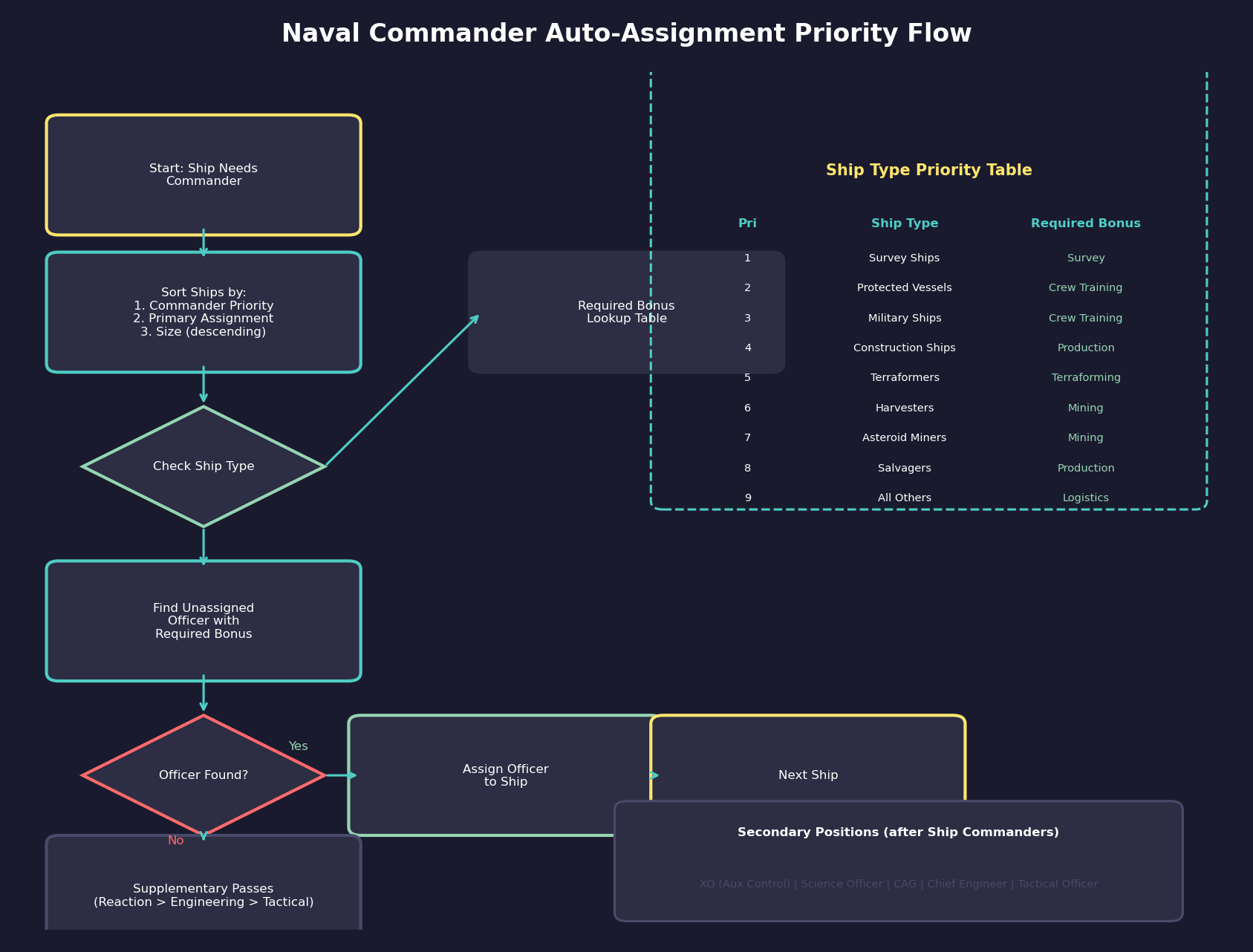
The auto-assignment system matches available commanders to ships needing captains during each construction phase, prioritizing by player-set preferences and ship requirements.
Assignment Priority Order:
Ships are processed for assignment in this order:
- Commander Priority (player-set via the ship class window, 0 = Low)
- Primary Assignment Priority (Aurora-determined, based on ship type)
- Secondary Assignment Priority (Aurora-determined, based on descending size)
New ship classes default to priority level 10. The Commander Priority is the most important factor in determining which ships are checked first.
Ship Classification and Required Bonuses (unverified — #718):
| Priority | Ship Type | Required Bonus |
|---|---|---|
| 1 | Survey ships (geological/gravitational sensors) | Survey |
| 2 | Protected vessels | Crew Training |
| 3 | Military ships | Crew Training |
| 4 | Construction ships | Production |
| 5 | Terraformers | Terraforming |
| 6 | Harvesters | Mining |
| 7 | Asteroid miners | Mining |
| 8 | Salvagers | Production |
| 9 | All others | Logistics |
Secondary priorities rank by descending ship size (or module count where applicable).
Commander Selection:
During the initial assignment phase, candidates must possess the ship’s required primary bonus or they will not be selected. Unassigned commanders still gain experience and new bonuses gradually.
Non-Command Position Assignment:
After ship commanders are assigned, secondary officer positions are filled based on ship modules (unverified — #718):
| Position | Required Module | Bonus Used |
|---|---|---|
| Executive Officer | Auxiliary Control | Crew Training |
| Science Officer | Science Department | Survey |
| Commander, Air Group | Primary Flight Control | Carrier Operations |
| Chief Engineer | Main Engineering | Engineering |
| Tactical Officer | CIC | Tactical |
Supplementary Assignment Passes:
Three additional passes occur for military ships still lacking commanders after the primary assignment, prioritizing Reaction, then Engineering, then Tactical bonuses respectively. (unverified — #718)
16.3.1.6 Task Group Commanders
When multiple ships operate together in a task group (see Section 9.3 Task Groups), a Task Group Commander provides fleet-level coordination. The task group commander is automatically the senior officer among all ship commanders in the group, or can be specifically assigned as a flag officer aboard a designated flagship.
Task group commander bonuses include:
- Fleet Tactics: Improves coordination between all ships in the group.
- Initiative: The task group acts more decisively in combat.
- Formation Control: Ships maintain better formation discipline and spacing.
For maximum effectiveness, assign your best Fleet Tactics officer as the task group commander and ensure they are aboard a suitable flagship (a ship with flag bridge facilities, if you have designed one).
16.3.1.7 Fleet Commanders
Fleets can have an overall fleet commander who provides the highest level of coordination:
- Fleet-wide reaction rating improvement (via the commander’s Reaction Bonus).
- Strategic-level decision making for automated fleet orders.
- Morale bonus to all ships in the fleet.
Flag bridge requirement: To appoint a fleet commander whose bonuses apply fleet-wide, at least one ship in the fleet must have a flag bridge component. If no flag bridge exists, the senior ship commander becomes the de facto fleet commander, but their reaction bonus does not apply to other ships.
Manual appointment only: Flag officers are not assigned by the auto-assignment system (see Section 16.3.1.5). You must manually assign a fleet commander through the Commanders window (F4) by selecting an unassigned officer of sufficient rank and assigning them to the flag bridge position.
Seniority rule: The highest-ranking officer in the fleet commands it, regardless of which ship they are on. If the highest-ranked officer is not aboard the ship with the flag bridge, the fleet does not receive the flag bridge bonus. Ensure your intended fleet commander is both the most senior officer and stationed on the flagship.
Fleet commanders require Admiral rank or higher and should be your most experienced and skilled senior officers.
16.3.1.8 Carrier and Fighter Commands
Carriers require special attention for officer assignments:
- Carrier Captain: Commands the carrier itself, handling ship operations.
- Fighter Wing Commander: Commands the embarked fighter groups, affecting their combat performance through Carrier Operations skill.
If your carrier design does not include a separate fighter command position, the ship captain’s Carrier Operations skill applies to embarked fighters instead.
Tip: When forming a task group for combat, check not just who will command it, but who among the ship captains is the senior officer. If your best frigate captain is senior to your cruiser captains, they will automatically become the task group commander – potentially commanding the fleet from a frigate while your cruisers go without fleet-level bonuses. Either promote a cruiser captain to higher rank or assign a flag officer to the group specifically.
16.3.1.9 Admin Command Auto-Assignment and Required Bonuses
Admin commands (see Section 9.4 Fleet Organization) support an auto-assign feature that matches commanders to positions based on a specified required bonus.
Required Bonus Selection:
When configuring an admin command, you can specify a required bonus type (e.g., “Crew Training” for a training academy command). The auto-assign button then evaluates all available officers and selects the one with the highest rating in that bonus, ensuring the best-qualified officer fills the role.
Rank Restriction Rule:
A subordinate command’s officer can never hold the same rank or higher than the parent command’s officer. The sole exception is Fleet Admirals, who can report to other Fleet Admirals (unverified — #718). When promotions create rank violations, the command structure displays red highlighting to alert the player that the hierarchy needs restructuring.
Priority Numbering:
Admin commands use priority numbers where lower values indicate higher importance (priority 1 is more important than priority 2). The overall navy command might be set to priority 2, while the military combat command is priority 1, reflecting operational precedence.
16.3.1.10 Training Command Behavior
Ships assigned to a Training-type admin command receive accelerated crew training (see Section 16.2.3 Crew Grade and Training). The training bonus from the command’s officer applies at full strength to all ships within the command hierarchy.
Training Operational Costs: (v2.6.0)
Training is not free. Ships under a Training command incur the following costs and requirements:
- Fuel Consumption: Ships consume fuel as if running engines at 10% power during training exercises (unverified — #718). Extended training periods can deplete fuel reserves significantly – ensure adequate fuel stockpiles or refueling capability.
- No Fuel, No Training: Training will NOT occur if the ship is out of fuel. A ship with empty tanks sits idle regardless of its Training command assignment.
- Commander Requirement: Training requires a sufficiently senior commander assigned to the Training command. Without an adequately ranked officer, the training bonus does not apply.
- Accelerated Maintenance: The maintenance clock increases at 2x the normal rate during training (unverified — #718). Ships in training wear out faster and require more frequent maintenance facility visits. Factor this into your maintenance scheduling.
Tip: Before assigning ships to a Training command, verify they have sufficient fuel reserves for the training duration and that a maintenance facility can handle the accelerated wear. A ship that runs out of fuel mid-training wastes the assignment slot.
The 100% Training Problem:
Once ships in a Training command reach maximum crew training, the game generates repeated “Fleet can’t improve anymore” notification messages every increment. These messages cannot be dismissed permanently while the ships remain under a Training-type command, creating notification spam that obscures other important events.
Reserve Command Workaround:
To resolve this, create a separate Naval Reserve command configured as a Naval type (not Training type). Move fully-trained ships from the Training command into the Reserve command. This stops the notification spam while keeping ships organized within the admin command hierarchy. When new untrained ships arrive, place them in the Training command until they reach full training, then transfer them to Reserve.
Tip: Establish a standard command structure early: a Training command for ships working up their crew grade, and a Reserve command for fully trained ships awaiting deployment. This two-stage pipeline prevents notification spam and makes it easy to identify which ships are combat-ready versus still in training.
Logistics Command Placement:
Logistics-type admin commands are typically placed under the navy command rather than under the military command, since freighter and tanker operations are more commercial in nature. This organizational choice affects which ships benefit from the logistics bonus cascade.
16.3.2 Colony Governors
Updated: v2026.01.30
Every colony benefits from having a governor assigned. Governors provide administrative bonuses that can significantly improve a colony’s output and growth.
16.3.2.1 Governor Effects
A colony governor applies their administrative skills to the colony:
- Mining Bonus: Improves the output of all mining operations (see Section 6.1 Minerals) (both manual mines and automated mines) on the colony. A governor with 30% Mining skill increases mineral extraction by 30%.
- Production Bonus: Improves the output of all construction facilities, ordnance factories, and fighter factories on the colony. Critical for major industrial worlds.
- Population Growth: Accelerates natural population growth and may improve immigration rates to the colony.
- Research Bonus: If the colony has research labs, the governor’s relevant research skill can provide a modest bonus to all research conducted there.
16.3.2.2 Choosing a Governor
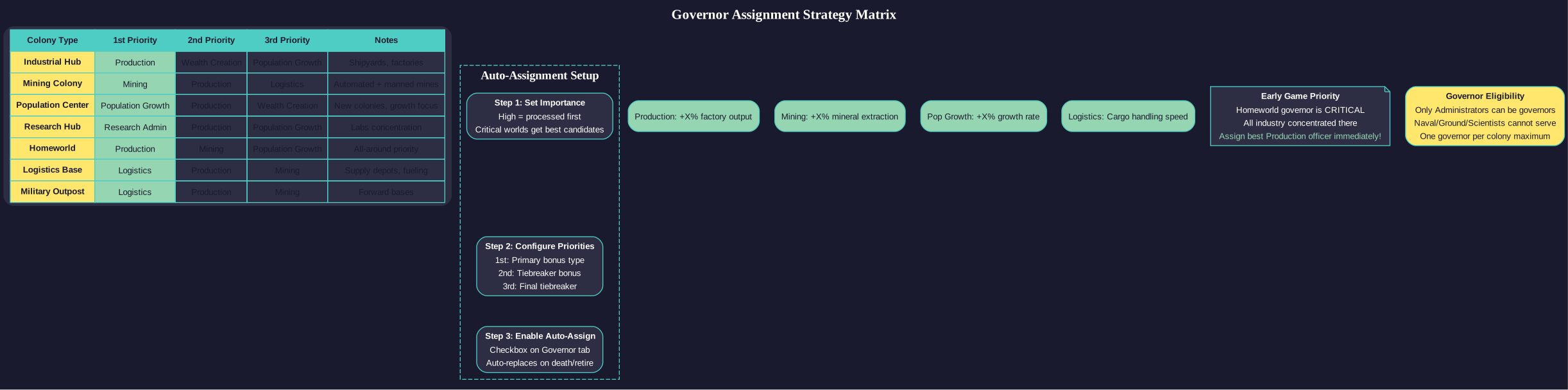
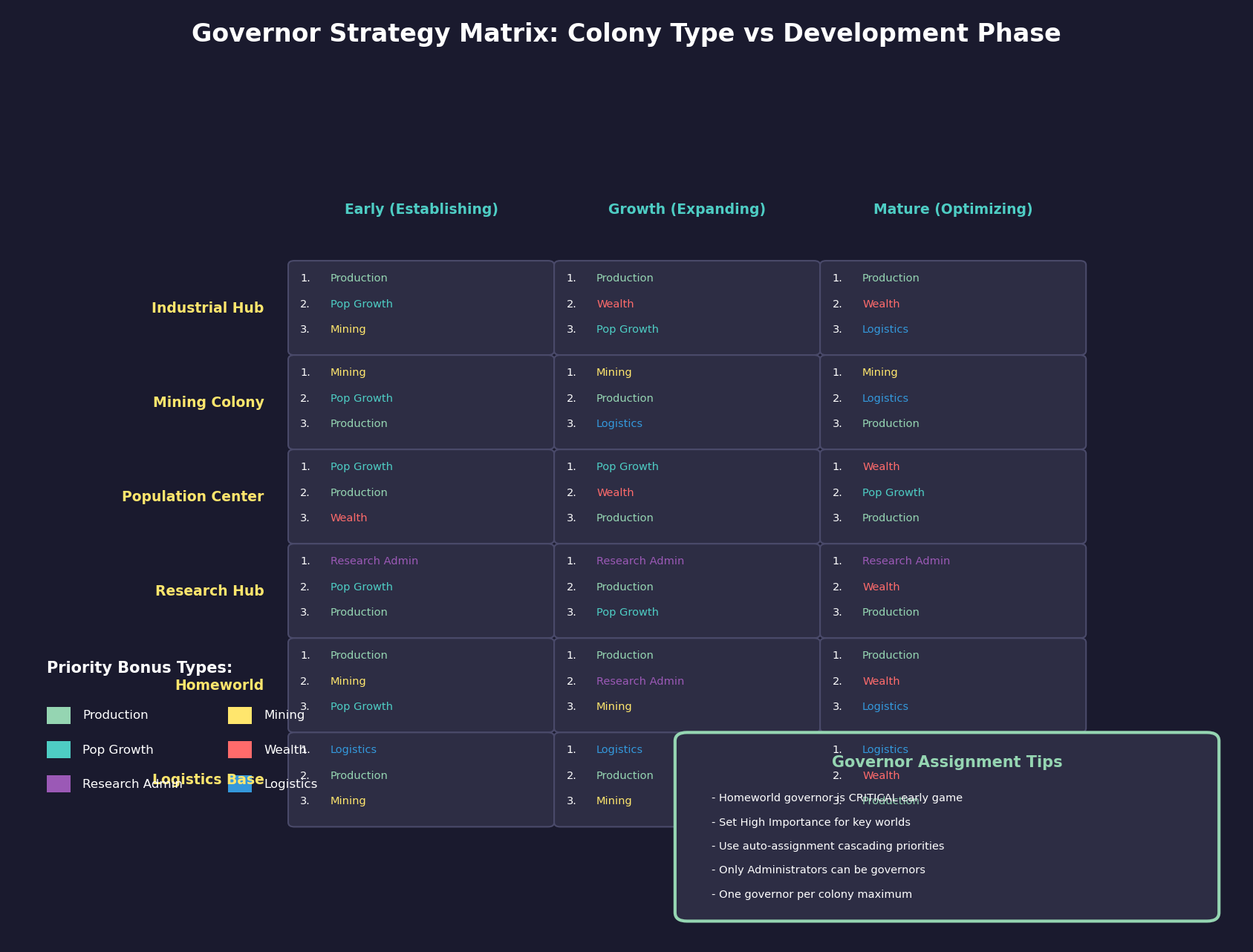
The ideal governor depends on the colony’s primary purpose:
- Industrial Worlds: Prioritize Production skill. Your main shipbuilding and construction worlds should have your best Production governors.
- Mining Colonies: Prioritize Mining skill. Particularly important for resource-rich bodies where increasing output has the greatest absolute effect.
- Population Centers: Prioritize Population Growth skill. New colonies that need to grow quickly benefit most from this.
- Research Centers: Prioritize the relevant scientific skill if the colony specializes in a particular research area.
16.3.2.3 Assigning Governors
To assign a governor via the Commanders window:
-
Open the Commanders window (F3).
-
In the commander type list (left panel), select Administrators to filter to governor-eligible officers.
-
Select an available administrator with the desired skills (Production, Mining, etc.).
-
Use the assignment controls to assign them as colony governor for the target world.
Only one governor can be assigned to each colony. If you reassign a governor, the previous one becomes available in the officer pool.
Note: The governor assignment option only appears when you have an Administrator-type commander selected. Other commander types (Naval Officers, Scientists, etc.) cannot be assigned as governors.
16.3.2.4 Automated Governor Assignment
The Governor & Miscellaneous tab on the Economics window provides an automated assignment system that handles governor selection and replacement without manual intervention. (v2.0.0)
Automated Assignment Checkbox:
When enabled for a colony, the system automatically assigns a replacement governor if the current governor dies, retires, or is reassigned. Without this checkbox, vacancies remain unfilled until the player manually assigns a new governor.
Importance Level:
Each colony can be assigned an importance level (e.g., “High Importance”) that influences candidate selection priority. Higher-importance colonies are processed first during automated assignment, ensuring your most critical worlds receive the best available candidates before less important colonies are considered.
Required Bonus Priority (Cascading):
Players configure a cascading priority list of up to three required bonuses for each colony. The system evaluates candidates in the following order:
-
First Priority: Candidates are ranked by their score in the primary bonus (e.g., Production).
-
Second Priority: Ties in the first priority are broken by the second bonus (e.g., Wealth Creation).
-
Third Priority: Remaining ties are broken by the third bonus (e.g., Mining).
The system selects the administrator with the highest score in the first priority bonus. Only when multiple candidates have identical first-priority scores does the second priority become the tiebreaker, and similarly for the third.
Assign Colony Governor Button:
Clicking this button triggers an immediate assignment based on the currently configured criteria, without waiting for the next automated assignment cycle. This is useful for filling a vacancy right away or re-evaluating after new officers become available.
Tip: Configure your homeworld and major industrial centers with “High Importance” and Production as the first priority bonus. For mining outposts, set Mining as the first priority. This ensures the automated system makes sensible choices even when you are focused on other aspects of your empire.
16.3.2.5 Governor Rank Requirements
Governors do not have strict rank requirements like ship commands, but assigning a high-ranking officer as governor of a major colony is appropriate and can provide morale benefits to the population.
16.3.2.6 Sector Commanders
For empires with many colonies, sector commanders can provide bonuses to multiple colonies within their sector. This is a higher-level assignment that affects all colonies in a defined region, though with reduced per-colony effectiveness compared to a dedicated governor.
Tip: Your Earth (or homeworld equivalent) governor is arguably your most important administrative assignment in the early game. With all your industry concentrated there, even a modest Production bonus translates into significantly faster ship construction and infrastructure development. Assign your best Production officer as homeworld governor immediately.
16.3.3 Research and Other Roles
Updated: v2026.01.28
Beyond ships and colonies, officers can fill several specialized roles that are essential to your empire’s development.
16.3.3.1 Research Scientists
Scientists are officers with high scientific skills who are assigned to lead research projects. This is one of the most impactful officer assignments in the game:
- Assignment: Each research project (see Section 7.1 Technology Tree) requires an assigned scientist. Open the Research window, select a project, and assign a scientist from the available pool.
- Skill Matching: The scientist’s skill in the relevant research field directly multiplies the research output. A scientist with 50% in Power/Propulsion assigned to an engine research project will produce 50% more research points per year than one with no bonus.
- Multiple Projects: Each scientist can only lead one project at a time, but you can have many projects running simultaneously with different scientists.
- Specialization: Scientists typically have one or two strong fields. Assigning them to research outside their specialty wastes their potential.
16.3.3.2 How to Evaluate Scientists
When reviewing scientists for research assignments, look at:
-
Primary Skill: Their highest scientific skill determines their best research field.
-
Skill Level: Higher is better, but a 30% specialist is still far better than a 0% generalist.
-
Secondary Skills: A scientist with moderate skills in two related fields provides flexibility.
-
Age: Young scientists will serve longer before retirement, providing continuity on long research projects.
16.3.3.3 Research Prioritization
With limited scientists, prioritize:
- Critical Technologies: Assign your best scientists to the technologies you need most urgently.
- Expensive Research: High-cost research projects benefit more from scientist bonuses in absolute terms (50% of a large number is more impactful than 50% of a small number).
- Bottleneck Fields: If you have many projects in one field but few specialists, that field’s scientists become especially valuable.
16.3.3.4 Ground Force Commanders
Army units require officers for effective ground combat operations:
- Battalion/Regiment Commanders: Lead individual ground units. Their Ground Combat Tactics skill directly affects unit effectiveness.
- Division/Corps Commanders: Lead larger formations. Their skills apply to all subordinate units.
- Garrison Commanders: Officers assigned to garrison duty focus on fortification and defense. Their Fortification skill provides bonuses to defensive positions.
Ground force commanders use the same assignment interface as other officers – select the officer and assign them to the relevant ground unit command.
16.3.3.5 Intelligence Officers
Officers with high Intelligence skill (naval officers only) enhance ELINT operations when commanding ships equipped with ELINT modules:
- ELINT Operations: The commander’s Intelligence bonus multiplies the base 1 point/day intelligence gathering rate from ELINT modules (see Section 15.5 Intelligence Gathering).
- No Active Espionage: C# Aurora does not have active espionage missions, counter-intelligence, or sabotage operations. Intelligence gathering is entirely passive and ship-based through ELINT modules.
16.3.3.6 Diplomatic Officers
Officers with high Diplomacy skill serve in diplomatic roles:
- Communication Teams: Officers assigned to communication efforts accelerate language learning for specific alien races.
- Diplomatic Missions: Officers assigned to diplomatic missions improve the success rate of treaty negotiations and other diplomatic actions.
16.3.3.7 Logistical Officers
Officers with Logistics skills can be assigned to logistical commands:
- Supply Bases: Improve the efficiency of supply distribution from major logistics centers.
- Fleet Train: Officers commanding logistics vessels (see Section 14.1 Fuel) (tankers, supply ships) with high Logistics skill reduce fuel waste and improve supply delivery rates.
16.3.3.8 Unassigned Officers
Officers without assignments remain in the reserve pool. While not actively contributing to operations, they:
- Continue to age and may retire.
- Do not gain experience (or gain it very slowly).
- Remain available for immediate assignment when needed.
Avoid keeping too many officers unassigned for extended periods, as they stagnate and may retire before you use them. Conversely, maintaining a small reserve ensures you can quickly fill vacancies when commanders are killed or retire.
Tip: Do not overlook the impact of scientist assignments on your research speed. The difference between having matching specialists and random officers on your research projects can amount to decades of tech development over a long game. Review your scientist assignments whenever new officers become available – a newly graduated scientist with 45% in your weakest research field is worth immediately reassigning from whatever project they were on.
Related Sections
- Section 5.1 Establishing Colonies – Colony governor assignments and production bonuses
- Section 7.1 Technology Tree – Scientist assignments and research project management
- Section 8.1 Design Philosophy – Command modules determining officer positions on ships
- Section 9.3 Task Groups – Task group and fleet commander hierarchy
- Section 14.1 Fuel – Logistics officer roles and supply chain management
References
\hypertarget{ref-16.3-1}{[1]}. Aurora C# Game Database (AuroraDB.db), Table: FCT_ShipDesignComponents (command module sizes and build costs: Bridge 1 HS/20 BP, Auxiliary Control 1 HS/15 BP, Science Department 2 HS/50 BP, Main Engineering 3 HS/75 BP, CIC 3 HS/75 BP, Primary Flight Control 4 HS/100 BP, Flag Bridge 5 HS/125 BP)
\hypertarget{ref-16.3-2}{[2]}. Aurora C# Game Database (AuroraDB.db v2.7.1) — FCT_ShipClass: NoOfficers column (INTEGER, default=0) stores the “No Officers” flag for ship classes.
\hypertarget{ref-16.3-3}{[3]}. Aurora Forums — v2.6.0 Changes List (https://aurora2.pentarch.org/index.php?topic=13463.0) — “‘No Officers’ flag excludes ship classes from Commander window assignments.”