17.1 Geological Survey
Updated: v2026.01.30

Contents
Updated: v2026.01.30
- 17.1 Geological Survey
- Contents
- 17.1.1 Survey Mechanics
- 17.1.2 Survey Ships
- 17.1.3 Mineral Discovery
- 17.1.3.1 Mineral Types
- 17.1.3.2 Deposit Characteristics
- 17.1.3.3 Accessibility Changes
- 17.1.3.4 Evaluating Survey Results
- 17.1.3.5 Mineral Generation Process
- 17.1.3.6 Bodies Without Minerals
- 17.1.3.7 Survey Strategy for Minerals
- 17.1.3.8 Survey Prioritization Strategy
- 17.1.3.9 Multi-System Survey Fleet Organization
- 17.1.4 Ground-Based Geological Survey
- 17.1.5 Survey Speed Modifier
- Related Sections
- References
17.1.1 Survey Mechanics
Updated: v2026.01.30
Geological surveys are the process by which your empire discovers mineral deposits on planets, moons, asteroids, and comets. Without a geological survey, you have no knowledge of what resources a body contains, making surveys one of the first and most important activities in any Aurora campaign.
17.1.1.1 Survey Points
Each celestial body requires a certain number of survey points to complete its geological survey. The number of points required depends on the body’s size:
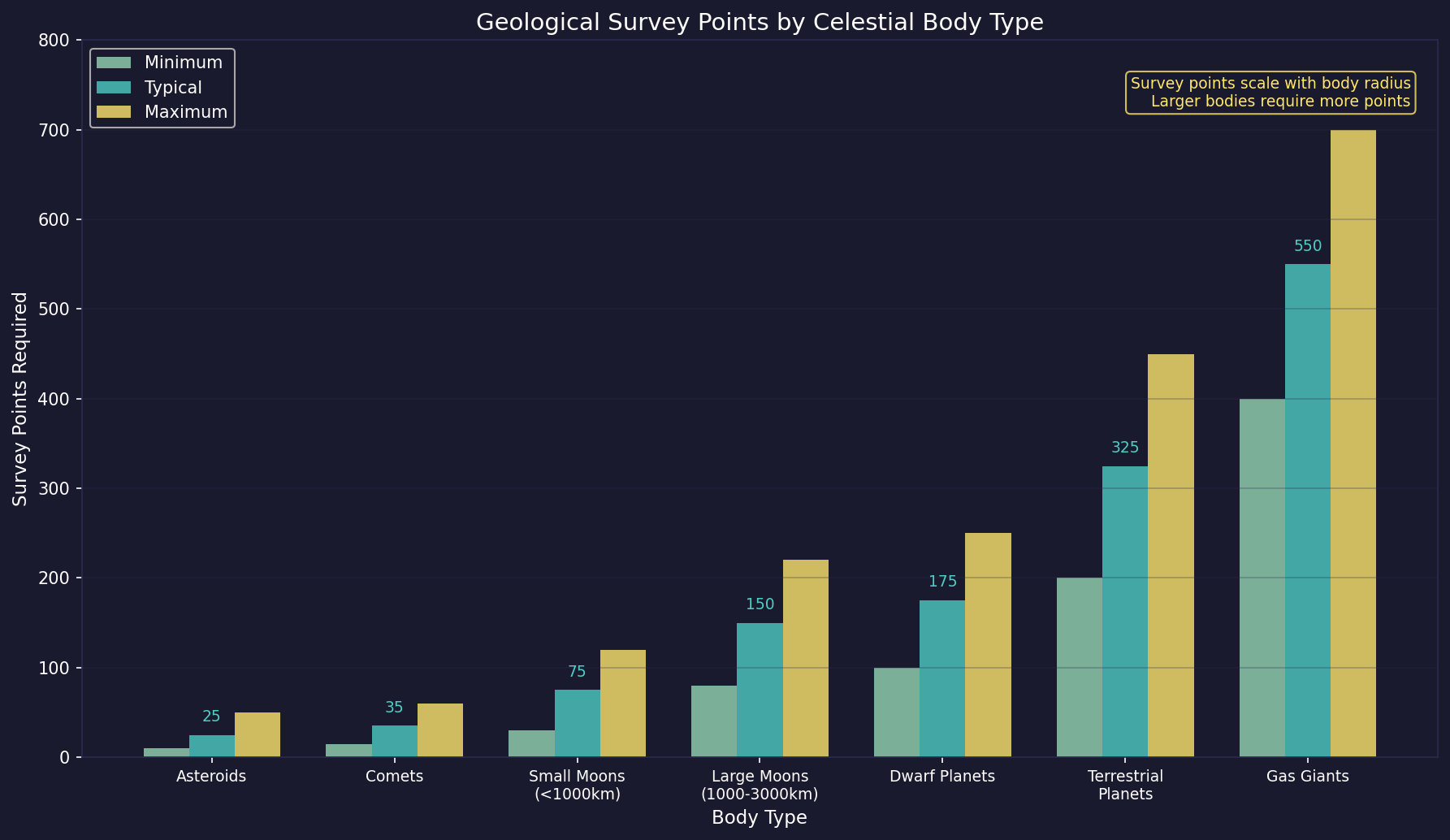
- Large Planets (gas giants, super-earths): Require the most survey points, often 500+ due to their immense size and number of potential mining sites. (requires live testing — #722)
- Terrestrial Planets: Require moderate survey points (typically 200-400), proportional to their surface area. (requires live testing — #722)
- Moons: Require fewer points than planets (typically 50-200), depending on size. (requires live testing — #722)
- Dwarf Planets: Similar to large moons (100-200 points). (requires live testing — #722)
- Asteroids: Require the fewest points (typically 10-50), as they are small bodies. (requires live testing — #722)
- Comets: Similar to asteroids in survey requirements.
Survey points are generated by geological survey sensors aboard your survey ships (see Section 8.1 Design Philosophy). The ship must be in the same system as the target body and ordered to survey it.
17.1.1.2 Survey Progress
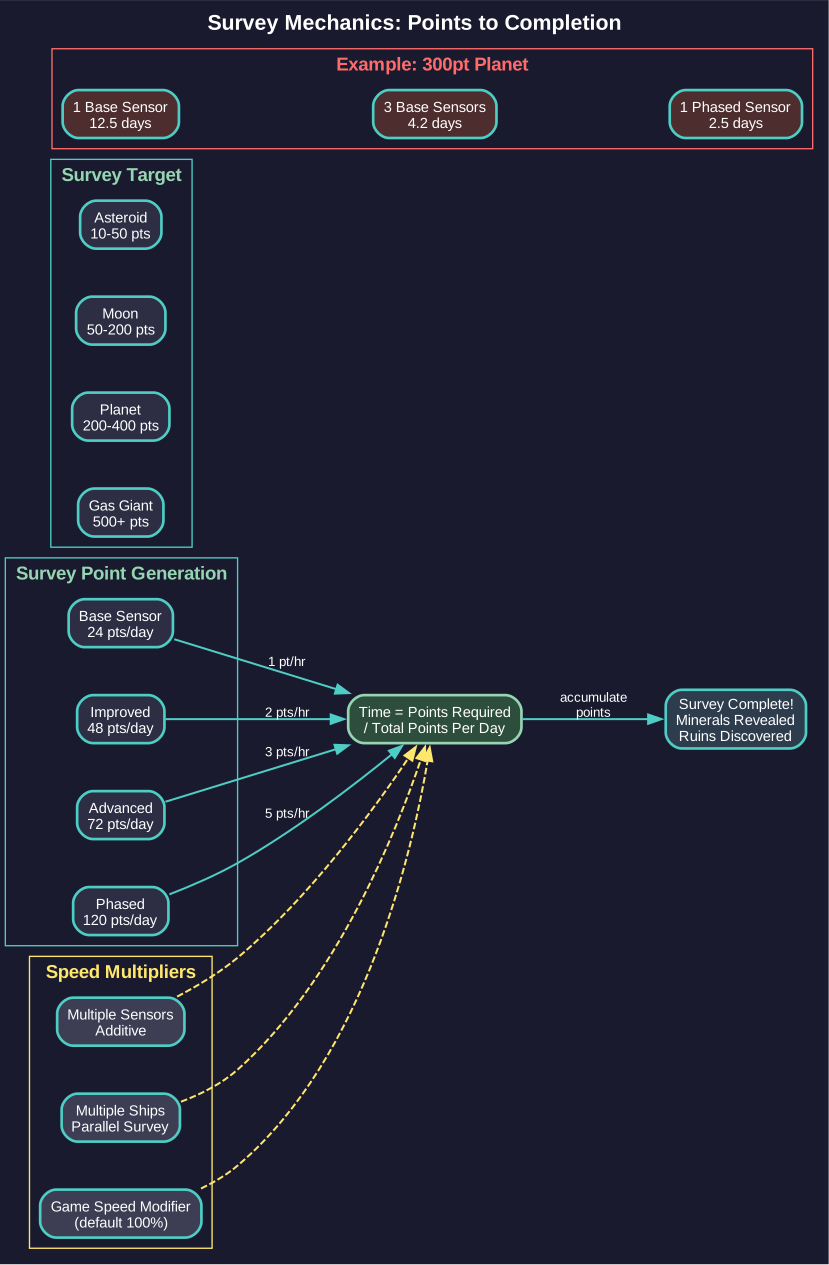
Surveying is not instantaneous – it takes time to accumulate the required survey points:
- Each geological survey sensor generates a fixed number of survey points per time increment based on the sensor’s Survey Points Per Hour rating (e.g., the base sensor generates 1 point per hour, or 24 points per day).\hyperlink{ref-17.1-1}{[1]}
- Multiple sensors on the same ship are additive, generating points faster.
- Multiple ships surveying the same body simultaneously each contribute their own points.
- Progress is tracked per-body and persists even if the survey ship leaves and returns later.
When the required number of survey points is reached, the survey completes and all mineral deposits on that body are revealed.
17.1.1.3 Survey Orders
To conduct a geological survey, assign your survey ship a survey order through the Task Group Orders window (see Section 9.5 Orders):
- Select the task group containing your survey ship.
- Choose “Geological Survey” from the order list.
- Select the target – you can survey a specific body or set the ship to automatically survey all unsurveyed bodies in the system.
The most common approach is to use the “Survey All” order, which instructs the ship to automatically move to and survey each unsurveyed body in the system. The ship will prioritize bodies in an efficient order based on its current position and the relative positions of unsurveyed bodies. (requires live testing — #722 — prioritization algorithm)
17.1.1.4 Survey Standing Order Options
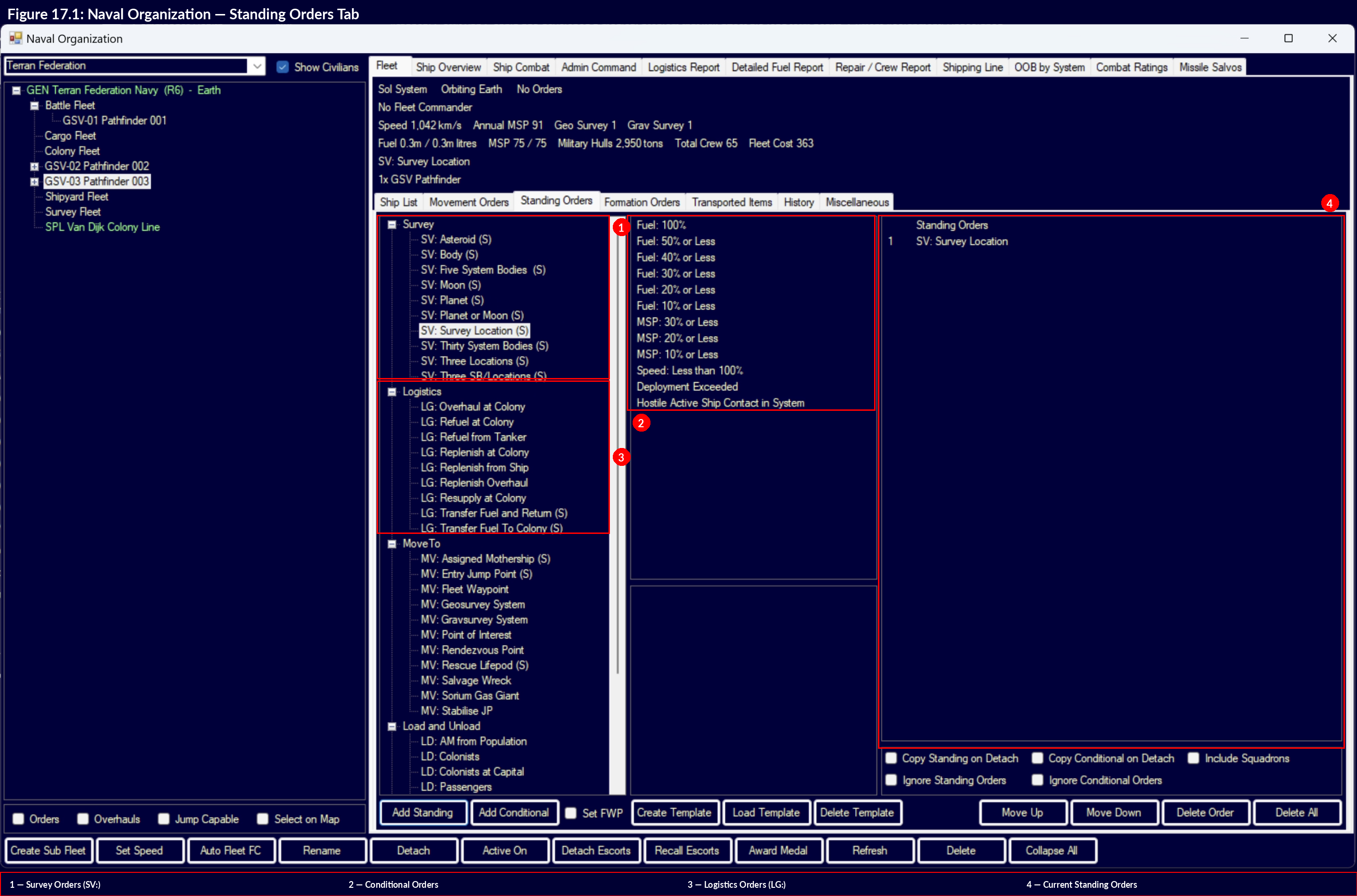
When setting up geological survey standing orders, several configuration options control how targets are selected and queued:
17.1.1.4.1 Batch Size (5 vs 30 System Bodies)
The batch size setting controls how many survey targets are loaded into the ship’s movement orders at once:
- 5 System Bodies: Loads five targets at a time.\hyperlink{ref-17.1-11}{[11]} This is the recommended setting because it prevents a flood of “order cannot be fulfilled” messages when the ship’s deployment period nears expiration. The ship requests new targets as it completes the current batch. (requires live testing — #722 — messaging behavior)
- 30 System Bodies: Loads thirty targets at once for fewer interruptions.\hyperlink{ref-17.1-11}{[11]} However, this generates confusing messages when deployment nears expiration, as many queued orders report unfulfillment simultaneously. (requires live testing — #722 — messaging behavior)
Tip: Use the “5 system bodies” setting for most survey fleets. The smaller batch size keeps the order queue manageable and avoids end-of-deployment message spam that can obscure important notifications.
17.1.1.4.2 Body Type Filters
Standing orders can be filtered by body type to divide survey labor among multiple fleets:\hyperlink{ref-17.1-11}{[11]}
| Filter | Targets |
|---|---|
| System Bodies | All unsurveyed bodies in the system (planets, moons, asteroids, comets) |
| Body | A single specified body |
| Planets or Moons | Only planets and moons, excluding asteroids and comets |
| Asteroids | Only asteroid bodies |
| System Bodies and Locations | All bodies plus gravitational survey locations (requires gravitational survey sensors) |
The “S” prefix on standing order names indicates the order searches within the current system only (SystemCheck=’S’ in the database) rather than across all known systems.\hyperlink{ref-17.1-11}{[11]}
17.1.1.4.3 Division of Labor
A practical fleet organization approach is to assign different body type filters to different survey fleets:
- Fleet A: “5 system bodies” with “Planets or Moons” filter – surveys the larger, higher-priority bodies first.
- Fleet B: “5 system bodies” with “Asteroids” filter – handles the numerous small bodies that take less time individually but add up.
When all qualifying bodies of the selected type have been surveyed, the standing order reports that it cannot be fulfilled, signaling the fleet is ready for reassignment to a new system.
17.1.1.4.4 Order Templates
Survey standing order configurations can be saved as templates and loaded onto new fleets, allowing rapid setup of multiple survey groups with consistent settings. See Section 9.5 Orders for details on the template system.
17.1.1.5 Survey Completion
When a geological survey of a body completes:
- All mineral deposits are revealed, showing the mineral type, quantity (in tons), and accessibility rating.
- Any alien ruins present on the body are discovered.\hyperlink{ref-17.1-10}{[10]} Ruins can only be found through geological survey — you cannot detect them any other way. See Section 17.3 Xenoarchaeology for details on excavating discovered ruins.
- An event message notifies you of the survey completion and any significant deposits found.
- The body is marked as “Geo Surveyed” in the system view.
- The survey ship automatically moves to the next unsurveyed body if using “Survey All” orders.
Tip: In systems with many bodies, a single survey ship can take years to complete all surveys. Consider sending multiple survey ships to large systems, or prioritizing habitable worlds and bodies near potential colony sites first. You can always come back for the asteroids later.
17.1.1.6 Hostile Encounters During Survey
Warning: Bodies in unexplored systems may harbor hostile alien forces. Survey ships approaching inhabited planets or moons can be attacked and destroyed without warning. This is a distinct danger from hostile encounters at jump points – aliens may already be present on or near system bodies, and your unarmed survey ship will be fired upon as it closes to survey range.
The risk of hostile encounters during geological survey operations is often underestimated by new players. The danger at jump points is well-known (see Section 4.4 Jump Points), but approaching a planet to survey it can be equally lethal if alien forces are already present. Survey ships are typically unarmed and unable to defend themselves or escape once engaged.
17.1.1.6.1 Mitigation Strategies
- Equip passive sensors: Mounting thermal or EM sensors on survey ships allows detection of alien populations or fleets before closing to survey range. Survey ships without sensors are flying blind and cannot detect threats until it is too late.
- Send an armed escort: When surveying bodies in newly discovered or potentially hostile systems, attach a military escort to the survey task group. Even a small warship can deter or delay attackers long enough for the survey ship to retreat.
- Survey inner bodies cautiously: Planets and moons are more likely to harbor alien populations than asteroids or comets. Consider surveying outer system bodies first while observing the inner system for signs of activity.
- Set conditional retreat orders: Configure standing orders so survey ships retreat to the jump point if fired upon, rather than continuing their survey route into further danger.
Tip: A survey ship lost to an ambush represents not just the cost of the vessel, but months or years of irreplaceable survey progress. The small investment in passive sensors or a light escort pays for itself the first time a threat is detected before engagement range.
17.1.2 Survey Ships
Updated: v2026.01.30
Effective geological survey requires purpose-built ships equipped with the appropriate sensor components.
17.1.2.1 Required Components
A geological survey ship must include at least one Geological Survey Sensor in its design. This is the only mandatory component for the survey function. However, practical survey ships also include:
- Engine: Obviously required for movement. Survey ships benefit from high speed to minimize transit time between survey targets.
- Fuel Tanks: Sufficient fuel capacity for extended operations across entire star systems without refueling.
- Engineering Spaces: For maintenance during long deployments away from port.
- Life Support: Extended life support for long-duration missions.
17.1.2.2 Geological Survey Sensors
The Geological Survey Sensor is a specialized sensor component that generates survey points:
- Base Model: The starting sensor provides 1 survey point per hour (24 points per day).\hyperlink{ref-17.1-1}{[1]} This rate improves with technology.
- Higher Tech Versions: As you research improved survey sensor technology, new sensors become available that generate more survey points per hour: Improved (2/hour), Advanced (3/hour), and Phased (5/hour).\hyperlink{ref-17.1-1}{[1]}\hyperlink{ref-17.1-2}{[2]}
- Multiple Sensors: You can mount multiple geological survey sensors on a single ship for faster surveying. Each sensor independently contributes to the survey rate.
- Size: Survey sensors are relatively compact and do not require excessive hull space.
17.1.2.3 Survey Speed Calculation
The time to survey a body is straightforward:
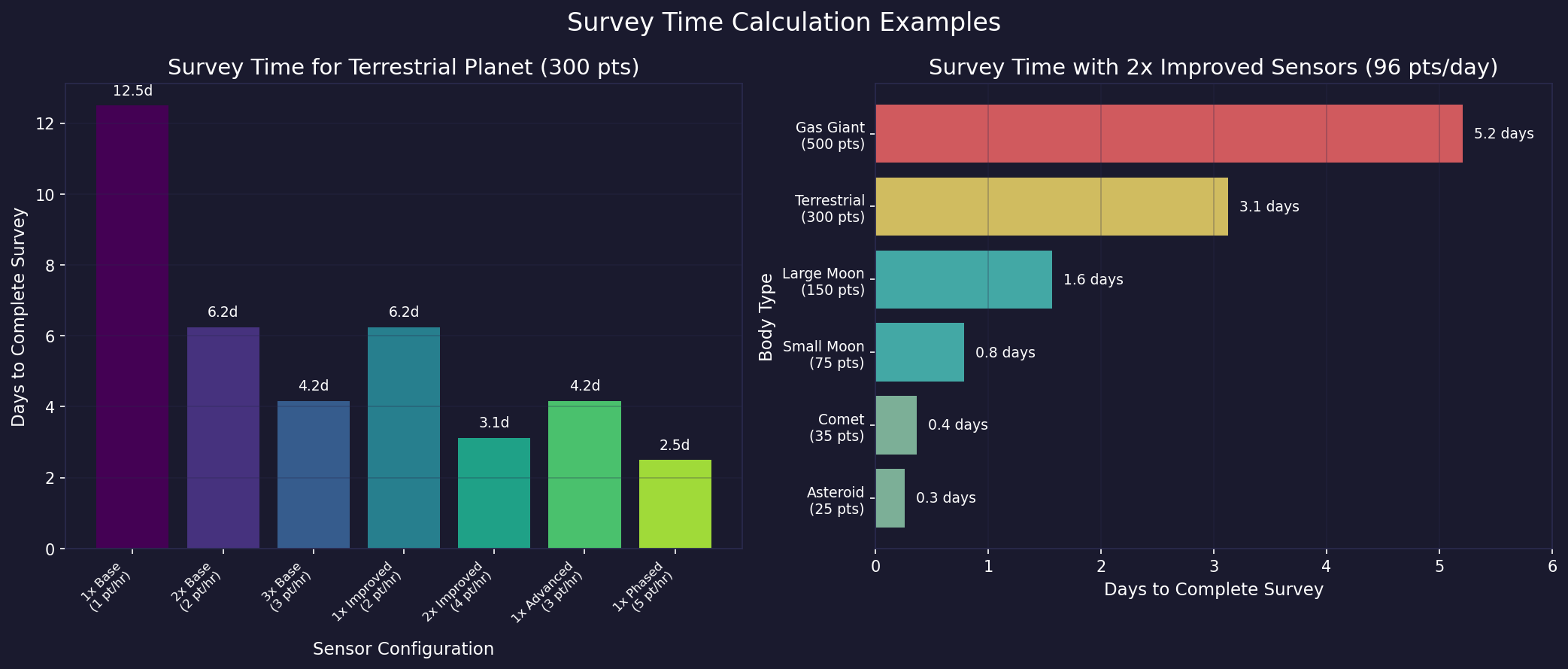
Time = Survey Points Required / Total Survey Points Per Day
For example, a planet requiring 300 survey points with a ship generating 30 points per day will take 10 days to survey. A ship with three sensors generating 30 points each (90 total) would complete the same survey in roughly 3.3 days.
Survey Speed Modifier: The game-level Survey Speed Modifier (set at game creation) affects survey point generation rate.\hyperlink{ref-17.1-9}{[9]} As of v1.12.0, this modifier also applies to ground-based geological surveys and sensor buoy-based geological surveys, not just ship-mounted sensors. A value of 100 is standard; lower values make all surveys take proportionally longer. (requires live testing — #722 — v1.12.0 ground/buoy modifier expansion)
17.1.2.4 Optimal Survey Ship Design
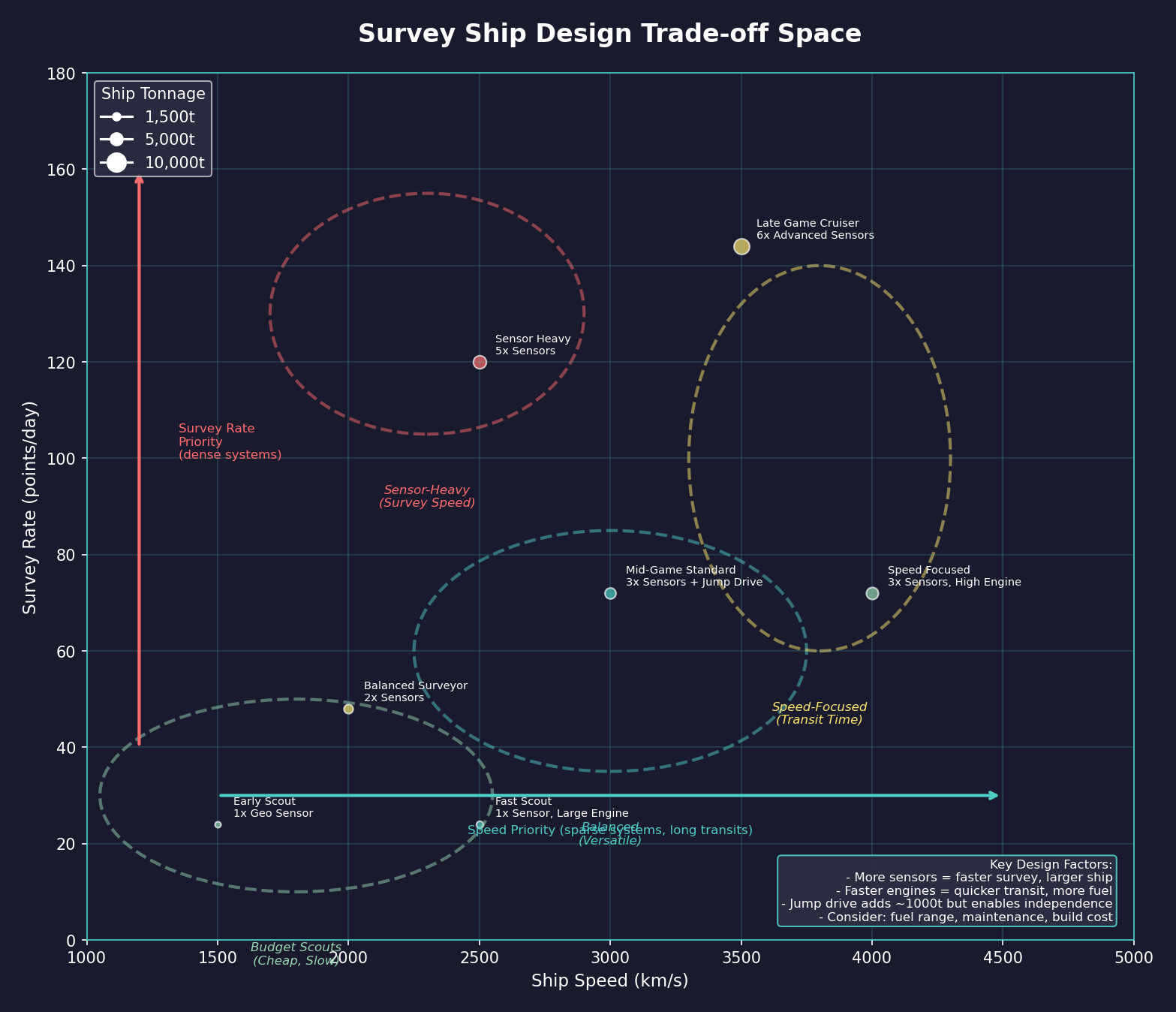
When designing geological survey ships, consider:
- Speed vs. Survey Rate: A faster ship reaches targets sooner, but more sensors survey them faster. The optimal balance depends on system size and body density. In compact systems with many bodies close together, more sensors are better. In sparse systems with widely separated bodies, speed matters more.
- Range: Survey ships often operate far from refueling facilities. Ensure enough fuel capacity for at least one full system survey without refueling.
- Endurance: Survey missions can take months or years. Include sufficient maintenance supplies to avoid breakdowns.
- Size: Smaller ships are cheaper and faster to build. Since survey ships do not fight, there is no need for weapons or heavy armor. Keep them lean.
- Jump Capability: Consider whether your survey ships need their own jump drives (see Section 10.2 Jump Transit) or will rely on jump-capable escorts or jump gates. Ships with their own drives are more flexible but larger and more expensive.
17.1.2.5 Example Survey Ship Designs
Early Game Scout (small, cheap, slow survey):
- 1x Geological Survey Sensor
- Small engine, large fuel tanks
- Minimal crew, extended life support
- Approximately 1,000-2,000 tons (design guidance — #722)
Mid-Game Surveyor (balanced speed and capability):
- 2-3x Geological Survey Sensors
- Medium engine for good transit speed
- Adequate fuel for extended operations
- Jump drive for independent operation
- Approximately 3,000-5,000 tons (design guidance — #722)
Late Game Survey Cruiser (fast, efficient, durable):
- 4-6x Geological Survey Sensors (advanced technology)
- High-performance engines
- Extended range fuel tanks
- Full maintenance facilities
- Jump drive
- Optional: point defense for hostile space operations
- Approximately 6,000-10,000 tons (design guidance — #722)
Tip: Survey ships are among the first ships your empire will build and remain useful throughout the entire game. Design a good one early and keep building improved versions as your technology advances. Having three or four survey ships exploring simultaneously is far more efficient than relying on a single vessel.
17.1.3 Mineral Discovery
Updated: v2026.01.30
The ultimate purpose of geological surveys is discovering exploitable mineral deposits. Understanding how minerals are distributed and what the survey results mean is crucial for planning your empire’s economy.
17.1.3.1 Mineral Types
Aurora C# features eleven minerals\hyperlink{ref-17.1-3}{[3]} (see Appendix D: Reference Tables for full details), each essential for different aspects of construction and technology:
| Mineral | Primary Uses |
|---|---|
| Duranium | Hull construction, basic structures |
| Neutronium | Armor, heavy structural components |
| Corbomite | Advanced armor, shields |
| Tritanium | Electronic components, sensors |
| Boronide | Power plants, reactors |
| Mercassium | Research equipment, electronics |
| Vendarite | Weapons systems |
| Sorium | Fuel (refined into fuel for ships) |
| Uridium | Jump drives, advanced components |
| Corundium | Terraforming equipment, life support |
| Gallicite | Engines, propulsion systems |
17.1.3.2 Deposit Characteristics
Each mineral deposit discovered through geological survey has two key attributes:
17.1.3.2.1 Quantity
The total amount of the mineral available, measured in tons. Deposits range from tiny (a few hundred tons) to massive (millions of tons). Larger deposits sustain mining operations longer before depletion.
17.1.3.2.2 Accessibility
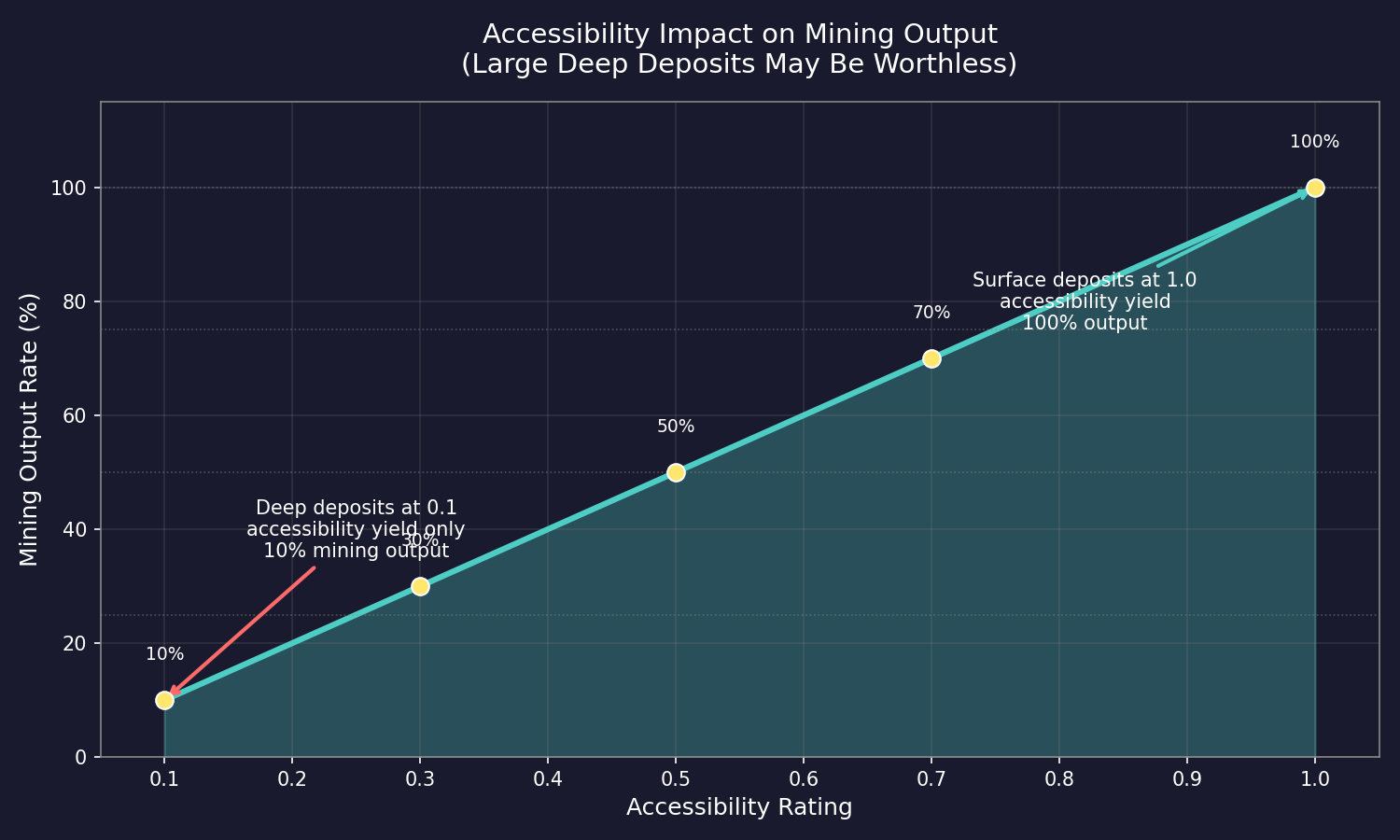
Accessibility is rated from 0.1 to 1.0 and determines the effective mining rate:\hyperlink{ref-17.1-8}{[8]}
- 1.0 (Maximum): The deposit is on the surface or easily accessible. Mining produces at full efficiency.
- 0.5 (Moderate): The deposit requires some effort to reach. Mining produces at half the normal rate.
- 0.1 (Minimum): The deposit is deep underground or otherwise difficult to exploit. Mining produces at only 10% of the normal rate.
Accessibility directly multiplies mining output. A deposit with 1,000,000 tons at 0.3 accessibility effectively produces minerals at 30% of the normal mining rate, making it equivalent to a 300,000-ton deposit at 1.0 accessibility for output purposes (though the total quantity available is still 1,000,000 tons).
17.1.3.3 Accessibility Changes
As a deposit is mined, its accessibility gradually decreases.\hyperlink{ref-17.1-8}{[8]} The easiest-to-reach portions of the deposit are extracted first, leaving progressively harder-to-access material. This means mining output from any single deposit naturally declines over time, eventually making the deposit uneconomical to exploit compared to finding new, more accessible sources.
17.1.3.4 Evaluating Survey Results
When reviewing survey results for a newly surveyed body, consider:
- Total Mineral Value: The combined quantity and accessibility of all minerals present. A body with large, accessible deposits of multiple minerals is a prime mining candidate.
- Critical Minerals: Some minerals are chronically scarce (Gallicite and Sorium are common bottlenecks). Prioritize bodies with good deposits of your scarcest minerals.
- Accessibility: A small deposit at 1.0 accessibility may be more immediately valuable than a huge deposit at 0.1.
- Location: A moderate deposit in a convenient location (near existing colonies or jump points) may be more practical than an excellent deposit in a dangerous or distant system.
17.1.3.5 Mineral Generation Process
The system uses a three-phase roll to determine mineral deposits:
- Overall Mineral Potential: Based on the body’s radius, density, and system abundance settings, the game determines whether the body has minerals at all. Approximately 5% of all bodies contain minerals.\hyperlink{ref-17.1-3}{[3]}
- Per-Mineral Type Rolls: Each mineral type is checked independently. Duranium has twice the probability of appearing compared to other minerals, making it the most commonly discovered resource.\hyperlink{ref-17.1-4}{[4]}
- Accessibility Rolls: Accessibility is determined based on the body’s radius. Larger bodies tend to have lower accessibility (deeper deposits), while smaller bodies like asteroids tend to have very high accessibility (averaging 0.97-1.0) but lower quantities.\hyperlink{ref-17.1-12}{[12]}
Sensor quality (normal, improved, advanced, phased) and ground surveyor capabilities affect only the time required to complete a survey, not the chance of finding minerals. The mineral generation results are predetermined by the body’s characteristics.
17.1.3.6 Bodies Without Minerals
Not every surveyed body will have useful mineral deposits. Many asteroids, moons, and even planets will be mineral-poor or entirely barren. This is normal and expected – roughly 95% of bodies will have no minerals at all. Typically:
- Gas giants only contain Sorium (MaterialID=8 is the only mineral type present on BodyTypeID=4 bodies) and cannot receive ground surveys.\hyperlink{ref-17.1-13}{[13]}
- Terrestrial planets in habitable zones often have moderate deposits when minerals are present.
- Asteroids are hit-or-miss – many are worthless, but some are mineral-rich with high accessibility.
- Comets (BodyTypeID=14) have moderate accessibility (averaging 0.73) and moderate quantities – they fall between small moons and asteroids in deposit characteristics.\hyperlink{ref-17.1-12}{[12]}
17.1.3.7 Survey Strategy for Minerals
To maximize the return on your survey investment:
- Survey habitable worlds first: They are candidates for colonization regardless of minerals, and mineral deposits are a bonus.
- Survey inner system bodies next: Closer to your likely colonies, easier to exploit.
- Survey asteroid belts: High-accessibility deposits are common in asteroids, though quantities tend to be smaller.
- Leave distant/peripheral bodies for later: Survey them when your nearer resources are depleted or when convenient.
Tip: Do not dismiss low-accessibility deposits entirely. As your technology improves and you gain access to more efficient mining operations, deposits that were uneconomical early in the game become viable later. A body with massive quantities at 0.2 accessibility might be worth colonizing once you have advanced mining technology and have exhausted more accessible deposits elsewhere.
17.1.3.8 Survey Prioritization Strategy
With limited survey ships and vast numbers of bodies to survey, strategic prioritization determines how quickly you find the resources your empire needs.
17.1.3.8.1 Which Systems to Survey First
(Community Tip) Prioritize systems in this order:
- Your starting system: Complete all geological surveys before sending ships through jump points. You need to know what resources are available at home.
- Systems one jump away: Your first expansion targets. Even mineral-poor neighbors may be transit corridors to richer systems.
- Systems with habitable worlds: Detected during gravitational survey transit, habitable worlds are colonization candidates regardless of minerals. Survey them first within each new system.
- Systems along your primary expansion corridor: If you are pushing toward a specific goal (known alien contact, promising star types), survey those systems to support forward operations.
- Backfill systems: Systems that are neither on your expansion path nor near habitable worlds can wait. Survey them when your ships would otherwise be idle.
17.1.3.8.2 Which Bodies to Prioritize Within a System
Not all bodies in a system deserve equal attention. Survey in this order:
- Habitable worlds: Always first. They are colonization candidates and may have ruins.
- Moons of gas giants: Often have accessible mineral deposits and are protected from detection by the gas giant’s bulk.
- Terrestrial planets: Larger deposits but often lower accessibility. Still worth surveying early.
- Asteroids: Numerous and quick to survey individually, but most are mineral-poor. Survey asteroids after the larger bodies unless you have a dedicated asteroid survey fleet.
- Comets: High accessibility but low quantity. Worth surveying opportunistically, but do not chase comets across the system.
(Community Tip) Gas giants themselves only contain Sorium and cannot be ground-surveyed. If you are not Sorium-starved, deprioritize gas giant surveys. The time spent surveying a gas giant could survey several asteroids.
17.1.3.8.3 Balancing Thorough Surveys vs. Rapid Expansion
Two competing philosophies exist for survey strategy:
Thorough Approach: Survey every body in each system before moving to the next. This ensures you know exactly what resources are available and never miss a valuable deposit.
- Pros: Complete information, no backtracking, identifies all mining opportunities
- Cons: Slow expansion, may delay finding critical resources in distant systems
Rapid Expansion Approach: Survey only high-priority bodies (habitable worlds, large moons) before pushing survey ships through new jump points. Return for complete surveys later.
- Pros: Faster exploration, finds more systems quickly, may discover richer systems sooner
- Cons: Incomplete information, may establish colonies in systems that prove mineral-poor
(Community Tip) Most experienced players use a hybrid approach: survey all planets and large moons in each system, but leave asteroids for later. This captures 80% of the valuable information at 30% of the time cost.
17.1.3.8.4 When to Skip Low-Value Bodies
Some bodies are rarely worth the survey time:
- Tiny asteroids (under 50 km): Very low mineral probability, quick to survey but rarely rewarding.
- Distant outer-system bodies: If a body is days of travel from your colony, the logistics cost of exploiting any minerals found may exceed their value.
- Bodies in systems you will not colonize: If a system has no strategic value and no habitable worlds, the minerals it contains may never be exploited.
Skip these bodies when your survey ships have more valuable targets elsewhere. Return when your survey fleet has excess capacity.
17.1.3.9 Multi-System Survey Fleet Organization
As your empire expands, organizing your survey operations becomes critical for sustained exploration efficiency.
17.1.3.9.1 Fleet Composition for Extended Missions
A well-organized survey fleet for multi-system operations includes:
- 2-4 Geological Survey Ships: Enough to survey large systems in reasonable time, with redundancy against losses.
- 1-2 Gravitational Survey Ships: Find jump points to the next system while geo surveys continue.
- 1 Jump-Capable Escort (optional): Protection in contested space and jump capability for ships without drives.
- 1 Tanker (recommended): Extends range dramatically and prevents stranding.
(Community Tip) The ideal ratio is approximately 2 geo survey ships per grav survey ship. The grav ship finds the next system’s jump points while the geo ships complete mineral surveys, then the fleet moves together.
17.1.3.9.2 Tanker Support for Deep-Space Surveys
Survey operations far from home require fuel logistics:
- Dedicated Survey Tanker: A small tanker (5,000-10,000 tons of fuel capacity) designed for survey fleet support. Includes jump drive, reasonable speed, and enough capacity to refuel the survey fleet twice.
- Fuel Efficiency Design: Design survey ships with extra fuel tanks and efficient engines. Every extra day of range reduces tanker dependency.
- Forward Fuel Caches: Establish small fuel stockpiles in systems along your exploration corridor. Even 10,000 tons of fuel at a forward base extends your effective range significantly.
17.1.3.9.3 Rotating Survey Ships for Continuous Coverage
For sustained exploration without gaps:
- Staggered Deployment: Do not send all survey ships out simultaneously. Stagger departures so ships return for maintenance at different times.
- Maintenance Scheduling: Survey ships need regular maintenance. Plan maintenance windows so at least one ship remains operational in each active survey region.
- Replacement Cycle: As you research better survey sensors, build new ships with improved technology. Retire older ships to secondary duties (following up on asteroid surveys) while new ships handle the frontier.
(Community Tip) A “rolling replacement” strategy works well: build one new survey ship per year. When the new ship enters service, the oldest ship transitions from frontier exploration to backfill survey work on skipped asteroids. This maintains continuous exploration while gradually upgrading your fleet.
17.1.4 Ground-Based Geological Survey
Updated: v2026.01.30
In C# Aurora, ground-based geological surveys provide a secondary method for discovering additional mineral deposits on bodies that have already been surveyed from orbit. This system replaces the VB6-era Geological Survey Teams with a military ground unit component.
17.1.4.1 Ground Survey Component
The ground-based geological survey capability comes from a specialized ground unit component (see Section 13.1 Unit Types and Formation Design):
- Technology Required: The ground geological survey component must be researched before it becomes available for ground unit design.
- Vehicle Requirement: The component is mounted on medium vehicles (ground force vehicle chassis), requiring vehicle construction capability.
- Size: 100 tons per component\hyperlink{ref-17.1-6}{[6]}
- Survey Rate: Each component provides 0.1 survey points per day\hyperlink{ref-17.1-6}{[6]}
- Integration: The component is mounted on ground combat vehicles or support vehicles, integrating geological survey into your ground force structure rather than treating it as a separate civilian capability
- Combined Capability: All formations at the same population with a geological survey capability combine their survey points, allowing multiple formations to work together toward survey completion
- Transport: Ground survey formations must be physically transported to the target body via troop transport or colony ship before they can begin survey operations
17.1.4.2 Eligibility Requirements
Not all bodies qualify for ground-based geological survey. A body must meet the following criterion:
- Minimum Diameter: 4,000 km or greater\hyperlink{ref-17.1-5}{[5]}
In Sol, the eligible bodies include Mercury, Venus, Earth, Mars, Ganymede, Callisto, and Titan.\hyperlink{ref-17.1-5}{[5]} Smaller moons, asteroids, and comets do not qualify for ground survey.
17.1.4.3 Ground Survey Potential
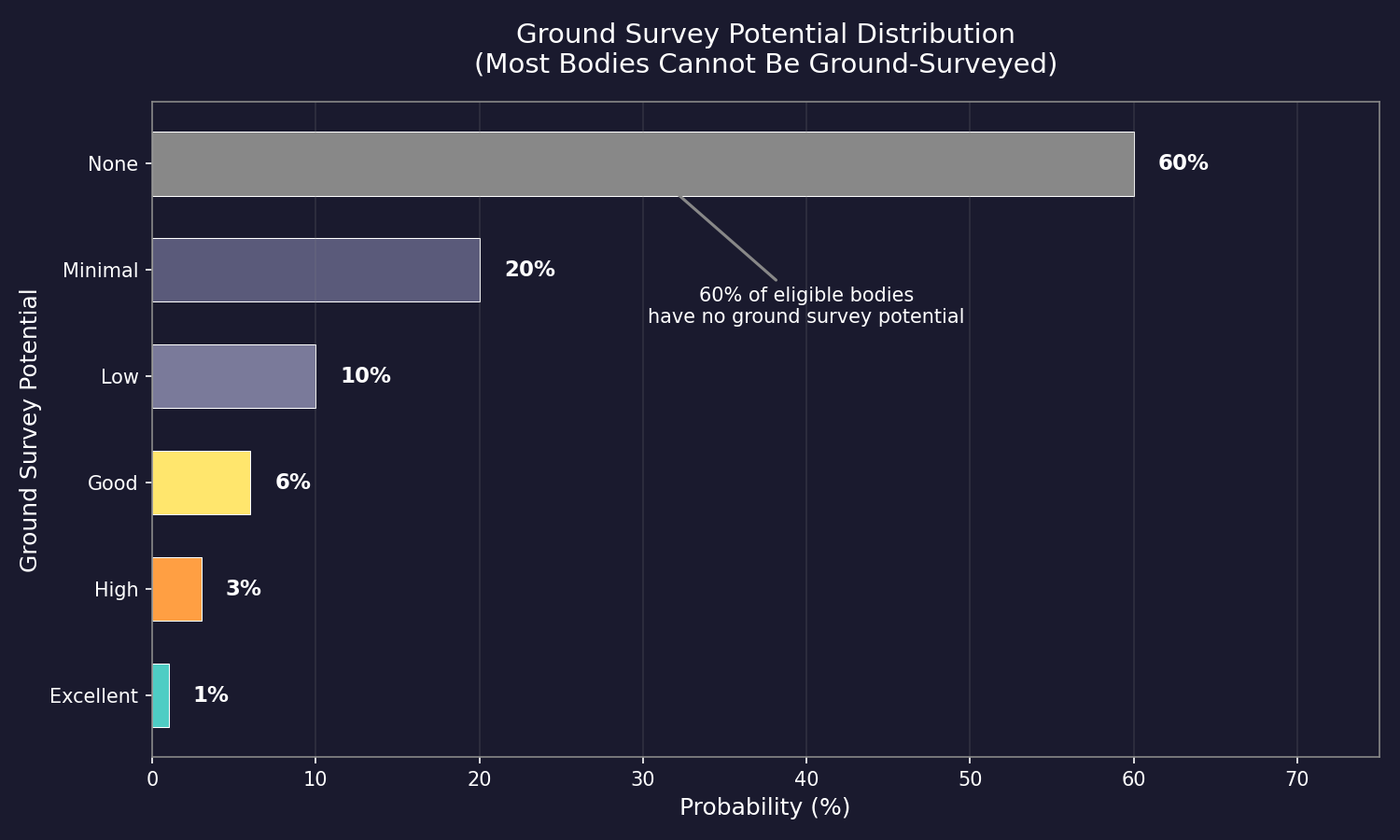
After completing an orbital geological survey, each eligible body is assigned a ground survey potential rating. This rating indicates how much additional mineral wealth might be discovered through ground-based operations:\hyperlink{ref-17.1-7}{[7]}
| Rating | Probability | Mineral Generation Rate | Accessibility Bonus |
|---|---|---|---|
| None | 60% | No ground survey possible | – |
| Minimal | 20% | 25% of normal rates | None |
| Low | 10% | 33% of normal rates | None |
| Good | 6% | 50% of normal rates | None |
| High | 3% | 100% of normal rates | +0.1 |
| Excellent | 1% | 200% of normal rates | +0.2 |
The ground survey potential is visible on the body’s information panel after the orbital survey is complete.
17.1.4.4 Ground Survey Number Indicator
After an orbital geological survey is completed, eligible bodies display a number next to them in the System View. This number is the ground survey potential indicator and represents how many times a ground-based geological survey can be completed on that body: (requires live testing — #722 — UI display)
- No number displayed: The body has no ground survey potential (the 60% “None” case) or is ineligible for ground survey.
- “1” displayed: The body can be ground-surveyed once, generating one set of additional mineral deposits upon completion.
- “2” displayed: The body can be ground-surveyed twice – after the first ground survey completes and reveals new minerals, a second ground survey can be performed for another chance at discovering additional deposits.
- Higher numbers: Rare, but indicate correspondingly more survey attempts are available.
Each completed ground survey consumes one count from this indicator. Once all available surveys are exhausted (the number reaches zero), no further ground surveys can be performed on that body.
Tip: A body showing a ground survey potential number of 2 or higher is a particularly valuable target, especially if it is already a colonization candidate. The additional mineral rolls can reveal deposits that were not present in the initial orbital survey, potentially turning a mineral-poor body into a worthwhile mining site. Prioritize deploying ground survey formations to bodies with higher numbers.
17.1.4.5 Survey Process
Ground surveys follow the same point-accumulation system as orbital surveys:
- Deploy ground forces with geological survey components to the target body
- Accumulate survey points over time (0.1 points per day per component)
- Complete the survey when accumulated points match the orbital survey requirement for that body. As of v2.3.0, ground geological survey completion triggers as an interrupt event, pausing the game to notify the player of the discovery. (requires live testing — #722 — v2.3.0 interrupt event)
- New minerals generated based on the ground survey potential rating
17.1.4.6 Mineral Generation from Ground Survey
When a ground survey completes, new mineral deposits are generated using a modified version of the normal mineral generation process:
- Overall probability roll: Based on planetary characteristics, determines if each mineral type is present
- Individual mineral determination: Each mineral type has a chance to appear, with Duranium having double the normal probability
- Accessibility assessment: Based on planetary radius, with bonuses at High (+0.1) and Excellent (+0.2) potential levels
The mineral generation rate modifier from the ground survey potential table is applied to the probability of each mineral type appearing. An Excellent-rated body generates minerals at twice the normal rate, while a Minimal-rated body generates at only one quarter.
17.1.4.7 Example Ground Survey Unit
A typical ground survey vehicle is a medium or heavy vehicle chassis (18-36 tons base) mounting the 100-ton geological survey component, resulting in a vehicle of approximately 118-136 tons or larger depending on additional components.\hyperlink{ref-17.1-6}{[6]} Players should design dedicated survey vehicles and organize them into formations for deployment to target bodies.
17.1.4.8 Strategic Considerations
- Focus on High and Excellent sites: The vast majority (60%) of eligible bodies have no ground survey potential. Of those that do, High and Excellent ratings are rare (3% and 1% respectively) but provide the best returns including accessibility bonuses
- Combine with colonization: Since ground survey requires deploying ground forces, coordinate with colonization efforts on promising bodies
- Multiple formations stack: Deploy multiple survey formations to the same population to accelerate the survey through combined survey points
- Long-term investment: At 0.1 points per component per day, ground surveys are slow. A formation with 10 survey vehicles generates only 1 point per day, meaning a body requiring 300 survey points takes 300 days to complete
17.1.5 Survey Speed Modifier
Updated: v2026.01.28
Aurora C# includes a configurable game-level setting that adjusts how quickly all survey operations complete.
17.1.5.1 How It Works
The survey speed modifier is a percentage value applied to the survey points produced by survey ships:
- Default Value: 100 (standard survey rate)\hyperlink{ref-17.1-9}{[9]}
- Value of 50: Surveys take twice as long (50% of normal speed)
- Value of 125: Surveys complete 25% faster (125% of normal speed)
17.1.5.2 What It Affects
The survey speed modifier applies only to the survey point generation rate of survey ships. All other game mechanics (mineral generation probabilities, survey point requirements for bodies, etc.) remain unchanged. (requires live testing — #722 — scope limitation)
17.1.5.3 Configuration
The survey speed setting is adjusted through the Game Details window and can be modified at any time during gameplay. (requires live testing — #722 — Game Details window) This allows players to customize survey duration to their preferred pace without affecting other gameplay systems.
Tip: If you find early-game exploration tediously slow, increasing the survey speed to 150 or 200 accelerates the discovery phase without making other aspects of the game easier. Conversely, reducing survey speed to 50 or 75 makes exploration a more significant logistical challenge, requiring more survey ships to cover the same ground in reasonable time.
Related Sections
- Section 4.1 Star Systems – Celestial body types and system composition
- Section 6.1 Minerals – Mining operations exploiting discovered mineral deposits
- Section 8.1 Design Philosophy – Designing survey ships with geological survey sensors
- Section 13.1 Unit Types and Formation Design – Ground-based geological survey unit components
- Appendix D: Reference Tables – Mineral types, uses, and installation specifications
- Worked Example: Exploration Workflow – Survey fleet operations and system exploration walkthrough
References
\hypertarget{ref-17.1-1}{[1]}. Aurora Wiki, “Geological Survey Sensors” – Base sensor provides 1 survey point per hour; Improved (2), Advanced (3), Phased (5).
\hypertarget{ref-17.1-2}{[2]}. Aurora C# game database (AuroraDB.db v2.7.1) – FCT_TechSystem (TechTypeID=89): Geological survey sensor progression confirmed: Base (1 pt/hr, 1,000 RP), Improved (2 pt/hr, 10,000 RP), Advanced (3 pt/hr, 35,000 RP), Phased (5 pt/hr, 100,000 RP). Gravitational sensors (TechTypeID=88) follow identical rate progression.
\hypertarget{ref-17.1-3}{[3]}. Aurora Wiki, “Survey” – Approximately 5% of all bodies contain minerals; sensor quality affects only time, not discovery chance. Eleven distinct mineral types confirmed in FCT_MineralDeposit (MaterialID 1-11).
\hypertarget{ref-17.1-4}{[4]}. Aurora Wiki, “Mineral Generation” – Duranium has twice the probability of other minerals.
\hypertarget{ref-17.1-5}{[5]}. Aurora Forum, “Ground Based Geosurvey” – 4,000 km minimum diameter for ground surveys; Sol eligible bodies: Mercury, Venus, Earth, Mars, Ganymede, Callisto, Titan.
\hypertarget{ref-17.1-6}{[6]}. Aurora C# game database (AuroraDB.db v2.7.1) – DIM_GroundComponentType (ComponentTypeID=26): Geosurvey Equipment: Size=100 tons, Geosurvey=0.1 points/day. Vehicle-class component (Vehicle=1, HeavyVehicle=1).
\hypertarget{ref-17.1-7}{[7]}. Aurora Forum, C# Changes – Ground survey potential probability distribution: None 60%, Minimal 20%, Low 10%, Good 6%, High 3%, Excellent 1%.
\hypertarget{ref-17.1-8}{[8]}. Aurora C# game database (AuroraDB.db v2.7.1) – FCT_MineralDeposit: Accessibility range confirmed 0.1 to 1.0. Table includes HalfOriginalAmount and OriginalAcc columns tracking depletion mechanics.
\hypertarget{ref-17.1-9}{[9]}. Aurora C# game database (AuroraDB.db v2.7.1) – FCT_Game.SurveySpeed: Default value 100 confirmed in database schema and game data.
\hypertarget{ref-17.1-10}{[10]}. Aurora Wiki, “Ruins” – “Geological surveys conducted on terrestrial worlds may reveal abandoned alien ruins on that world.” Ruins appear on qualifying bodies (terrestrial worlds, moons with gravity > 0.4G, temperature 200K-360K) with 20% base probability.
\hypertarget{ref-17.1-11}{[11]}. Aurora C# game database (AuroraDB.db v2.7.1) – DIM_StandingOrders: Survey standing orders confirmed including “SV: Five System Bodies” (OrderID=13), “SV: Thirty System Bodies” (OrderID=49), body type filters (Asteroid, Moon, Planet, “Planet or Moon”), and SystemCheck=’S’ for system-only searches.
\hypertarget{ref-17.1-12}{[12]}. Aurora C# game database (AuroraDB.db v2.7.1) – FCT_MineralDeposit + FCT_SystemBody analysis: Accessibility correlates inversely with body size. Asteroids (BodyTypeID=1,7) average 0.97-1.0 accessibility with quantities averaging 4,700-18,200 tons. Comets (BodyTypeID=14) average 0.73 accessibility with 46,400 tons. Large planets average 0.56 accessibility.
\hypertarget{ref-17.1-13}{[13]}. Aurora C# game database (AuroraDB.db v2.7.1) – FCT_MineralDeposit + FCT_SystemBody: Gas giants (BodyTypeID=4) contain only MaterialID=8 (Sorium). No other mineral types found on gas giant bodies in database.