Screenshot Guidelines
Capture Settings
- Resolution: 1280x800 or 1920x1080 window size
- Format: PNG (lossless, supports transparency)
- Theme: Use Aurora’s default color scheme for consistency
Naming Convention
[section]-[description].png
Examples:
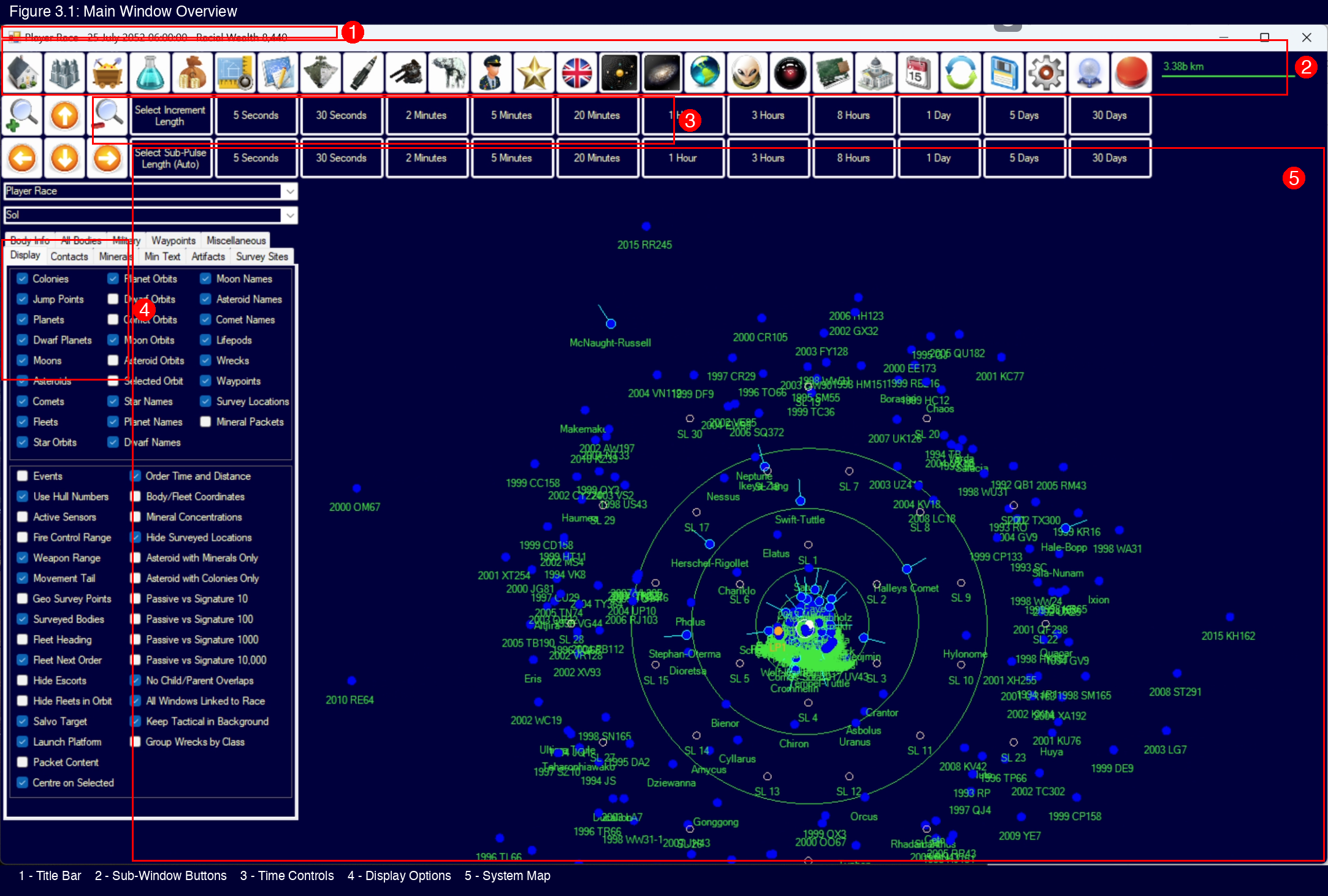
3.1-main-window-overview.png8.1-class-design-hull-tab.png9.1-shipyard-window.png
Annotation Guidelines
- Use red (#FF0000) for arrows and boxes
- 2-3px line weight for visibility
- Annotate sparingly — highlight only what the text references
- Tools: macOS Markup, Skitch, or similar
Directory Structure
Place screenshots in the chapter folder matching the manual section:
images/screenshots/
  3-user-interface/
    3.1-main-window-overview.png
  8-ship-design/
    8.1-class-design-hull-tab.png
Version Compatibility
Screenshots should be captured from Aurora C# v2.8.0 or later. If UI changes significantly between versions, note the version in the PR description.
Markdown Reference
Priority Screenshots
High-value screenshots that help new players the most:
- Main game window with key areas labeled
- System Map with navigation controls
- Class Design window tabs
- Colony management screens
- Fleet/Task Group organization